Source: nixCRAFT
You need to use the sudo command which is use to execute a command as another user. It allows a permitted user to execute a command as the superuser or another user, as specified in the /etc/sudoers (config file that defines or list of who can run what) file. The sudo command allows users to do tasks on a Linux system as another user.
sudo command
sudo is more more secure than su command. By default it logs sudo usage, command and arguments in /var/log/secure (Red Hat/Fedora / CentOS Linux) or /var/log/auth.log (Ubuntu / Debian Linux).
If the invoking user is root or if the target user is the same as the invoking user, no password is required. Otherwise, sudo requires that users authenticate themselves with a password by default. Once a user has been authenticated, a timestamp is updated and the user may then use sudo without a password for a short period of time (15 minutes unless overridden in sudoers).
/etc/sudoers Syntax
Following is general syntax used by /etc/sudoers file:
USER HOSTNAME=COMMAND
Where,
- USER: Name of normal user
- HOSTNAME: Where command is allowed to run. It is the hostname of the system where this rule applies. sudo is designed so you can use one sudoers file on all of your systems. This space allows you to set per-host rules.
- COMMAND: A simple filename allows the user to run the command with any arguments he/she wishes. However, you may also specify command line arguments (including wildcards). Alternately, you can specify « » to indicate that the command may only be run without command line arguments.
Lire la suite…
Source: nixCraft
I‘m a new MySQL server user. My server is running on a CentOS Linux. How can I check the number of active MySQL connections on Linux based system?
You can use the following commands on Linux or Unix-like systems:
- mysqladmin
status command
- MySQL
show status command
netstat or ss commands
mysqladmin status command example
Open the terminal App or login to the remote server using ssh:
ssh [email protected]
Type the following command to get a short status message from the MySQL server:
mysqladmin status
## OR ##
mysqladmin status -u root -p
## OR ##
mysqladmin status -h db1.dbsysnet.com -u root -p
Sample outputs:
Uptime: 691356 Threads: 5 Questions: 83237956 Slow queries: 102736 Opens: 3585 Flush tables: 1 Open tables: 1019 Queries per second avg: 120.398
MySQL show status command to see open database connections example
First, connect to the your mysql server:
mysql -u root -p
Type the following sql query to see the number of connection attempts to the MySQL serverincludes both failed and successful connection attempts:
mysql> show status like 'Conn%';
Sample outputs:
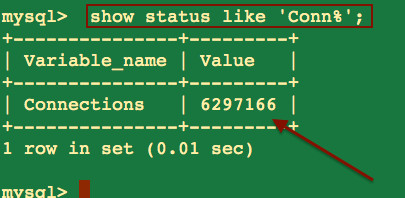
You can use the following sql command to see the number of currently open connections at mysql> prompt:
mysql> show status like '%onn%';
+--------------------------+---------+
| Variable_name            | Value   |
+--------------------------+---------+
| Aborted_connects         | 7       |
| Connections              | 6304067 |
| Max_used_connections     | 85      |
| Ssl_client_connects      | 0       |
| Ssl_connect_renegotiates | 0       |
| Ssl_finished_connects    | 0       |
| Threads_connected        | 7       | <---- No of currently open connections
+--------------------------+---------+
7 rows in set (0.00 sec)
Lire la suite…
Source: nixCraft
I have a backup sync program on local server. I have an ssh password less login set up, and I can run commands on an external server in bash script doing:
ssh root@server2 "sync; sync; /sbin/shutdown -h now"
How do I run multiple commands in bash on a remote Unix or Linux server? What is the best Way to SSH in and Run various unix commands in bash?
There are various ways to run multiple commands on a remote Unix server. The syntax is as follows:
Simple bash syntax to run multiple commands on remote machine
Simply run command2 if command1 successful on a remote host called foo
$ ssh bar@foo "command1 && command2"
Run date and hostname commands:
$ ssh user@host "date && hostname"
You can run sudo command as follows on a remote box called server1.cyberciti.biz:
$ ssh -t [email protected] "sudo /sbin/shutdown -h now"
And, finally:
$ ssh [email protected] "sync && sync && /sbin/shutdown -h now"
Lire la suite…
Source: nixCraft
What is a « locale » on a Linux operating system? How do I set or get locals (i18n) values on a Linux operating system?
Locales defines language and country specific setting for your programs and shell session. You can use locales to see date, time, number, currency and other values formatted as per your country or language on a Linux or Unix-like system.
To set system’s locale you need use shell variable. For example, LANG variable can be used to set en_US (English US) language.
How do I show current locale settings on a Linux or Unix?
The syntax is:
locale
locale name
locale [options] name
Examples
Simply type the following command:
$ locale

Lire la suite…
Source: TheGeekStuff
 rsync stands for Remote SYNC.
rsync is used to perform the backup operation in UNIX / Linux.
rsync utility is used to synchronize the files and directories from one location to another in an effective way. Backup location could be on local server or on remote server.
Important features of rsync
- Speed: First time, rsync replicates the whole content between the source and destination directories. Next time, rsync transfers only the changed blocks or bytes to the destination location, which makes the transfer really fast.
- Security: rsync allows encryption of data using ssh protocol during transfer.
- Less Bandwidth: rsync uses compression and decompression of data block by block at the sending and receiving end respectively. So the bandwidth used by rsync will be always less compared to other file transfer protocols.
- Privileges: No special privileges are required to install and execute rsync
Syntax
$ rsync options source destination
Source and destination could be either local or remote. In case of remote, specify the login name, remote server name and location.
Lire la suite…