How to access a Linux server behind NAT via reverse SSH tunnel
 You are running a Linux server at home, which is behind a NAT router or restrictive firewall. Now you want to SSH to the home server while you are away from home. How would you set that up? SSH port forwarding will certainly be an option. However, port forwarding can become tricky if you are dealing with multiple nested NAT environment. Besides, it can be interfered with under various ISP-specific conditions, such as restrictive ISP firewalls which block forwarded ports, or carrier-grade NAT which shares IPv4 addresses among users.
What is Reverse SSH Tunneling?
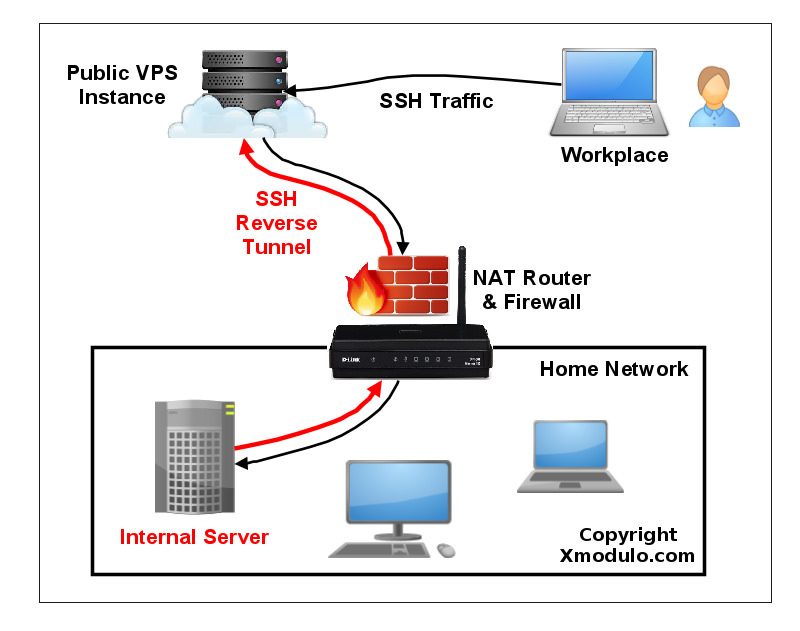
One alternative to SSH port forwarding is reverse SSH tunneling. The concept of reverse SSH tunneling is simple. For this, you will need another host (so-called « relay host ») outside your restrictive home network, which you can connect to via SSH from where you are. You could set up a relay host using a VPS instance with a public IP address. What you do then is to set up a persistent SSH tunnel from the server in your home network to the public relay host. With that, you can connect « back » to the home server from the relay host (which is why it’s called a « reverse » tunnel). As long as the relay host is reachable to you, you can connect to your home server wherever you are, or however restrictive your NAT or firewall is in your home network.
Set up a Reverse SSH Tunnel on Linux
Let’s see how we can create and use a reverse SSH tunnel. We assume the following. We will be setting up a reverse SSH tunnel from homeserver to relayserver, so that we can SSH to homeserver via relayserver from another computer called clientcomputer. The public IP address of relayserver is 1.1.1.1.
On homeserver, open an SSH connection to relayserver as follows.
homeserver~$ ssh -fN -R 10022:localhost:22 [email protected]
Here the port 10022 is any arbitrary port number you can choose. Just make sure that this port is not used by other programs on relayserver.
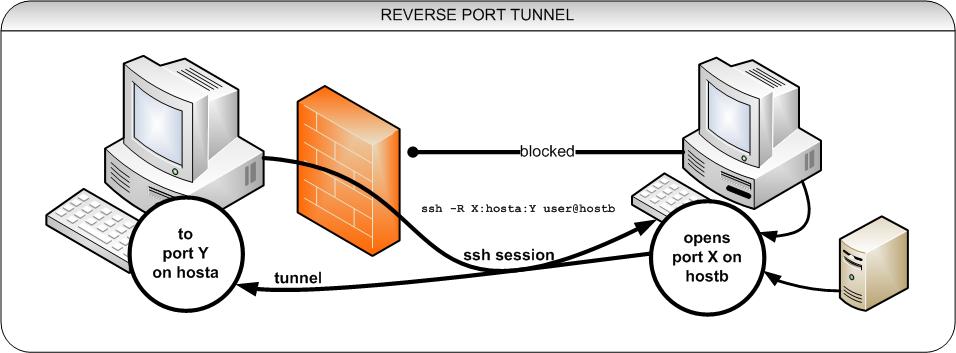
The « -R 10022:localhost:22 » option defines a reverse tunnel. It forwards traffic on port 10022 of relayserver to port 22 of homeserver.
With « -fN » option, SSH will go right into the background once you successfully authenticate with an SSH server. This option is useful when you do not want to execute any command on a remote SSH server, and just want to forward ports, like in our case.
After running the above command, you will be right back to the command prompt of homeserver.
Log in to relayserver, and verify that 127.0.0.1:10022 is bound to sshd. If so, that means a reverse tunnel is set up correctly.
relayserver~$ sudo netstat -nap | grep 10022
tcp      0    0 127.0.0.1:10022          0.0.0.0:*               LISTEN      8493/sshd
Now from any other computer (e.g., clientcomputer), log in to relayserver. Then access homeserver as follows.
relayserver~$ ssh -p 10022 homeserver_user@localhost
One thing to take note is that the SSH login/password you type for localhost should be for homeserver, not for relayserver, since you are logging in to homeserver via the tunnel’s local endpoint. So do not type login/password for relayserver. After successful login, you will be on homeserver.