Archive

Archives pour 06/2024

How to measure packets per second or throughput on high speed network interface
30/06/2024 Comments off

throughput networkThere are many traffic monitoring tools available on Linux, which can monitor/classify network traffic, and report real-time traffic statistics in fancy user interfaces. Most of these tools (e.g., ntopng, iftop) are powered by libpcap, which is a packet capture library used to monitor network traffic in user space. Despite their versatility, however, libpcap-based network monitoring tools cannot scale to handle traffic on multi Gigabit rate network interfaces, due to the overhead associated with user-space packet capture.

In this tutorial, I will present simple shell scripts that can monitor network traffic on per-interface basis, without relying on slow libpcap library. These scripts are fast enough to support multi Gigabit rates, but only suitable if you are interested in « aggregate » network statistics on per interface basis.

The secret for the scripts lies in sysfs virtual filesystem which is used by the kernel to export device- or driver-related information to user space. Network interface related statistics are exported via /sys/class/net/<ethX>/statistics.

For example, the statistics on eth0 interface are found in these files:

  • /sys/class/net/eth0/statistics/rx_packets: number of packets received
  • /sys/class/net/eth0/statistics/tx_packets: number of packets transmitted
  • /sys/class/net/eth0/statistics/rx_bytes: number of bytes received
  • /sys/class/net/eth0/statistics/tx_bytes: number of bytes transmitted
  • /sys/class/net/eth0/statistics/rx_dropped: number of packets dropped while received
  • /sys/class/net/eth0/statistics/tx_dropped: number of packets dropped while transmitted

The numbers stored in the files are automatically refreshed in real-time by the kernel. Therefore, you can write scripts that calculate traffic statistics based on these files.

The following are two such scripts (thanks to joemiller). The first script counts the number of packets per second, received (RX) or sent (TX) on an interface, while the latter scripts measures the network bandwidth of incoming (RX) and outgoing (TX) traffic on an interface. For these scripts to work, you do not need to install anything.

Measure Packets per Second on an Interface

#!/bin/bash
INTERVAL="1"  # update interval in seconds
if [ -z "$1" ]; then
        echo
        echo usage: $0 [network-interface]
        echo
        echo e.g. $0 eth0
        echo
        echo shows packets-per-second
        exit
fi

IF=$1

while true
do
        R1=`cat /sys/class/net/$1/statistics/rx_packets`
        T1=`cat /sys/class/net/$1/statistics/tx_packets`
        sleep $INTERVAL
        R2=`cat /sys/class/net/$1/statistics/rx_packets`
        T2=`cat /sys/class/net/$1/statistics/tx_packets`
        TXPPS=`expr $T2 - $T1`
        RXPPS=`expr $R2 - $R1`
        echo "TX $1: $TXPPS pkts/s RX $1: $RXPPS pkts/s"
done
 

Measure Network Bandwidth on an Interface

#!/bin/bash
 
INTERVAL="1" # update interval in seconds
 
if [ -z "$1" ]; then
 echo
 echo usage: $0 [network-interface]
 echo
 echo e.g. $0 eth0
 echo
 exit
fi
 
IF=$1
 
while true
do
 R1=`cat /sys/class/net/$1/statistics/rx_bytes`
 T1=`cat /sys/class/net/$1/statistics/tx_bytes`
 sleep $INTERVAL
 R2=`cat /sys/class/net/$1/statistics/rx_bytes`
 T2=`cat /sys/class/net/$1/statistics/tx_bytes`
 TBPS=`expr $T2 - $T1`
 RBPS=`expr $R2 - $R1`
 TKBPS=`expr $TBPS / 1024`
 RKBPS=`expr $RBPS / 1024`
 echo "TX $1: $TKBPS kB/s RX $1: $RKBPS kB/s"
done
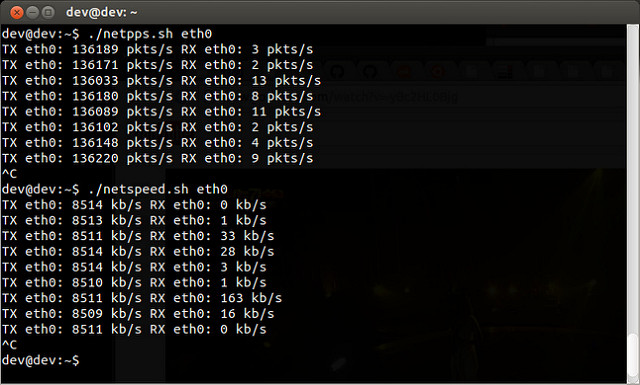
The following screenshot shows the above two scripts in action.

10700906313_cfa3cd1ed7_z

Source: Xmodulo 

Prevent DDoS with iptables

30/06/2024 Comments off

Iptables against DDoS

Using iptables to fight DDoS attacks.

After a recent conversation on the Ubuntu Forums I wanted to post an example of using iptables.

Of course there are several types of DOS attacks , in this post I will demonstrating the use if iptables to limit the traffic on port 80.

The goal is to keep your web server “responsive” to legitimate traffic, but to throttle back on excessive (potential DOS) traffic.

In this demonstration iptables is configured :

  1. The default policy is ACCEPT (to prevent lockout in the event of flushing the rules with iptables -F).
  2. “Legitimate” traffic is then allowed. In this example I am allowing traffic only on port 80.
  3. All other traffic is then blocked at the end of the INPUT chain (the final rule in the INPUT chain is to DROP all traffic).

The rules I will demonstrate are as follows:

First rule : Limit NEW traffic on port 80

sudo iptables -A INPUT -p tcp --dport 80 -m state --state NEW -m limit --limit 50/minute --limit-burst 200 -j ACCEPT

Lets break that rule down into intelligible chunks.

-p tcp --dport 80 => Specifies traffic on port 80 (Normally Apache, but as you can see here I am using nginx).

-m state NEW => This rule applies to NEW connections.

-m limit --limit 50/minute --limit-burst 200 -j ACCEPT =>This is the essence of preventing DOS.

  • “--limit-burst” is a bit confusing, but in a nutshell 200 new connections (packets really) are allowed before the limit of 50 NEW connections (packets) per minute is applied.

For a more technical review of this rule, see this netfilet page. Scroll down to a bit to the “limit” section.

Second rule – Limit established traffic

This rule applies to RELATED and ESTABLISHED all traffic on all ports, but is very liberal (and thus should not affect traffic on port 22 or DNS).

If you understood the above rule, you should understand this one as well.

sudo iptables -A INPUT -m state --state RELATED,ESTABLISHED -m limit --limit 50/second --limit-burst 50 -j ACCEPT

In summary, 50 ESTABLISHED (and/or RELATED) connections (packets really) are allowed before the limit of 50 ESTABLISHED (and/or RELATED) connections (packets) per second is applied.

Do not let that rule fool you, although it seems very open, it does put some limits on your connections.

Test it for yourself, try using the first rule with and without the second rule.

Lire la suite…

How to configure SNMPv3 in Ubuntu, CentOS and Cisco

29/06/2024 Comments off

snmpv3 ubuntuSimple Network Management Protocol (SNMP) is a widely used protocol for gathering information about what is going on within a device. For example, CPU and RAM usage, load on a server, traffic status in a network interface, and many other interesting properties of a device can be queried using SNMP.

Currently, three versions of SNMP are available: v1, v2c and v3. SNMP v1 and v2c can be easily configured, which has been discussed in a previous article. SNMPv3 adds some additional features, including authentication and encryption schemes (e.g., MD5, SHA, AES and DES). This makes SNMPv3 more secure and advisable while you run SNMP queries over the Internet.

SNMPv3 configuration is a bit different compared to SNMP v1 or v2c. The following sections explain in detail how the configuration is done.

Configure SNMPv3 on Ubuntu or Debian

The net-snmp-config tool is used for configuration. The following example creates a read-only SNMPv3 user named ‘snmpv3user‘ with password ‘snmpv3pass‘. Default authentication method MD5 and default encryption DES are used. These values can be customized as well.

root@server:~# apt-get install snmp snmpd
 root@server:~# service snmpd stop
 root@server:~# net-snmp-config --create-snmpv3-user -ro -A snmpv3pass snmpv3user
## OUTPUT ##
adding the following line to /var/lib/snmp/snmpd.conf:
   createUser snmpv3user MD5 "snmpv3pass" DES
adding the following line to /usr/share/snmp/snmpd.conf:
   rouser snmpv3user

root@server:~# service snmpd start

Lire la suite…

Categories: Réseau Tags: ,

iptables extension modules

29/06/2024 Comments off

iptables extensions

NAME

iptables-extensions — list of extensions in the standard iptables distribution

SYNOPSIS

ip6tables [-m name [module-options...]] [-j target-name [target-options...]
iptables [-m name [module-options...]] [-j target-name [target-options...]

MATCH EXTENSIONS

iptables can use extended packet matching modules with the -m or --match options, followed by the matching module name; after these, various extra command line options become available, depending on the specific module. You can specify multiple extended match modules in one line, and you can use the -h or --help options after the module has been specified to receive help specific to that module. The extended match modules are evaluated in the order they are specified in the rule.

If the -p or --protocol was specified and if and only if an unknown option is encountered, iptables will try load a match module of the same name as the protocol, to try making the option available.

addrtype

This module matches packets based on their address type. Address types are used within the kernel networking stack and categorize addresses into various groups. The exact definition of that group depends on the specific layer three protocol.

The following address types are possible:

UNSPEC
an unspecified address (i.e. 0.0.0.0)
UNICAST
an unicast address
LOCAL
a local address
BROADCAST
a broadcast address
ANYCAST
an anycast packet
MULTICAST
a multicast address
BLACKHOLE
a blackhole address
UNREACHABLE
an unreachable address
PROHIBIT
a prohibited address
THROW
FIXME
NAT
FIXME
XRESOLVE
[!] --src-type type
Matches if the source address is of given type
[!] --dst-type type
Matches if the destination address is of given type
--limit-iface-in
The address type checking can be limited to the interface the packet is coming in. This option is only valid in the PREROUTING, INPUT and FORWARD chains. It cannot be specified with the –limit-iface-out option.
--limit-iface-out
The address type checking can be limited to the interface the packet is going out. This option is only valid in the POSTROUTING, OUTPUT and FORWARD chains. It cannot be specified with the –limit-iface-in option.

Lire la suite…

IPTables Map : see your attackers

28/06/2024 Comments off

Ce script lit la configuration de votre pare-feu basé sur iptables et affiche vos règles dans l’ordre dans lequel les paquets vont effectivement les traverser. La sortie est intuitive tout en ressemblant étroitement à celle de iptables-save, et indique la table propriété des règles, etc.

Très commode pour débugger vos scripts iptables.

Source: sourceforge.net

Categories: Réseau, Sécurité Tags: ,