How to analyze and view Apache web server logs interactively on Linux
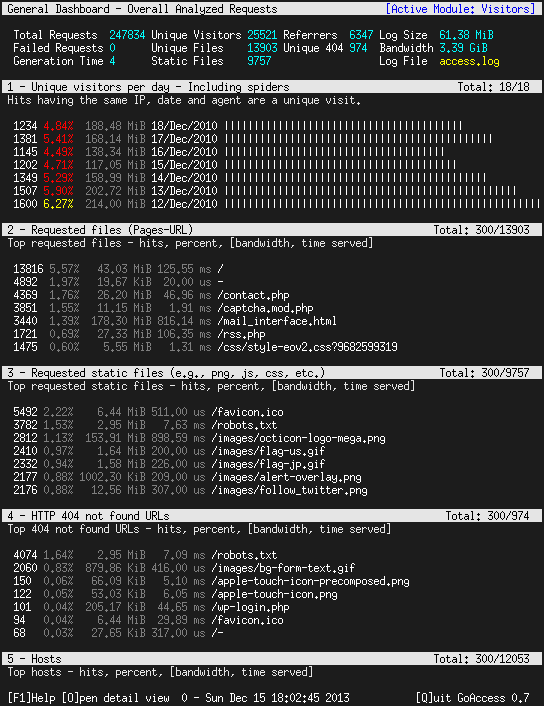 Whether you are in the web hosting business, or run a few web sites on a VPS yourself, chances are you want to display visitor statistics such as top visitors, requested files (dynamic or static), used bandwidth, client browsers, and referring sites, and so forth.
GoAccess is a command-line log analyzer and interactive viewer for Apache or Nginx web server. With this tool, you will not only be able to browse the data mentioned earlier, but also parse the web server logs to dig for further data as well – and all of this within a terminal window in real time. Since as of today most web servers use either a Debian derivative or a Red Hat based distribution as the underlying operating system, I will show you how to install and use GoAccess in Debian and CentOS.
Installing GoAccess on Linux
In Debian, Ubuntu and derivatives, run the following command to install GoAccess:
# aptitude install goaccess
In CentOS, you’ll need to enable the EPEL repository and then:
# yum install goaccess
In Fedora, simply use yum command:
# yum install goaccess
If you want to install GoAccess from the source to enable further options (such as GeoIP location), install required dependencies for your operating system, and then follow these steps:
# wget http://tar.goaccess.io/goaccess-0.8.5.tar.gz
# tar -xzvf goaccess-0.8.5.tar.gz
# cd goaccess-0.8.5/
# ./configure --enable-geoip
# make
# make install
That will install version 0.8.5, but you can always verify what is the latest version in the Downloads page of the project’s web site.
Since GoAccess does not require any further configurations, once it’s installed you are ready to go.
Running GoAccess
To start using GoAccess, just run it against your Apache access log.
For Debian and derivatives:
# goaccess -f /var/log/apache2/access.log
For Red Hat based distros:
# goaccess -f /var/log/httpd/access_log
When you first launch GoAccess, you will be presented with the following screen to choose the date and log format. As explained, you can toggle between options using the spacebar and proceed with F10. As for the date and log formats, you may want to refer to the Apache documentation if you need to refresh your memory.
In this case, Choose Common Log Format (CLF):
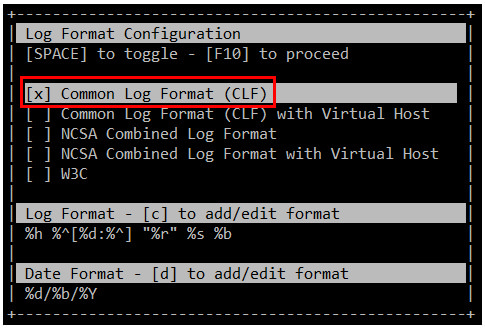
and then press F10. You will be presented with the statistics screen. For the sake of brevity, only the header, which shows the summary of the log file, is shown in the next image:
