Better than Time Machine: backup your Mac with rsync
Backup your Mac with rsync
Using rsync: We all know we need to make backups. Apparently, 30% of all computer users lose all of their files sometime in their life. Not a pretty foresight.
Fortunately, Mac Leopard users have a program called Time Machine that makes things a lot easier. But is Time Machine the perfect backup solution? I don’t think so. There are a couple of things that make Time Machine very unsuitable for me:
- You need to get a seperate external hard drive that can only be used for Time Machine (and has to be formatted first)
- That drive has to be formatted in HFS+, hence, without any (commercial) third-party plugins it’s not readable on Windows or Linux systems
- You have to leave your drive on all the time to make sure Time Machine makes backups
- You can’t make a list of things you want to have backed up, you can only exclude folders from your complete hard disk
- Time Machine makes an exact copy of your hard drive
 Especially that last ‘feature’ is very irritating to me. I have an external drive with about 300G of files, including lots of music and video files. My MacBook drive is only 80GB big, so i can never have the complete contents of my external drive on my MacBook. Let’s say i have 10GB of MP3 files, which i backup with Time Machine, then i remove about 5GB of files from my MacBook to free some space. What happens when the next backup round is happening? Exactly, the 5GB of files get deleted from the external disk as well. When i want to play a certain MP3 file from my external drive i now have to ‘restore’ and ‘look back in history’ to find it. Not very user-friendly.
Luckily, there is a very good (free) alternative to Time Machine that does exactly what i want with backups: it lets you specify which folders you want to backup, it doesn’t delete things on the backup drive when you delete files from your original drive, and it’s compatible with any external drive and can even backup files over a network. This piece of software is called rsync. Here’s how to use it.
rsync is a command-line utility shipped with every copy of Mac OS X. It originated from the UNIX/Linux world, where it has been part of most Linux distributions for many years. rsync is reliable, fast, and easily configurable. Try running it by opening up the Terminal.app (located in your Applications/Utilities folder) and running the command:
rsync
You’ll get an overview of all possible options. In essence the syntax is very simple:
rsync OPTIONS SOURCE DESTINATION
What you’ll probably want is a one-way transfer of all files in SOURCE to DESTINATION, where only files are copied that are not available on the DESTINATION disk or different. Aside from that you’ll want to include all subdirectories, links, permissions, date/time, groups, owner and devices. To do that simply use this easy-to-remember option list:
rsync -rlptgoD
Ha, just kidding! Fortunately there is another switch that does all of that with one switch, namely the archive switch:
rsync -a
So, let’s say you want to backup the files in your Documents directory to your external harddrive, which you appropriately named ‘backup’, then this would be the command:
rsync -a ~/Documents/ /Volumes/backup/Documents
For those of you who don’t use the Terminal very often: the tilde (~) is a shortcut for your home directory. If, for example, your name would be ‘Alice’ your home directory would probably be
/Users/alice
 Rsync is a program for synchronizing two directory trees across different file systems even if they are on different computers. It can run its host to host communications over ssh to keep things secure and to provide key based authentication. If a file is already present in the target and is the same as on the source the file will not be transmitted. If the file on the target is different than the one on the source then only the parts of it that are different are transferred. These features greatly increase the performance of rsync over a network.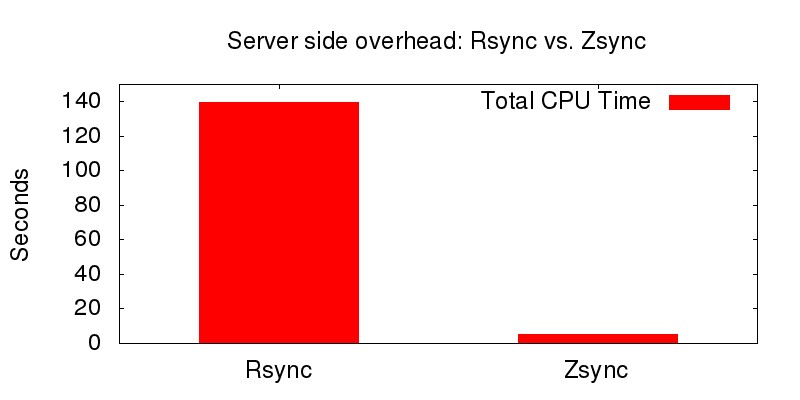
 Using TimeMachine with rsync: Over many years, I have dealt with scripts that do backup versioning, i.e., maintain multiple backups. Due to their flexibility, they have been complex to understand and configure. Here is a simple