Archive

Articles taggués ‘firewall’

How to stop Small DDOS attacks

06/05/2024 Comments off

dosNodaways seems that every script kid is able to produce a soft DDOS attack, happily they are small and limited so they cant saturate your DNS unless they really know what they are doing.

This is a more or less step by step guide intended for begginers to help stabilize the linux server and prevent further attacks.

There are some basic settings you should have already implemented in your linux server as part of security 101 but this is not always the case and also it is not enough.

Questions and Answers:

  • Limiting the ammount of concurrent connections from the same IP address to your Server.
  • Identifying the offending IP.
  • And kill the Ongoing TCP Connections with TCPKILL.
  • Or use Cutter to kill the connections on any port/Network interface.
  • Drop it With Iptables.
  • Make the DROP Persistant after a reboot. (iptables save and restore)
  • Basic Iptables-save trouble shoot.
  • Stop Start Iptables

This article assumes you have root access to your linux BOX / Server, the IP addresses shown in this guide are randomly generated and in no case are offending connections.

Lire la suite…

IP Fragmentation Attack

05/05/2024 Comments off

ip fragmentation attackIP fragmentation attacks are a common form of denial of service attack, in which the perpetrator overbears a network by exploiting datagram fragmentation mechanisms.

Understanding the attack starts with understanding the process of IP fragmentation, a communication procedure in which IP datagrams are broken down into small packets, transmitted across a network and then reassembled back into the original datagram.

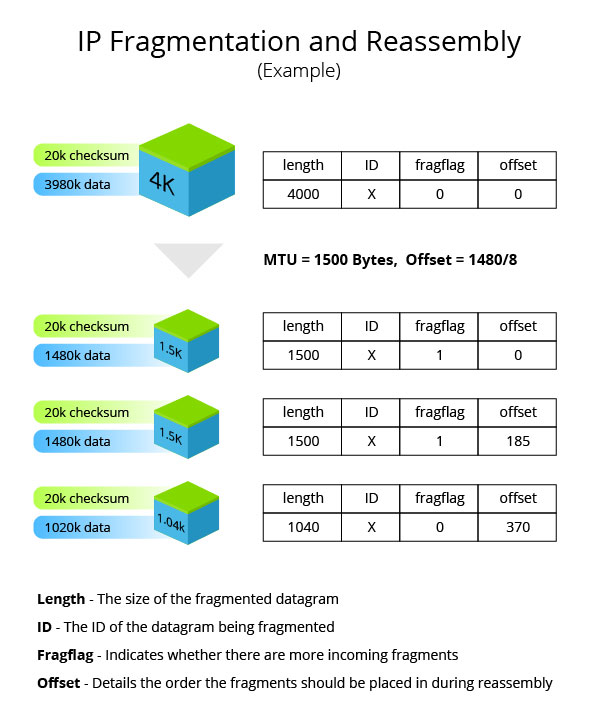
Fragmentation is necessary for data transmission, as every network has a unique limit for the size of datagrams that it can process. This limit is known as the maximum transmission unit (MTU). If a datagram is being sent that is larger than the receiving server’s MTU, it has to be fragmented in order to be transmitted completely

ip-fragmentation
Example of how an IP datagram is fragmented and reassembled

The IP header in every datagram contains flags detailing whether fragmentation is allowed to take place. In cases where a « don’t fragment » flag is attached to the IP header, the packet is dropped and the server sends out a message saying that the ICMP datagram is too big to transmit. The offset explains to the recipient device the exact order the fragments should be placed in for reassembly.

Attack Types

IP fragmentation attacks can take several forms. While they all exploit the breakdown of datagrams in order to overbear the target networks, there are some notable differences in how different attack vectors are executed.

  • UDP and ICMP fragmentation attacks – These attacks involve the transmission of fraudulent UDP or ICMP packets that are larger than the network’s MTU, (usually ~1500 bytes). As these packets are fake, and are unable to be reassembled, the target server’s resources are quickly consumed, resulting in server unavailability.
  • TCP fragmentation attacks (a.k.a. Teardrop) – Also known as Teardrop attacks, these assaults target TCP/IP reassembly mechanisms, preventing them from putting together fragmented data packets. As a result, the data packets overlap and quickly overwhelm the victim’s servers, causing them to fail.Teardrop attacks are a result of an OS vulnerability common in older versions of Windows, including 3.1, 95 and NT. While patches were thought to have put a stop to these attacks, a vulnerability resurfaced in Windows 7 and Windows Vista, making Teardrop attacks once again a viable attack vector.The vulnerability was re-patched in the latest version of Windows, but operators should keep an eye out to ensure that it stays patched in all future versions.

Methods of Mitigation

IP fragmentation attacks are mitigated in several different ways, depending on the type and severity of the attack. Most mitigation methods ensure that malicious data packets never reach their target destinations. The most common one involves inspecting incoming packets for violations of fragmentation rules (e.g., using a router or a secured proxy).

At Incapsula, these inspections are augmented by dedicated DDoS protection hardware. On top of leveraging our on-edge position to observe fragmentation rules, Incapsula also employs blacklisting/whitelisting mechanisms that filter traffic based on factors such as IP reputation and rate patterns. Using these methods, our platform provides complete immunity from all types of IP fragmentation attacks.

Source: incapsula

How Do I Save Iptables Rules or Settings

04/05/2024 Comments off

save iptables rulesI am using GUI tool to setup firewall rules for my home computer connected to ADSL (DSL/Cable) network. However, after reboot my rules are not saved. Is there any way I can save and load all firewall rules again?

You need to use the iptables-save command, which is used to dump the contents of an IP Table in easily parseable format to screen. Using I/O-redirection provided by your shell you can save iptables firewall rules to a file.

To restore iptables rules use the iptables-restore command. It is used to restore an IP Tables from data specified from file. Use I/O redirection provided by your shell to read from a file.

Examples: Saving and Restoring Iptables Rules

In this example, save current iptables firewall rules to a file called /root/dsl.fw, enter:
# iptables-save > /root/dsl.fw

To restore iptables rules, enter:
# iptables-restore < /root/dsl.fw

To restore rules automatically upon Linux system reboot add following command to your /etc/rc.local file, enter:
# vi /etc/rc.local

Append the line:
/sbin/iptables-restore < /root/dsl.fw

Save and close the file. Please note that under Red Hat enterprise Linux (RHEL) / CentOS / Fedora Linux you can use following commands to save and restore firewall rules. To Save the rules to /etc/sysconfig/iptables file:
# /etc/init.d/iptables save

To restore the rules from /etc/sysconfig/iptables file:
# /etc/init.d/iptables start

If you are using Debian / Ubuntu Linux open /etc/network/interfaces:
# vi /etc/network/interfaces

Append the line to eth0 section:
post-up iptables-restore
Close and save the file. Reboot the system.

Source: nixCraft

Categories: Réseau, Sécurité Tags: ,

psad: Intrusion Detection and Log Analysis with iptables

01/05/2024 Comments off

Source CipherDyne

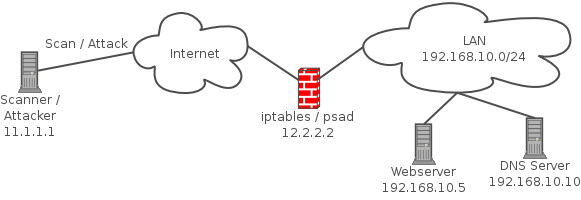
psad is a collection of three lightweight system daemons (two main daemons and one helper daemon) that run on Linux machines and analyze iptables log messages to detect port scans and other suspicious traffic. A typical deployment is to run psad on the iptables firewall where it has the fastest access to log data.

Network diagram to illustrate the deployment of psad along with an iptables firewall

psad incorporates many signatures from the Snort intrusion detection system to detect probes for various backdoor programs (e.g. EvilFTP, GirlFriend, SubSeven), DDoS tools (mstream, shaft), and advanced port scans (FIN, NULL, XMAS) which are easily leveraged against a machine via nmap. When combined with fwsnort and the Netfilter string match extension, psad is capable of detecting many attacks described in the Snort rule set that involve application layer data. In addition, psad makes use of various packet header fields associated with TCP SYN packets to passively fingerprint remote operating systems (in a manner similar to p0f) from which scans originate. Further, psad can be integrated with Logstash, and also offers support for UFW firewalls [1]. For more information, see the complete list of features offered by psad.

Lire la suite…

HTTP DDoS Attack Mitigation Using Tarpitting

30/04/2024 Comments off

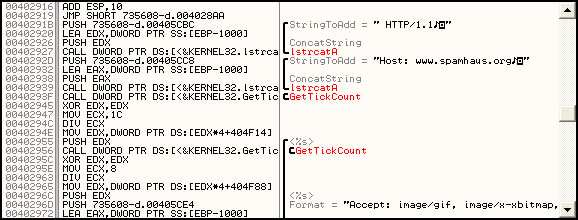
Recently, the anti-spam organization Spamhaus has come under yet another distributed denial-of-service attack. With some help from our good friends at myNetWatchman we were able to obtain a sample of the malware used in the attack. This one is particularly nasty, starting up 1500 threads to send randomized HTTP requests to Spamhaus’ webserver in a loop. This attack tool doesn’t have a command-and-control mechanism, so it was likely force-installed on all the infected systems of an existing botnet.

This kind of attack is particularly troublesome to deal with. While simplistic packet-based attacks can be more easily mitigated upstream, with an HTTP-based attack it is often difficult to distinguish attack traffic from legitimate HTTP requests. And because the attack consumes resources from the webserver, not just the system TCP/IP stack, it can quickly bring even a well-tuned webserver to its knees unless the target has better-than-average resources at its disposal to help weather the storm (like Spamhaus does).ddostool

Fortunately, most HTTP-based DoS attacks we have seen have a particular weakness – they are vulnerable to a technique known as « tarpitting ». This idea was first proposed by Tom Liston many years ago when the first scanning worms hit the Internet, and was implemented in his program LaBrea (which he no longer offers for download, due to legal concerns – however, the source code can still be found elsewhere and should work on Linux or BSD-based operating systems). The quickest way to implement tarpitting (if your webserver runs on Linux) is in the Linux netfilter source code. If the tarpit module is compiled for your Linux kernel, the operation becomes as simple as « iptables -A INPUT -s x.x.x.x -p tcp -j TARPIT« .

Tarpitting works by taking advantage of TCP/IP’s idea of window size and state. In a tarpitted session, we respond to the connection initiation as normal, but we immediately set our TCP window size to just a few bytes in size. By design, the connecting system’s TCP/IP stack must not send any more data than will fit in our TCP window before waiting for us to ACK the packets sent. This is to allow connections to deal with packet loss that might occur in a normal session. If the sending system doesn’t get an ACK to a packet sent, it will resend the packet at increasingly longer intervals. In our tarpitted session, we simply don’t ack any of the post-handshake packets at all, forcing the remote TCP/IP stack to keep trying to send us those same few bytes, but waiting longer each time. With this, bandwidth usage falls off quickly to almost nothing.

It might seem reasonable to simply use iptables -j DROP to not respond to connections at all – this will certainly prevent the webserver from seeing the connection, but because the connection may have a timeout set, it is likely we’ll keep seeing connection attempts at a fairly regular rate. Essentially a DROP rule turns our HTTP flood into a SYN flood.

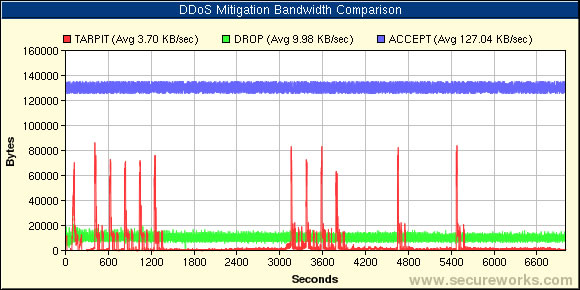
Below is a chart made by running the Spamhaus DDoS malware on a single host in a sandnet, and comparing the bandwidth usage of each iptables mitigation technique with no mitigation. Here we extrapolated the bandwidth usage of the full non-mitigated attack (the blue line in the chart) from just the first 30 seconds of the attack, rather than let it fully DDoS the server the entire two hours. Under load, our untuned Apache server probably would have slowed down, forcing the attack bandwidth to decrease with it as it became unresponsive. In this simulation we are assuming the server can withstand a single attacker with no slowdown.ddosmitigation

We see that although with tarpitting, there are momentary spikes as the sessions finally time out and try again, overall the average bandwidth usage is substantially lower with tarpitting as opposed to simply dropping the attacker’s packets.

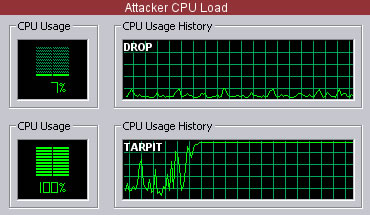
There seems to be an added side-effect to mitigation by tarpit. When the attacked host mitigates with an iptables DROP (no response), the attacker’s CPU load is fairly minimal and the system is responsive. However, as demonstated by the graphic below, under tarpitting the CPU load in our test system quickly rose to 100% as the attacking system’s kernel tried to maintain a large number of open connections in a retry state.

In the case of our test system, the user interface became nearly unresponsive. Of course, this may depend on the overal system CPU speed and RAM (our test was done in a VMware environment which also may be a factor), but if the system becomes unacceptibly slow, it serves as an impetus for the unknowing owner of the attacking system to have the computer cleaned of its botnet infection.cpuload
Unfortunately, the TARPIT iptables module is not part of every Linux distribution. It is possible to obtain it by getting the netfilter Patch-o-Matic-NG source and compiling it for your kernel (don’t forget the iptables source must also be patched to support the TARPIT option).

At some point, the scalability of having thousands of iptables rules may come into play. At the University of Florida, Chuck Logan and Jordan Wiens were able to successfully mitigate a DDoS attack from the Netsky virus by writing customized software to detect the attacking hosts and create intelligent chains of iptables rules that were more scalable. Details and source code can be found here.

No matter how you implement it, tarpitting isn’t going to completely stop an attack – it can only slow it down. However, it could be an effective stop-gap measure until upstream providers can effectively null-route an attack on your website, or until the attack stops on its own.

Source: Dell SecureWorks – Author: Joe Stewart