Source: myunster.com
In order to update « locate » database on OS X, some people suggest create a symlink:
sudo ln -s /usr/libexec/locate.updatedb /usr/local/bin/updatedb
However, this method can create an erroneous output if you are in directory with specific permission e.g.
shell-init: error retrieving current directory: getcwd: cannot access parent directories: Permission denied
shell-init: error retrieving current directory: getcwd: cannot access parent directories: Permission denied
shell-init: error retrieving current directory: getcwd: cannot access parent directories: Permission denied
find: .: Permission denied
The better method would be create a bash script /usr/bin/updatedb:
  #!/bin/bash
  pushd . > /dev/null
  cd /usr/libexec
  echo "Updating locate database..."
  sudo ./locate.updatedb
  echo "Updating complete!"
  popd > /dev/null
Make it executable: sudo chmod +x /usr/bin/updatedb
Now you can just run «sudo updatedb», in order to update «locate» database.
Introduction
Many times it can be convenient to tunnel your web traffic through a proxy, particularly an encrypted one. This web page shows how to easily tunnel your traffic through an ssh-encrypted proxy on Mac OS X. This allows your traffic to traverse your local network without being visible to snoopers, even when visiting unencrypted sites.
It also allows you to appear to come from a different IP address, allowing you to defeat geolocation schemes. In particular, some credit card processors try to make sure that your credit card billing address is correlated with your IP address, which can be hard on us expatriates. Another example is the free credit report web site which doesn’t seem to work from outside the United States. There are undoubtedly many other practical, legitimate uses for this sort of redirection. Lire la suite…
Source: therealmacgenius.com
Do you have a GMail or Google account and use Google Calendar? Have you ever needed to view multiple calendars in iCal, but can’t? Getting your Google Calendar into your iCal is fairly easy with a few simple steps.
To begin, you will need to do is fire up iCal, in iCal “Preferences,” and click on “Accounts” at the top. Then under “Account Type” select “Google” and fill out your username and password. After the window disappears go to “Server Settings” and make sure the server address is www.google.com, and that the port “use SSL” is checked. After you have checked over those things you will need to click on “Delegation” which should be right next to “Server Settings.” Click all the boxes of Calendar Categories that you would like to have in iCal and it in a few minutes your calendar should have the events from Google Calendar. iCal will automatically bring in new changes every 15 minutes; however, if you wish to have it done faster, just change the rate in the “Refresh Calendars” box.
There you go, all of your Google Calendars should now be in iCal, now you don’t have to view Google Calendars’ “Microsoft looking” interface.
Source: OSXdaily
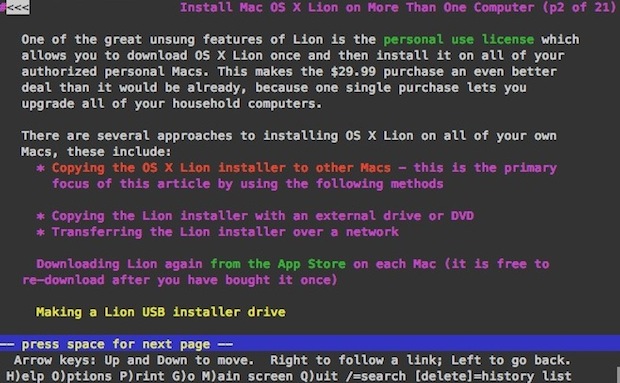
Lynx is a text based command line web browser, it’s relatively popular within unix communities but it also has a variety of general uses too; it’s great if you want to discretely browse the web and read articles at work or school, and developers use lynx frequently to test accessibility and to roughly estimate how spiders or crawlers view a website. Because it only loads text and avoids javascript and images, it’s also lightning fast.
Anyway, after updating to Lion I discovered my previous installation of lynx was not functioning. Thankfully it’s very easy to install a working version with the help of MacPorts.
Installing and Running Lynx in Mac OS X 10.7 Lion
For the purpose of this walkthrough, we’re going to keep requirements to a minimum and install lynx through MacPorts, here’s what you’ll need:
Assuming you have now installed Xcode 4.1 and MacPorts 2.0, here’s how to install lynx:
sudo port install lynx
MacPorts will then fetch all the required dependencies including ncurses and zlib, and then proceed to install the lynx browser.
Once it’s finished, just type ‘lynx’ at the command line and it’ll launch as expected. You can then hit “G” to go to a URL, or open one directly from the command line.
This opens OSXDaily.com, for example:
lynx osxdaily.com
You then just use the arrow keys and return/enter to navigate around a site.
Lynx is great, enjoy!