Archive

Archives pour la catégorie ‘Système’

Accéder à un serveur ssh comme si c’était un répertoire local

29/01/2024 Comments off

1. Installez sshfs:

sudo aptitude install sshfs

2. Créez le répertoire où apparaîtra le serveur ssh:

mkdir pointdemontage

3. Ajoutez les utilisateurs autorisés à utiliser le logiciel au groupe fuse :

sudo adduser username fuse

4. Montez le serveur ssh:

sshfs login@monserveurssh: pointdemontage

(N’oubliez pas les deux points (:) après le nom ou l’adresse du serveur ssh)

Et voilà !

Vous pouvez accéder au contenu de votre serveur ssh comme si c’était un simple répertoire local !

Pour démonter l’accès:

fusermount -u pointdemontage

Pour plus d’informations, voir la documentation ubuntu : http://doc.ubuntu-fr.org/sshfs

Convert apache HTTP combined logs into SQL (and import it into a mysql database eventually)

28/01/2024 Comments off

source: snippets.dzone.com

you need to extract the data in your http server log files and put it in a database to query it with your usual tools using SQL. this perl script does just this.

it was hard to find it, that’s why i put it here.

#!/usr/bin/perl -w
# Written by Aaron Jenson.
# Original source: http://www.visualprose.com/software.php
# Updated to work under Perl 5.6.1 by Edward Rudd
# Updated 24 march 2007 by Slim Amamou <[email protected]>
#  - output SQL with the option '--sql'
#  - added SQL create table script to the HELP
#
#  NOTE : you need the TimeDate library (http://search.cpan.org/dist/TimeDate/)
# Lire la suite...

Basic munin plugins for Snort

27/01/2024 Comments off

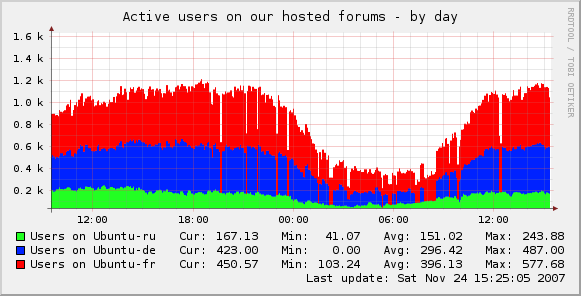
munin pluginsHere are some basic munin plugins for snort using perfmon (Enable preprocessor perfmonitor in snort.conf)
The snort.conf entry should look something like:

preprocessor perfmonitor: time 300 file /your/path/to/snort.stats pktcnt 5000

(Read the snort docs for more info on performance issues etc.)

Drop Rate:
http://download.gamelinux.org/snort/snort_drop_rate

Pattern Matching:
http://download.gamelinux.org/snort/snort_pattern_match

Traffic speed:
http://download.gamelinux.org/snort/snort_traffic

Alerts:
http://download.gamelinux.org/snort/snort_alerts

Avg KBytes/pkt:
http://download.gamelinux.org/snort/snort_bytes_pkt

Avg Pkts/sec:
http://download.gamelinux.org/snort/snort_pkts

Edit any one of them, to graph what you want from perfmon output. It should be easy!

And now I will test them myself!

Update:
Here is a picture to give you an idea on how the graphs looks:
http://download.gamelinux.org/snort/Snort-Munin-Plugins.pngsource: http://www.gamelinux.org/?p=32

source: GAMELINUX

Linux Command: Show Linux Version

27/01/2024 Comments off

Source: nixCraft

What command I need to type to display Linux kernel version and other information such as Linux distribution name? How do I check Linux kernel version number?

You need to use the following two commands:

[a] uname - Print kernel and system information.
[b] lsb_release - Print distribution-specific information.
[c] /proc/version file - Print running kernel information.

How to check linux kernel version number?

Open a shell prompt (or a terminal) and type the following command to see your current Linux kernel version:

$ uname -r

Sample outputs:

2.6.32-23-generic-pae

Or type the following command:

$ uname -mrs

Sample outputs:

Linux 2.6.32-23-generic-pae i686

To print all information, enter:

$ uname -a

Sample outputs:

Linux vivek-laptop 2.6.32-23-generic-pae #37-Ubuntu SMP Fri Jun 11 09:26:55 UTC 2010 i686 GNU/Linux

Where,

  • 2.6.32-23 – Linux kernel version number
  • pae – pae kernel type indicate that I’m accssing more than 4GB ram using 32 bit kernel.
  • SMP – Kernel that supports multi core and multiple cpus.

Lire la suite…

Categories: Système Tags: , , ,

Protéger ses images contre le Hotlinking

24/01/2024 Comments off
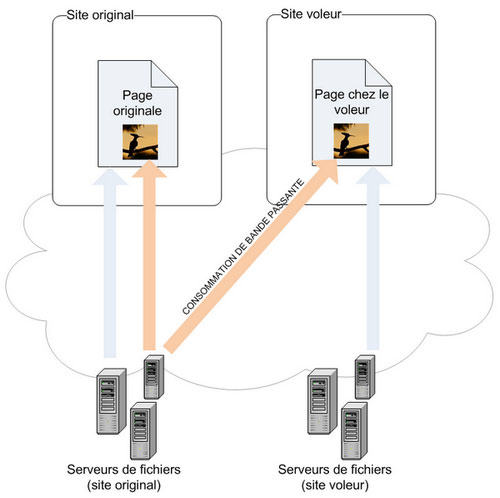
fonctionnement-hotlinkLe hotlinking est une pratique courante qui consiste, le plus souvent, à afficher une image en utilisant l’adresse URL en provenance d’un autre site où elle est publiée. En fait, au lieu de stocker l’image sur son serveur, le hotlinkeur crée un lien direct vers le serveur d’origine.Principe du Hotlinking en schéma.Cette méthode est totalement illégale puisqu’il s’agit d’un vol de bande passante. En effet, à chaque fois que l’image est visionnée par un internaute, une requête HTTP est envoyée vers le serveur qui l’héberge. Cela ralentit le serveur qui doit fournir les images hotlinkées en plus des images du site d’origine. De plus, cela peut engendrer un coût financier supplémentaire puisque certains hébergeurs prennent en compte le trafic mensuel de données afin d’éviter les abus et de préserver la bande passante.

Pour lutter contre le hotlinking, il suffit de copier le code suivant dans le fichier .htaccess présent à la racine de votre projet. Il permet de remplacer l’image volée par une autre destinée à dissuader le hotlinkeur (par ex: http://p7.storage.canalblog.com/78/13/603253/75105879.jpg).

RewriteEngine On
# Remplacer mywebsite\.com/ par l'adresse de votre site
RewriteCond %{HTTP_REFERER} !^http://(.+\.)?mywebsite\.com/ [NC]
RewriteCond %{HTTP_REFERER} !^$
# Remplacer /images/nohotlink.jpg par le chemin de l'image affichée chez les voleurs
RewriteRule .*\.(jpe?g|gif|bmp|png)$ /images/nohotlink.jpg [L]