Source: OSXdaily
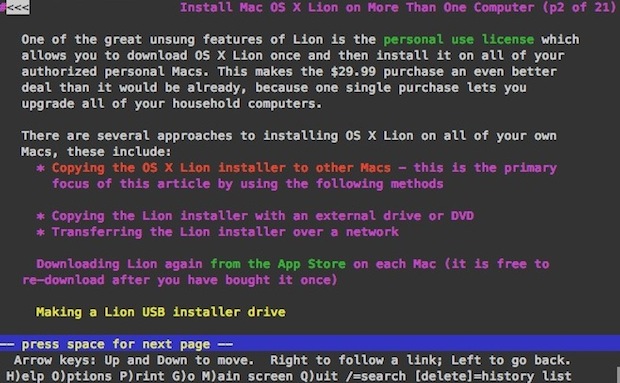
Lynx is a text based command line web browser, it’s relatively popular within unix communities but it also has a variety of general uses too; it’s great if you want to discretely browse the web and read articles at work or school, and developers use lynx frequently to test accessibility and to roughly estimate how spiders or crawlers view a website. Because it only loads text and avoids javascript and images, it’s also lightning fast.
Anyway, after updating to Lion I discovered my previous installation of lynx was not functioning. Thankfully it’s very easy to install a working version with the help of MacPorts.
Installing and Running Lynx in Mac OS X 10.7 Lion
For the purpose of this walkthrough, we’re going to keep requirements to a minimum and install lynx through MacPorts, here’s what you’ll need:
Assuming you have now installed Xcode 4.1 and MacPorts 2.0, here’s how to install lynx:
sudo port install lynx
MacPorts will then fetch all the required dependencies including ncurses and zlib, and then proceed to install the lynx browser.
Once it’s finished, just type ‘lynx’ at the command line and it’ll launch as expected. You can then hit “G” to go to a URL, or open one directly from the command line.
This opens OSXDaily.com, for example:
lynx osxdaily.com
You then just use the arrow keys and return/enter to navigate around a site.
Lynx is great, enjoy!
You can add a Recent Items menu to the Mac OS X Dock by using a defaults write command. The default is set to “Recent Applications” but once the Dock item exists you can adjust it to feature other recent items too.
Launch the terminal and enter the following:
defaults write com.apple.dock persistent-others -array-add '{ "tile-data" = { "list-type" = 1; }; "tile-type" = "recents-tile"; }'
That needs to all be on a single line, so if you copy and paste it make sure the command is one string.
You will then need to kill the Dock:
killall Dock
Now right-click on the newly appeared Recent Applications Dock item and you can change it to be Recent Applications, Recent Documents, Recent Servers, Favorite Volumes, or Favorite Items.
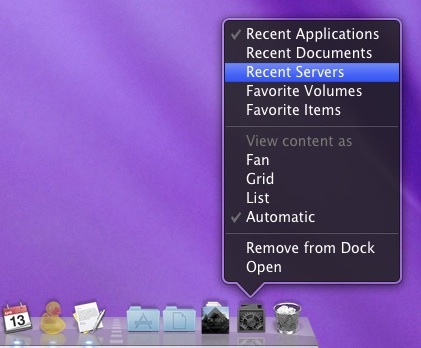
If you want to remove the Recent Items menu, just drag it out of your Dock.
Source: faqforge.com
If you lost your ISPConfig 3 administrator password, you can reset it with the following SQL query.
UPDATE sys_user SET passwort = md5(‘admin’) WHERE username = ‘admin’;
The SQL query sets the password to “admin” for the user “admin”, it has to be executed in the ISPConfig mysql database, e.g. with phpmyadmin. If you dont have phpmyadmin installed, then the query can be executed with the mysql commandline utility as well:
Login to the mysql database.
mysql -u root -p
and enter the password of the mysql root user. To switch to the ISPConfig database, run this command:
use dbispconfig;
Now execute the SQL command:
UPDATE sys_user SET passwort = md5(‘admin’) WHERE username = ‘admin’;
and close the mysql shell:
quit;
Lorsque vous utilisez Webmin pour administrer votre serveur, les paramètres de votre firewall iptables sont visibles et manageables depuis la console Webmin.
Toutefois, les règles iptables présentées par Webmin sont celles qui ont été préalablement sauvées par /sbin/iptables-save dans le fichier que vous avez choisi.
Donc si vous utilisez un script depuis le shell pour changer les règles de iptables, ce ne seront pas ces règles que Webmin vous présentera mais celles que vous avez sauvées préalablement avec Webmin.When using Webmin as an administration tool, iptables rules visible for Webmin are those previously saved through Webmin.
So when you use a shell script to change iptables rules on the fly, these rules won’t be the ones Webmin present to you.
The solution is to use:
iptables-save > the_file_used_by_webmin_last_time_you_backed_up_rules
to retrieve the exact actual state of iptables rules.
Source: Gregory F. Welch
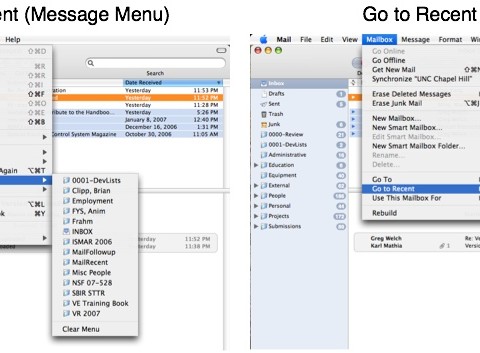
Adds « Copy to Recent, » « Move to Recent, » and « Go to Recent » menu items to Apple’s Mail application. These menu items contain dynamically-updated lists of recently used mailboxes. The number of mailboxes kept in the list is determined by the « Number of Recent Items » setting for Documents in the Appearance panel of the OS X System Preferences.
Usage
Once installed (see instructions below) as you drag or option-drag a message to a mailbox, that mailbox should then appear under
- « Copy to Recent » and « Move to Recent » submenus under the « Messages » menu, and
- a « Go to Recent » submenu under the « Mailboxes » menu.
Similarly if you use Mail’s built-in « Move To » or « Copy To » menus to move a message to a mailbox, that mailbox should then appear in the lists. The recent mailboxes will be sorted alphabetically, the same as OS X does for recent documents. (You can change the sorting behavior using the Terminal application as described below.)
Lire la suite…
