Source: nixCraft
I am a new Debian Linux v.7.x / Ubuntu Linux LTS user. How do I reinstall a package using apt-get command line?
The Advanced Packaging Tool (APT) works on both Debian / Ubuntu and it can handle the installation and removal of software. You need use apt-get command as follows to forcefully reinstall package. The syntax is:
apt-get --reinstall install PackageNameHere
OR
apt-get --reinstall install Package1 Package2
The --reinstall option re-install packages that are already installed and at the newest version.
Pro tip: Backup configuration files before you reinstall packages. For example, if you are reinstalling nginx web server package, backup /etc/nginx/ with cp command i.e. mkdir /root/nginx.mmddyyyy/; cp -avr /etc/nginx/* /root/nginx.mmddyyy/
Examples
The following command will reinstall rsync package. Open a terminal and then type:
$ sudo apt-get --reinstall install rsync
OR
# apt-get --reinstall install rsync
Sample outputs:
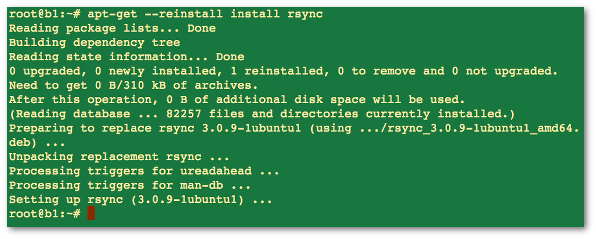
Fig.01: Debian / Ubuntu Linux reinstall a package using apt-get command
If above method failed for you, try the following syntax. Make sure you backup config file before typing the following commands. Please note that the --purge option is identical to remove except that packages are removed and purged including any configuration files are deleted too.
sudo apt-get --purge remove package1
sudo apt-get install package1
Comment rendre la commande ssh-copy-id disponible sur Mac OS X
Si vous avez tenté d’utiliser la commande ssh-copy-id sur Mac OS X, vous avez dû vous rendre compte que, même si openssh est installé nativement, cette commande n’est pas disponible.
Heureusement, cette commande est un simple script qu’il suffit de copier au bon endroit, de lui donner les bons droits et SURPRISE la commande est disponible.
Et comme je suis sympa, eh bien je vous donne tout ça. 😉 Pour commencer le script ssh-copy-id
Ensuite, la méthodologie à suivre pour le mettre en place:
- Télécharger le fichier
- Déplacer le fichier dans le répertoire /usr/bin
- Lui donner les droits nécessaires
$ chmod 755 /usr/bin/ssh-copy-id
Edit
Si vous utilisez homebrew, il existe un package pour faire la même chose :
brew install ssh-copy-id
Source: Mikael Randy

Firewalls
Iptables Examples For New SysAdmins
Linux comes with a host based firewall called Netfilter. According to the official project site:
netfilter is a set of hooks inside the Linux kernel that allows kernel modules to register callback functions with the network stack. A registered callback function is then called back for every packet that traverses the respective hook within the network stack.
This Linux based firewall is controlled by the program called iptables to handles filtering for IPv4, and ip6tables handles filtering for IPv6. I strongly recommend that you first read our quick tutorial that explains how to configure a host-based firewall called Netfilter (iptables) under CentOS / RHEL / Fedora / Redhat Enterprise Linux. This post list most common iptables solutions required by a new Linux user to secure his or her Linux operating system from intruders.

Linux
IPTABLES Rules Example
- Most of the actions listed in this post are written with the assumption that they will be executed by the root user running the bash or any other modern shell. Do not type commands on remote system as it will disconnect your access.
- For demonstration purpose I’ve used RHEL 6.x, but the following command should work with any modern Linux distro.
- This is NOT a tutorial on how to set iptables. See tutorial here. It is a quick cheat sheet to common iptables commands.
Lire la suite…
Source: nixCraft
How can I mount remote directory with ssh on a Linux bases system? How do I use SSHFS to mount remote file systems over SSH on a Ubuntu or Debian/RHEL/CentOS/Arch Linux system?
SSH is a secure protocol and you can use it to mount a directory on a remote server or local laptop with the help of the SSHF service. With SSHFS you can mount remote server file system to your local
More on SSHFS
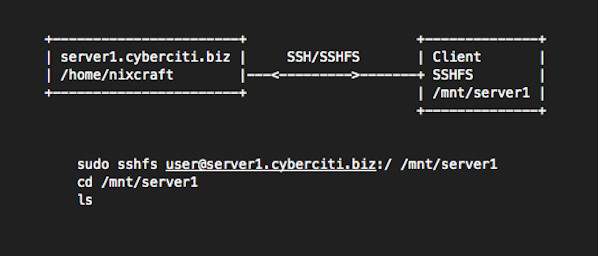
sshfs is a filesystem based on the SSH file transfer protocol. It is used on a client system i.e. you need to install sshfs package on your local computer/laptop powered by CentOS/RHEL/Ubuntu/Debian/Arch Linux. No need to install anything on server (server1.cyberciti.biz). You only need an openssh server installed on server side. Our sample setup:
Lire la suite…