Portier SSH
Si vous possédez un serveur avec ssh opérationnel, vous ne serez pas long à avoir des messages tels que ceux ci dans le fichier /var/log/auth.log:
...
Mar 11 12:48:21 serv sshd[12956]: Failed password for invalid user root from 64.71.148.162 port 47270 ssh2
Mar 11 15:45:04 serv sshd[6954]: Did not receive identification string from 210.21.30.72
Mar 11 15:46:48 serv sshd[7041]: Did not receive identification string from 81.93.188.5
Mar 11 15:47:50 serv sshd[7106]: User root from 210.21.30.72 not allowed because none of user s groups are listed in AllowGroups
Mar 11 15:47:50 serv sshd[7106]: pam_unix(sshd:auth): authentication failure; logname= uid=0 euid=0 tty=ssh ruser= rhost=210.21.30.72  user=root
Mar 11 15:47:52 serv sshd[7106]: Failed password for invalid user root from 210.21.30.72 port 54346 ssh2
Mar 11 15:49:33 serv sshd[7241]: User root from 81.93.188.5 not allowed because none of user s groups are listed in AllowGroups
Mar 11 15:49:33 serv sshd[7241]: pam_unix(sshd:auth): authentication failure; logname= uid=0 euid=0 tty=ssh ruser= rhost=81.93.188.5  user=root
Mar 11 15:49:35 serv sshd[7241]: Failed password for invalid user root from 81.93.188.5 port 44663 ssh2
Mar 12 00:51:18 serv sshd[22229]: User root from host.ongamemarketing.com not allowed because none of user s groups are listed in AllowGroups
Mar 12 00:51:18 serv sshd[22229]: pam_unix(sshd:auth): authentication failure; logname= uid=0 euid=0 tty=ssh ruser= rhost=host.ongamemarketing.com  user=root
Mar 12 00:51:20 serv sshd[22229]: Failed password for invalid user root from 174.133.12.130 port 48089 ssh2
Mar 12 00:51:22 serv sshd[22236]: User root from host.ongamemarketing.com not allowed because none of user s groups are listed in AllowGroups
Mar 12 00:51:22 serv sshd[22236]: pam_unix(sshd:auth): authentication failure; logname= uid=0 euid=0 tty=ssh ruser= rhost=host.ongamemarketing.com  user=root
Mar 12 00:51:24 serv sshd[22236]: Failed password for invalid user root from 174.133.12.130 port 48521 ssh2
Mar 12 01:47:10 serv sshd[30827]: Did not receive identification string from 114.200.199.144
Mar 12 01:53:17 serv sshd[31227]: Invalid user staff from 114.200.199.144
Mar 12 01:53:17 serv sshd[31227]: pam_unix(sshd:auth): check pass; user unknown
Mar 12 01:53:17 serv sshd[31227]: pam_unix(sshd:auth): authentication failure; logname= uid=0 euid=0 tty=ssh ruser= rhost=114.200.199.144
Mar 12 01:53:19 serv sshd[31227]: Failed password for invalid user staff from 114.200.199.144 port 35343 ssh2
Mar 12 01:53:27 serv sshd[31234]: Invalid user sales from 114.200.199.144
...
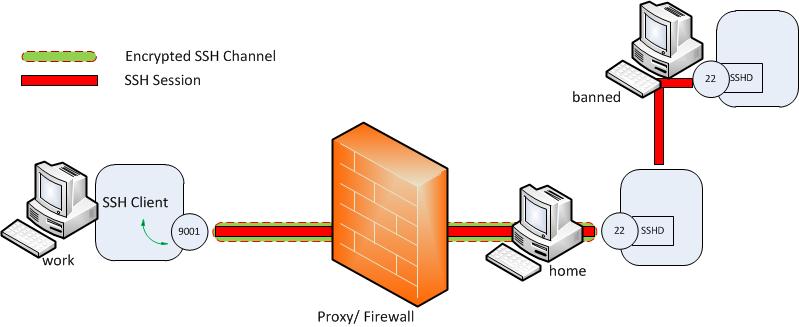 Vous avez besoin de pouvoir vous connecter en
 ssh depuis le réseau local, depuis l’extérieur, mais vous voulez limiter les risques. Il existe plusieurs solutions, qui peuvent être cumulées: Lire la suite…
Source: Ubuntu manuals
raring (1) par2.1.gz
Provided by: par2_0.4-11build1_i386 
NAME
par2 – PAR 2.0 compatible file verification and repair tool.
SYNOPSIS
 par2 c(reate) [options] <par2 file> [files]
 par2 v(erify) [options] <par2 file> [files]
 par2 r(epair) [options] <par2 file> [files]
Or:
par2create [options] <par2 file> [files]
 par2verify [options] <par2 file> [files]
 par2repair [options] <par2 file> [files]
DESCRIPTION
par2 is a program for creating and using PAR2 files to detect damage in
data files and repair them if necessary. It can be used with any kind
of file. Lire la suite…
When you want to restore your packages that you’ve backup-ed with :
sudo dpkg --get_selections > selections.txt
And when you restore them with:
dpkg --set-selections < selections.txt
And the result is a whole bunch of warnings like “warning: package blabla not in database….”
Then theres a easy fix:
$ sudo apt-get install dselect
$ sudo dselect
 -> Update
 -> Install
To get a list of packages installed locally do this in your terminal:
dpkg --get-selections | grep -v deinstall
To save that list to a text file called packages on your desktop do this in your terminal:
dpkg --get-selections | grep -v deinstall > ~/Desktop/packages