Archive

Articles taggués ‘securite’

How To Create a High Availability Setup with Heartbeat and Floating IPs on Ubuntu 14.04

01/07/2021 Comments off

Source: Digital Ocean – Mitchell Anicas

Introduction

Heartbeat is an open source program that provides cluster infrastructure capabilities—cluster membership and messaging—to client servers, which is a critical component in a high availability (HA) server infrastructure. Heartbeat is typically used in conjunction with a cluster resource manager (CRM), such as Pacemaker, to achieve a complete HA setup. However, in this tutorial, we will demonstrate how to create a 2-node HA server setup by simply using Heartbeat and a DigitalOcean Floating IP.

If you are looking to create a more robust HA setup, look into using Corosync and Pacemaker or Keepalived.

Goal

When completed, the HA setup will consist of two Ubuntu 14.04 servers in an active/passive configuration. This will be accomplished by pointing a Floating IP, which is how your users will access your services or website, to point to the primary, or active, server unless a failure is detected. In the event that the Heartbeat service detects that the primary server is unavailable, the secondary server will automatically run a script to reassign the Floating IP to itself via the DigitalOcean API. Thus, subsequent network traffic to the Floating IP will be directed to your secondary server, which will act as the active server until the primary server becomes available again (at which point, the primary server will reassign the Floating IP to itself).
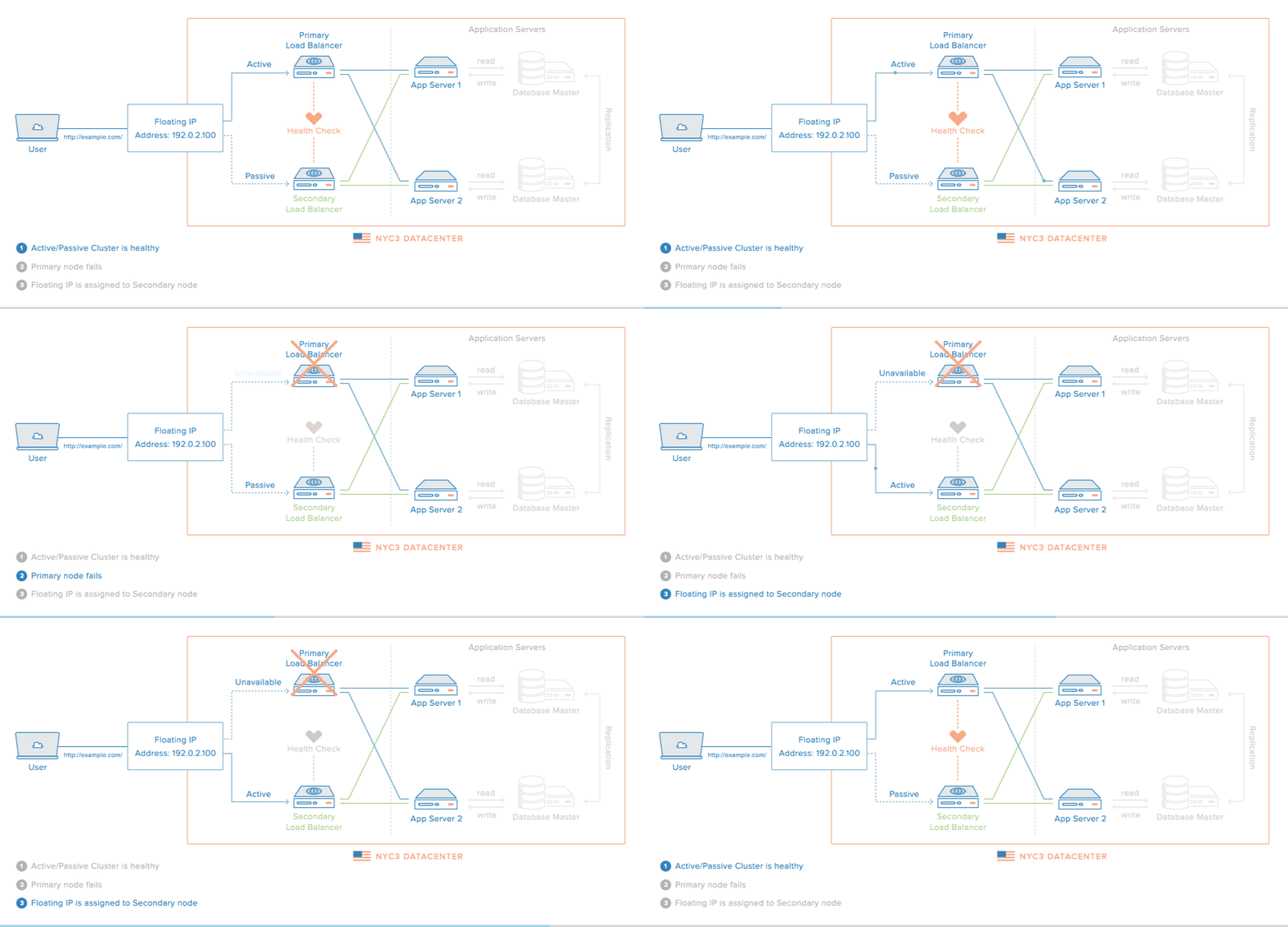
ha-diagram-animated

Note: This tutorial only covers setting up active/passive high availability at the gateway level. That is, it includes the Floating IP, and the load balancer servers—Primary and Secondary. Furthermore, for demonstration purposes, instead of configuring reverse-proxy load balancers on each server, we will simply configure them to respond with their respective hostname and public IP address.

To achieve this goal, we will follow these steps:

  • Create 2 Droplets that will receive traffic
  • Create Floating IP and assign it to one of the Droplets
  • Create DNS A record that points to Floating IP (optional)
  • Install Heartbeat on Droplets
  • Configure Heartbeat to Run Floating IP Reassignment Service
  • Create Floating IP Reassignment Service
  • Test failover

Lire la suite…

Administration réseau sous Linux: SSH

27/06/2021 Comments off

Source: Wikilivres

SSH signifie Secure SHell. C’est un protocole qui permet de faire des connexions sécurisées (i.e. cryptées) entre un serveur et un client SSH.

On peut l’utiliser pour se connecter à une machine distante comme avec telnet, pour transférer des fichiers de manière sécurisée ou pour créer des tunnels. Les tunnels permettent sécuriser des protocoles qui ne le sont pas en faisant passer les données par une connexion SSH.

Sections

Le système de clés de SSH

Cryptographie asymétrique

SSH utilise la cryptographie asymétrique RSA ou DSA. En cryptographie asymétrique, chaque personne dispose d’un couple de clé : une clé publique et une clé privée. La clé publique peut être librement publiée tandis que chacun doit garder sa clé privée secrète. La connaissance de la clé publique ne permet pas d’en déduire la clé privée.

Si la personne A veut envoyer un message confidentiel à la personne B, A crypte le message avec la clé publique de B et l’envoie à B sur un canal qui n’est pas forcément sécurisé. Seul B pourra décrypter le message en utilisant sa clé privée.

Cryptographie symétrique

SSH utilise également la cryptographie symétrique. Son principe est simple : si A veut envoyer un message confidentiel à B, A et B doivent d’abord posséder une même clé secrète. A crypte le message avec la clé sécrète et l’envoie à B sur un canal qui n’est pas forcément sécurisé. B décrypte le message grâce à la clé secrète.

Toute autre personne en possession de la clé secrète peut décrypter le message.

La cryptographie symétrique est beaucoup moins gourmande en ressources processeur que la cryptographie asymétrique, mais le gros problème est l’échange de la clé secrète entre A et B. Dans le protocole SSL, qui est utilisé par les navigateurs Web et par SSH, la cryptographique asymétrique est utilisée au début de la communication pour que A et B puissent s’échanger une clé secrète de manière sécurisée, puis la suite la communication est sécurisée grâce à la cryptographie symétrique en utilisant la clé secrète échangée.

Lire la suite…

Categories: Réseau, Système, Tutoriel Tags: ,

HowTo: Linux Check Password Strength With Cracklib-check Command

06/06/2021 Comments off

check password strengthUsing the same password on different servers allows attackers to access your accounts if cracker manage to steal your password from a less secure server. This is true for online website accounts too. So solution is to create unique passwords for server accounts like your email, sftp and ssh accounts. General guideline to create a strong and unique password is as follows:

Creating a strong and unique password for Linux or Unix-like systems

  1. Create a password with mix of numbers, special symbols, and alphabets.
  2. Make sure your password is hard to guess. You can use tool such as makepasswd to create hard to guess password.
  3. Do not use simple words like « password« , « 123456« , « 123abc » or « qwerty« .
  4. Use a unique password for all your server accounts.
  5. A minimum password length of 12 to 14 characters should be used. See how to configure CentOS / RHEL / Fedora Linux based server password quality requirements.
  6. Generating passwords randomly where feasible. You can do this with a simple shell scriptfunction.
  7. If possible use two-factor authentication.
  8. Use pam_crack to ensure strong passwords and to check passwords against a dictionary attack.

But, how do you test the effectiveness of a password in resisting guessing and brute-force attacks under Linux? The answer is simple use cracklib-check command.

Install cracklib on a Linux based system

Type the following yum command to install on RHEL and friends:
# yum install cracklib

Type the following apt-get command to install on Debian/Ubuntu and friends:
# apt-get install libcrack2

Lire la suite…

Réplication MySQL

25/05/2021 Comments off

Source: Howto MySQL

Préparation

  • Prérequis : disposer de deux serveurs MySQL avec un datadir identique

Dans le cas où le futur master est en production et ne peut être arrété :

# mysqldump --master-data --all-databases > mysql.dump

--master-data ajoute un CHANGE MASTER TO dans le dump contenant les informations nécessaires au slave sur les logs (nom de fichier et position). Cette option implique--lock-all-tables qui bloquera toutes les tables pendant le dump.

  • Autoriser les connections MySQL distantes
  • Activer les logs binaires sur chaque serveur : log_bin = /var/log/mysql/mysql-bin.log dans le format mixed : binlog_format = mixed
  • Positionner un server-id différent sur chaque serveur (a priori, ne pas utiliser 0…)
  • Créer un utilisateur dédié pour la réplication sur chaque serveur avec le droit REPLICATION SLAVE :grant replication slave on *.* to repl@'%' identified by 'XXX';

Lire la suite…

Linux/Unix: OpenSSH Multiplexer To Speed Up OpenSSH Connections

22/05/2021 Comments off

Source: nixCraft

How can I multiplex SSH sessions by setting up a master session and then having subsequent sessions go through the master to speed up my ssh connection on a Linux or Unix-like operating systems?

Multiplexing is nothing but send more than one ssh connection over a single connection. OpenSSH can reuse an existing TCP connection for multiple concurrent SSH sessions. This results into reduction of the overhead of creating new TCP connections. First, you need to set a ControlMaster to open a Unix domain socket locally.

Lire la suite…

Categories: Système, Tutoriel Tags: ,