Archive

Articles taggués ‘replication’

How to Setup MySQL Master Master Replication

05/11/2023 Comments off

MySQL master master replication, also known as “mysql chained replication”, “multi master replication or “mysql daisy chaining replication” is an extension of mysql replication allowing the creation of multiple master servers that can then be masters of multiple slaves. In this post, I demonstrate how to setup mysql master master replication.

In a multi master mysql configuration, bar the first master server, each additional master acts as both a master and slave. Therefore, it is possible to create new masters from each additional slave added.

Take a look at this diagram which helps to illustrate one possible configuration.

mysql master master replication

Lire la suite…

Categories: Bases de données Tags: ,

MySQL Circular Replication

04/11/2023 Comments off

Source: icicimov

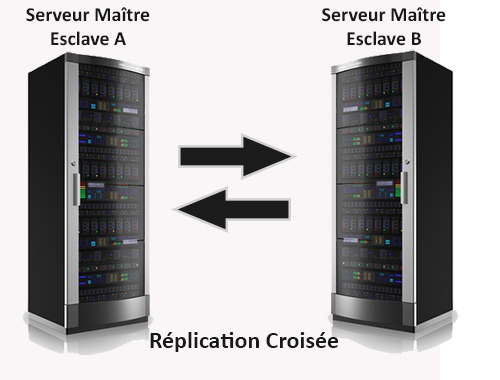
Setting the MySQL in Master-Master mode means in case of an instance failure the other one will transparently take over the client connections avoiding the need of any manual intervention. In Master-Slave mode we would need to manually promote the Slave to Master which will cause service interruption. MySQL circular replication can be used to scale out write nodes but there are certain considerations to be taken into account. The data will only be as complete as the speed of the replication. If data is inserted faster than the MySQL slave thread can run then each node can be missing data from the other node. This can be acceptable or not depending on the application and data requirements. For example if we use foreign keys in our database, inserts will fail if the data which the foreign key references has not yet been replicated. These issues need to be considered before we decide to employ Master-Master circular replication.

Setup

The hosts have been setup with two network interfaces, one on a public 192.168.100.0/24 network that will be used for incoming client connections and cluster communication and one on the private 10.10.1.0/24 network that will be used for the replication traffic only. We will start by setting the MySQL service on the nodes first.

Lire la suite…

Initialize MySQL Master-Slave replication with a script

03/11/2023 Comments off

Mysql Master-SlaveSource: Nico’s Blog

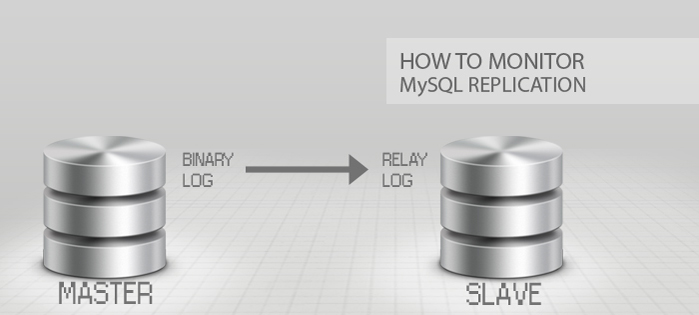
MySQL Master-Slave replication is natively supported by MySQL. However its configuration is not so simple. For each slave added as a replica, a few configuration steps must be done on both the master and itself.

So if you want to install a master instance on a machine or VM, and then install 5 other instances as slaves on other hosts, you will be doing quite a lot of back-and-forth configuration. I couldn’t find any way of configuring the replication automatically on the web, so I decided to create my own bash script to do it.

MySQL Master-Slave Replication

What is it and why use it ?

This form of replication is pretty simple: only a single instance, known as the master, creates or updates data. Each additional instance, called slave, simply keeps a copy of the master’s data, by replicating it each time the master has new data. Lire la suite…

When the Replication stops working: analysis and resync of MySQL Replication

02/11/2023 Comments off

Source: ryadel.com

We already had the opportunity to talk about Replication between MySQL Database in a previous article, where we described it as a great way to increase the security and reliability of data storage without spending a fortune. In this article we will see what to do when the Replication stops working: how to notice, what can I do to restore it and, most importantly, how to ensure that the data is re-synchronized.

Identify causes

The first thing to do is make sure that the Replication is actually broken. Although in most cases we can clearly see it by just looking at the replicated data, we need to check it in an objective way. In order to do this go to the Slave, issue the command – or if you prefer to read the results in human-readable format – and go read the column contents: and : if there’s at least a NO, that means that the Replication is actually broken, otherwise the problem is attributable to other causes. Lire la suite…

MySQL database replication with Linux

22/10/2021 Comments off

MySQL database replication with Linux

Database replication is a technique where a given database is copied to one or more locations, so that the reliability, fault-tolerance or accessibility of the database can be improved. Replication can be snapshot-based (where entire data is simply copied over to another location), merge-based (where two or more databases are merged into one), or transaction-based (where data updates are periodically applied from master to slaves).

MySQL replication is considered as transactional replication. To implement MySQL replication, the master keeps a log of all database updates that have been performed. The slave(s) then connect to the master, read individual log entries, and perform recorded updates. Besides maintaining a transaction log, the master performs various housekeeping tasks, such as log rotation and access control. When new transactions occur and get logged on the master server, the slaves commit the same transactions on their copy of the master database, and update their position in the master server’s transaction log. This master-to-slave replication process is done asynchronously, which means that the master server doesn’t have to wait for the slaves to catch up. If the slaves are unable to connect to the master for a period of time, they will download and execute all pending transactions when connectivity is re-established.

Database replication allows one to have an exact copy of a live database of a master server at another remote server (slave server) without taking the master server offline. In case the master server is down or having any trouble, one can temporarily point database clients or DNS resolver to the slave server’s IP address, achieving transparent failover. It is must be noted that MySQL replication is not a backup solution. For example, if an unintended DELETE command gets executed in the master server by accident, the same transaction will mess up all slave servers.

In this article, we will demonstrate master-slave based MySQL replication on two Linux computers. Let’s assume that the IP addresses of master/slave servers are 192.168.2.1 and 192.168.2.2, respectively.

Setting up a Master MySQL Server

This part will explain the steps needed on the master server.

First, log in to MySQL, and create test_repl database.

$ mysql -u root -p
mysql> CREATE DATABASE test_repl;

Next, create a table inside test_repl database, and insert three sample records.

mysql> USE test_repl;
mysql> CREATE TABLE employee (EmployeeID int, LastName varchar(255), FirstName varchar(255), Address varchar(255), City varchar(255));
mysql> INSERT INTO employee VALUES(1,"LastName1","FirstName1","Address1","City1"),(2,"Lastname2","FirstName2","Address2","City2"),(3,"LastName3","FirstName3","Address3","City4");

After exiting the MySQL server, edit my.cnf file using your favorite text editor. my.cnf is found under /etc, or /etc/mysql directory.

# nano /etc/my.cnf

Add the following lines under [mysqld] section.

[mysqld]
id=1
log-bin=master-bin.log
do-db=test_repl
innodb_flush_log_at_trx_commit=1
sync_binlog=1

The server-id option assigns an integer ID (ranging from 1 to 2^23) to the master server. For simplicity, ID 1 and 2 are assigned to the master server and the slave server, respectively. The master server must enable binary logging (with log-bin option), which will activate the replication. Set the binlog-do-db option to the name of a database which will be replicated to the slave server. The innodb_flush_log_at_trx_commit=1 and sync_binlog=1options must be enabled for the best possible durability and consistency in replication.

After saving the changes in my.cnf, restart mysqld daemon.

# systemctl restart mysqld

or:

# /etc/init.d/mysql restart

Log in to the master MySQL server, and create a new user for a slave server. Then grant replication privileges to the new user.

mysql> CREATE USER [email protected];
mysql> GRANT REPLICATION SLAVE ON *.* TO [email protected] IDENTIFY BY 'repl_user_password';
mysql> FLUSH PRIVILEGES;

A new user for the slave server is repl_user, and its password is repl_user_password. Note that the master MySQL server must not bind to the loopback interface since a remote slave server needs to log in to the master server as repl_user. Check this tutorial to change MySQL server’s binding interface.

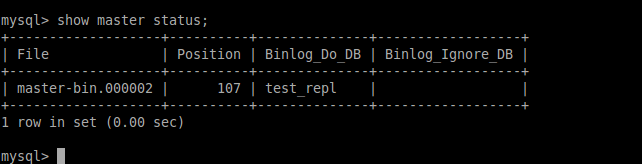
Finally, check the master server status by executing the following command on the server.

mysql> SHOW MASTER STATUS;

18157192466_b3cc2d5ced_o

Please note that the first and second columns (e.g., master-bin.000002 and 107) will be used by the slave server to perform master-to-slave replication.

Lire la suite…