MySQL – Monitorer le port 3306
04/02/2024
Comments off
Pour faire le monitoring du port 3306 sous Linux il suffit d’utiliser la commande :
tcpdump -i eth0 -nN -vvv -xX -s 1500 port 3306
Où s représente la longueur du paquet.
Pour faire le monitoring du port 3306 sous Linux il suffit d’utiliser la commande :
tcpdump -i eth0 -nN -vvv -xX -s 1500 port 3306
Où s représente la longueur du paquet.
L’optimisation au niveau de MySQL passe par trois composants, à savoir :
source: Devshed
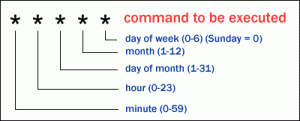 Crontabs is very useful when doing website maintenance. You can use this feature for the following purposes:
This tutorial will focus on creating a cron PHP script application, then configuring your cron hosting feature to execute these scripts automatically. Lire la suite…
source: snippets.dzone.com
you need to extract the data in your http server log files and put it in a database to query it with your usual tools using SQL. this perl script does just this.
it was hard to find it, that’s why i put it here.
#!/usr/bin/perl -w
# Written by Aaron Jenson.
# Original source: http://www.visualprose.com/software.php
# Updated to work under Perl 5.6.1 by Edward Rudd
# Updated 24 march 2007 by Slim Amamou <[email protected]>
#  - output SQL with the option '--sql'
#  - added SQL create table script to the HELP
#
#  NOTE : you need the TimeDate library (http://search.cpan.org/dist/TimeDate/)
# Lire la suite...

To show/list the users in a MySQL database, first log into your MySQL server as an administrative user, then run this MySQL query:
select * from mysql.user;
This MySQL query shows a large listing of MySQL user information, including user permission information, so you may want to trim down some of the fields to display. You can get a listing of the fields in the mysql.user table by running this command:
desc mysql.user;