Source: My Linux Notebook
It doesn’t happen a lot but it does sometimes when the Gnome Panel freeze. If you are a former windows user you might be used to restart the computer when something in you desktop stuck. This is not the way with Linux. We can fix the problem by restarting the desktop session (restarting the X server) pressing the Ctrl+Alt+BackSpace but this will destroy everything we worked on so far. A more elegant way will be to restart only the Gnome Panel.
Getting access to the Linux command line shell
In order to restart the Gnome Panel we will need to execute the Linux kill command. Once the Gnome Panel process is killed Gnome will restart it automatically so the only thing left for us is to kill the Gnome Panel process. In order to execute the Linux kill command we will need to get access to the Linux shell. This can be done by one of the following:
- Pressing Alt+F2
- Using an opened console window using the Alt+Tab buttons to navigate to it.
- Using a console session by pressing Ctrl+Alt+F1
Killing the Gnome Panel
In each of these options we will need to execute the Linux kill command in order to kill the Gnome Panel process. There are two ways to use the kill command:
- Using the application name will kill all the applications with the same name
- Using the process id (pid) will kill only the process with the specified id.
Back to our case with the Gnome Panel, we can use both of the options.
Lire la suite…
Source: nixCraft
I am a new Debian Linux v.7.x / Ubuntu Linux LTS user. How do I reinstall a package using apt-get command line?
The Advanced Packaging Tool (APT) works on both Debian / Ubuntu and it can handle the installation and removal of software. You need use apt-get command as follows to forcefully reinstall package. The syntax is:
apt-get --reinstall install PackageNameHere
OR
apt-get --reinstall install Package1 Package2
The --reinstall option re-install packages that are already installed and at the newest version.
Pro tip: Backup configuration files before you reinstall packages. For example, if you are reinstalling nginx web server package, backup /etc/nginx/ with cp command i.e. mkdir /root/nginx.mmddyyyy/; cp -avr /etc/nginx/* /root/nginx.mmddyyy/
Examples
The following command will reinstall rsync package. Open a terminal and then type:
$ sudo apt-get --reinstall install rsync
OR
# apt-get --reinstall install rsync
Sample outputs:
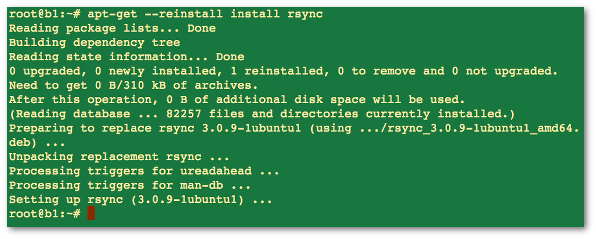
Fig.01: Debian / Ubuntu Linux reinstall a package using apt-get command
If above method failed for you, try the following syntax. Make sure you backup config file before typing the following commands. Please note that the --purge option is identical to remove except that packages are removed and purged including any configuration files are deleted too.
sudo apt-get --purge remove package1
sudo apt-get install package1
Comment rendre la commande ssh-copy-id disponible sur Mac OS X
Si vous avez tenté d’utiliser la commande ssh-copy-id sur Mac OS X, vous avez dû vous rendre compte que, même si openssh est installé nativement, cette commande n’est pas disponible.
Heureusement, cette commande est un simple script qu’il suffit de copier au bon endroit, de lui donner les bons droits et SURPRISE la commande est disponible.
Et comme je suis sympa, eh bien je vous donne tout ça. 😉 Pour commencer le script ssh-copy-id
Ensuite, la méthodologie à suivre pour le mettre en place:
- Télécharger le fichier
- Déplacer le fichier dans le répertoire /usr/bin
- Lui donner les droits nécessaires
$ chmod 755 /usr/bin/ssh-copy-id
Edit
Si vous utilisez homebrew, il existe un package pour faire la même chose :
brew install ssh-copy-id
Source: Mikael Randy
Source: nixCraft
How can I mount remote directory with ssh on a Linux bases system? How do I use SSHFS to mount remote file systems over SSH on a Ubuntu or Debian/RHEL/CentOS/Arch Linux system?
SSH is a secure protocol and you can use it to mount a directory on a remote server or local laptop with the help of the SSHF service. With SSHFS you can mount remote server file system to your local
More on SSHFS
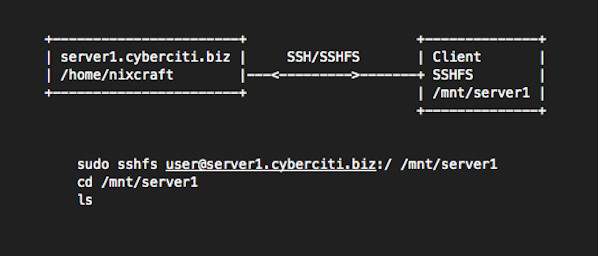
sshfs is a filesystem based on the SSH file transfer protocol. It is used on a client system i.e. you need to install sshfs package on your local computer/laptop powered by CentOS/RHEL/Ubuntu/Debian/Arch Linux. No need to install anything on server (server1.cyberciti.biz). You only need an openssh server installed on server side. Our sample setup:
Lire la suite…
Source: nixCraft
How to execute script on the last day of a month on Linux or Unix bash shell? How do I run a disk usage or custom reporting shell/perl/python script on the last day of a month on a Linux or Unix-like systems?
You need to use the date command to find out whether tomorrow is the first day of the next month. If it is true, you can run your script.
Say hello to TZ variable
TZ is time zone environment variable on Linux or Unix-like systems. The TZ environment variable tells functions such as the ctime(3) family and programs like date what the time zone and daylight saving rule is. For example, Greenwich Mean Time can be defined as follows:
TZ='GMT'
You can set TZ as follows to get tomorrow from the current date (+%d):
TZ=GMT-24 date +%d
Lire la suite…