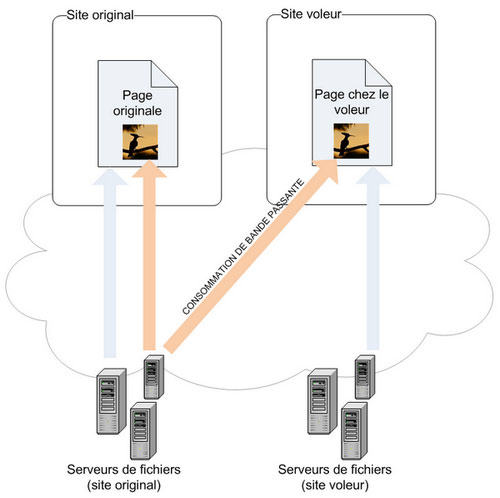
Source: journaldunadminlinux.fr
En parcourant pas mal de forums, j’ai pu remarquer que pas mal de jeunes admins ne connaissaient pas Rync.
Rsync est un petit outil de sauvegarde extrêmement puissant. Grâce à cette outil j’ai pu sauvegarder des centaines de giga-octet de données sans problèmes.
Rsync se charge en plus de garder tous les droits et attributs de vos fichiers et gère en natif SSH pour faire une sauvegarde d’une machine vers une autre. Lire la suite…
Source: Upwards with SBS
In earlier blog posts I’ve discussed other DNS records such as the TXT SPF record. This is a new but very important record that you will want in place for your domain.
Here’s a list of great resources that describe this in detail and include guidance to manually create and publish the record to whomever is hosting your DNS records for the domain.
Source: oav.net
255.255.255.255 11111111.11111111.11111111.11111111 /32 Host (single addr)
255.255.255.254 11111111.11111111.11111111.11111110 /31 Unuseable
255.255.255.252 11111111.11111111.11111111.11111100 /30 2 useable
255.255.255.248 11111111.11111111.11111111.11111000 /29 6 useable
255.255.255.240 11111111.11111111.11111111.11110000 /28 14 useable
255.255.255.224 11111111.11111111.11111111.11100000 /27 30 useable
255.255.255.192 11111111.11111111.11111111.11000000 /26 62 useable
255.255.255.128 11111111.11111111.11111111.10000000 /25 126 useable
255.255.255.0 11111111.11111111.11111111.00000000 /24 "Class C" 254 useable
255.255.254.0 11111111.11111111.11111110.00000000 /23 2 Class C's
255.255.252.0 11111111.11111111.11111100.00000000 /22 4 Class C's
255.255.248.0 11111111.11111111.11111000.00000000 /21 8 Class C's
255.255.240.0 11111111.11111111.11110000.00000000 /20 16 Class C's
255.255.224.0 11111111.11111111.11100000.00000000 /19 32 Class C's
255.255.192.0 11111111.11111111.11000000.00000000 /18 64 Class C's
255.255.128.0 11111111.11111111.10000000.00000000 /17 128 Class C's
255.255.0.0 11111111.11111111.00000000.00000000 /16 "Class B"
255.254.0.0 11111111.11111110.00000000.00000000 /15 2 Class B's
255.252.0.0 11111111.11111100.00000000.00000000 /14 4 Class B's
255.248.0.0 11111111.11111000.00000000.00000000 /13 8 Class B's
255.240.0.0 11111111.11110000.00000000.00000000 /12 16 Class B's
255.224.0.0 11111111.11100000.00000000.00000000 /11 32 Class B's
255.192.0.0 11111111.11000000.00000000.00000000 /10 64 Class B's
255.128.0.0 11111111.10000000.00000000.00000000 /9 128 Class B's
255.0.0.0 11111111.00000000.00000000.00000000 /8 "Class A"
254.0.0.0 11111110.00000000.00000000.00000000 /7
252.0.0.0 11111100.00000000.00000000.00000000 /6
248.0.0.0 11111000.00000000.00000000.00000000 /5
240.0.0.0 11110000.00000000.00000000.00000000 /4
224.0.0.0 11100000.00000000.00000000.00000000 /3
192.0.0.0 11000000.00000000.00000000.00000000 /2
128.0.0.0 10000000.00000000.00000000.00000000 /1
0.0.0.0 00000000.00000000.00000000.00000000 /0 IP space
Net Host Total
Net Addr Addr Addr Number
Class Range NetMask Bits Bits of hosts
----------------------------------------------------------
A 0-127 255.0.0.0 8 24 16777216 (i.e. 114.0.0.0)
B 128-191 255.255.0.0 16 16 65536 (i.e. 150.0.0.0)
C 192-254 255.255.255.0 24 8 256 (i.e. 199.0.0.0)
D 224-239 (multicast)
E 240-255 (reserved)
F 208-215 255.255.255.240 28 4 16
G 216/8 ARIN - North America
G 217/8 RIPE NCC - Europe
G 218-219/8 APNIC
H 220-221 255.255.255.248 29 3 8 (reserved)
K 222-223 255.255.255.254 31 1 2 (reserved)
(ref: RFC1375 & http://www.iana.org/assignments/ipv4-address-space )
( http://www.iana.org/numbers.htm )
----------------------------------------------------------
The current list of special use prefixes:
0.0.0.0/8
127.0.0.0/8
192.0.2.0/24
10.0.0.0/8
172.16.0.0/12
192.168.0.0/16
169.254.0.0/16
all D/E space
(ref: RFC1918 http://www.rfc-editor.org/rfc/rfc1918.txt )
( or ftp://ftp.isi.edu/in-notes/rfc1918.txt )
(rfc search: http://www.rfc-editor.org/rfcsearch.html )
( http://www.ietf.org/ietf/1id-abstracts.txt )
( http://www.ietf.org/shadow.html )
Martians: (updates at: www.iana.org/assignments/ipv4-address-space )
no ip source-route
access-list 100 deny ip host 0.0.0.0 any
deny ip 0.0.0.0 0.255.255.255 any log ! antispoof
deny ip 0.0.0.0 0.255.255.255 0.0.0.0 255.255.255.255 ! antispoof
deny ip any 255.255.255.128 0.0.0.127 ! antispoof
deny ip host 0.0.0.0 any log ! antispoof
deny ip host [router intf] [router intf] ! antispoof
deny ip xxx.xxx.xxx.0 0.0.0.255 any log ! lan area
deny ip 0/8 0.255.255.255 any log ! IANA - Reserved
deny ip 1/8 0.255.255.255 any log ! IANA - Reserved
deny ip 2/8 0.255.255.255 any log ! IANA - Reserved
deny ip 5/8 0.255.255.255 any log ! IANA - Reserved
deny ip 7/8 0.255.255.255 any log ! IANA - Reserved
deny ip 10.0.0.0 0.255.255.255 any log ! IANA - Private Use
deny ip 23/8 0.255.255.255 any log ! IANA - Reserved
deny ip 27/8 0.255.255.255 any log ! IANA - Reserved
deny ip 31/8 0.255.255.255 any log ! IANA - Reserved
deny ip 36-37/8 0.255.255.255 any log ! IANA - Reserved
deny ip 39/8 0.255.255.255 any log ! IANA - Reserved
deny ip 41-42/8 0.255.255.255 any log ! IANA - Reserved
deny ip 50/8 0.255.255.255 any log ! IANA - Reserved
deny ip 58-60/8 0.255.255.255 any log ! IANA - Reserved
deny ip 69-79/8 0.255.255.255 any log ! IANA - Reserved
deny ip 82-95/8 0.255.255.255 any log ! IANA - Reserved
deny ip 96-126/8 0.255.255.255 any log ! IANA - Reserved
deny ip 127/8 0.255.255.255 any log ! IANA - Reserved
deny ip 169.254.0.0 0.0.255.255 any log ! link-local network
deny ip 172.16.0.0 0.15.255.255 any log ! reserved
deny ip 192.168.0.0 0.0.255.255 any log ! reserved
deny ip 192.0.2.0 0.0.0.255 any log ! test network
deny ip 197/8 0.255.255.255 any log ! IANA - Reserved
deny ip 220/8 0.255.255.255 any log ! IANA - Reserved
deny ip 222-223/8 0.255.255.255 any log ! IANA - Reserved
deny ip 224.0.0.0 31.255.255.255 any log ! multicast
deny ip 224.0.0.0 15.255.255.255 any log ! unless MBGP-learned routes
deny ip 224-239/8 0.255.255.255 any log ! IANA - Multicast
deny ip 240-255/8 0.255.255.255 any log ! IANA - Reserved
filtered source addresses
0/8 ! broadcast
10/8 ! RFC 1918 private
127/8 ! loopback
169.254.0/16 ! link local
172.16.0.0/12 ! RFC 1918 private
192.0.2.0/24 ! TEST-NET
192.168.0/16 ! RFC 1918 private
224.0.0.0/4 ! class D multicast
240.0.0.0/5 ! class E reserved
248.0.0.0/5 ! reserved
255.255.255.255/32 ! broadcast
ARIN administrated blocks: (http://www.arin.net/regserv/IPStats.html)
24.0.0.0/8 (portions of)
63.0.0.0/8
64.0.0.0/8
65.0.0.0/8
66.0.0.0/8
196.0.0.0/8
198.0.0.0/8
199.0.0.0/8
200.0.0.0/8
204.0.0.0/8
205.0.0.0/8
206.0.0.0/8
207.0.0.0/8
208.0.0.0/8
209.0.0.0/8
216.0.0.0/8
----------------------------------------------------------
well known ports: (rfc1700.txt)
www.iana.org/assignments/port-numbers
protocol numbers:
www.iana.org/assignments/protocol-numbers
www.iana.org/numbers.htm
ICMP(Types/Codes)
Testing Destination Reachability & Status
(0/0) Echo-Reply
(8/0) Echo
Unreachable Destinations
(3/0) Network Unreachable
(3/1) Host Unreachable
(3/2) Protocol Unreachable
(3/3) Port Unreachable
(3/4) Fragmentaion Needed and DF set (Pkt too big)
(3/5) Source Route Failed
(3/6) Network Unknown
(3/7) Host Unknown
(3/9) DOD Net Prohibited
(3/10) DOD Host Prohibited
(3/11) Net TOS Unreachable
(3/12) Host TOS Unreachable
(3/13) Administratively Prohibited
(3/14) Host Precedence Unreachable
(3/15) Precedence Unreachable
Flow Control
(4/0) Source-Quench [RFC 1016]
Route Change Requests from Gateways
(5/0) Redirect Datagrams for the Net
(5/1) Redirect Datagrams for the Host
(5/2) Redirect Datagrams for the TOS and Net
(5/3) Redirect Datagrams for the TOS and Host
Router
(6/-) Alternate-Address
(9/0) Router-Advertisement
(10/0) Router-Solicitation
Detecting Circular or Excessively Long Routes
(11/0) Time to Live Count Exceeded
(11/1) Fragment Reassembly Time Exceeded
Reporting Incorrect Datagram Headers
(12/0) Parameter-Problem
(12/1) Option Missing
(12/2) No Room for Option
Clock Synchronization and Transit Time Estimation
(13/0) Timestamp-Request
(14/0) Timestamp-Reply
Obtaining a Network Address (RARP Alternative)
(15/0) Information-Request
(16/0) Information-Reply
Obtaining a Subnet Mask [RFC 950]
(17/0) Address Mask-Request
(18/0) Address Mask-Reply
Other
(30/0) Traceroute
(31/0) Conversion-Error
(32/0) Mobile-Redirect
Ref: [RFC 792] [RFC 896] [RFC 950] [RFC 1016]
www.cisco.com/univercd/cc/td/doc/product/lan/cat6000/sw_5_3/cofigide/qos.htm#19774
Decimal system Prefix's
Factor Exponent Prefix
---------------------------------------------------
1 000 000 000 000 000 000 000 000...10^24....yotta
1 000 000 000 000 000 000 000...10^21....zetta
1 000 000 000 000 000 000...10^18....exa
1 000 000 000 000 000...10^15....peta
1 000 000 000 000...10^12....tera
1 000 000 000...10^9.....giga
1 000 000...10^6.....mega
1 000...10^3.....kilo
100...10^2.....hecto
10...10^1.....deka
0.1...10^-1....deci
0.01...10^-2....centi
0.001...10^-3....milli
0.000 001...10^-6....micro
0.000 000 001...10^-9....nano
0.000 000 000 001...10^-12...pico
0.000 000 000 000 001...10^-15...femto
0.000 000 000 000 000 001...10^-18...atto
0.000 000 000 000 000 000 001...10^-21...zepto
0.000 000 000 000 000 000 000 001...10^-24...yocto
---------------------------------------------------
Convert Fahrenheit <> Celsius:
Celsius = (Fahrenheit - 32) / 1.8
Fahrenheit = (Celsius * 1.8) + 32
Today I found myself reconfiguring a wireless access point I hadn’t used in a very long time. I no longer have the manual (so I could reset it to factory defaults) nor do I remember what the obscure IP address I configured it with was. Luckily I do know what network it’s setup for ( 192.168.1.x ) but I don’t want to have to try to connect to all 254 IP addresses (192.168.1.1 through 192.168.1.254) as that would take quite some time.
So what I’m going to do is use Nmap a swiss army knife for network operators and system admins. What we’re going to do is use Nmap to scan the entire network and tell us which IP addresses are active. This will allow us to drastically reduce the number of IP addresses we have to try.
There are Nmap versions for all three major OS’s *nix, OS X and Windows. I’ll be showing you the syntax for the *nix/OS X version.
nmap -sP 192.168.1.0/24
replace 192.168.1.0/24 with whatever network it is you’re trying to scan.
The /24 is the netmask of the network in CDIR notation. If you need a cheat sheet you can find one here
Once you press return (or enter) Nmap will start to work pinging each and every IP address on your network and noting which ones respond and which don’t. (Note that if your device has a firewall that discards ping requests it will appear to be down to this scan)
You’ll quickly get an output similar to the following
Starting Nmap 4.50 ( http://insecure.org ) at 2008-08-19 10:15 PDT
HOST 192.168.1.25 appears to be up.
MAC Address: 0:0F:1F:4C:0B:E6 (WW Pcba Test)
Nmap finished: 256 IP addresses (3 hosts up) scanned in 5.711 seconds
Source: Stupid SSH Tricks: A Better Hosts File
J’ai bidouillé avec SSH pour me simplifier la vie. Une des pistes était de créer des host aliases dans le fichier de configuration de SSH (en général ~/.ssh/config). Et c’est plutôt facile. Voici un exemple;
Host webhost
User host_user
HostName example.com
IdentityFile ~/.ssh/some_id_dsa
La raison pour laquelle cette méthode est préférable que d’utiliser le fichier de hosts (/private/etc/hosts) est que vous pouvez par exemple utiliser des commandes comme scp.
scp ~/somefile.txt webhost:~/upload.txt
et scp, comme il utilise ssh, va comprendre ce que vous voulez dire, c’est-à-dire en réalité:
scp -i ~/.ssh/some_id_dsa ~/somefile.txt [email protected]:~/upload.txt
Si vous utilisez couramment ssh et scp comme je le fais, vous allez trouver cette méthode très pratique. Et si vous utilisez des clés ssh, cela rend le travail distant aussi commode que le travail en local.