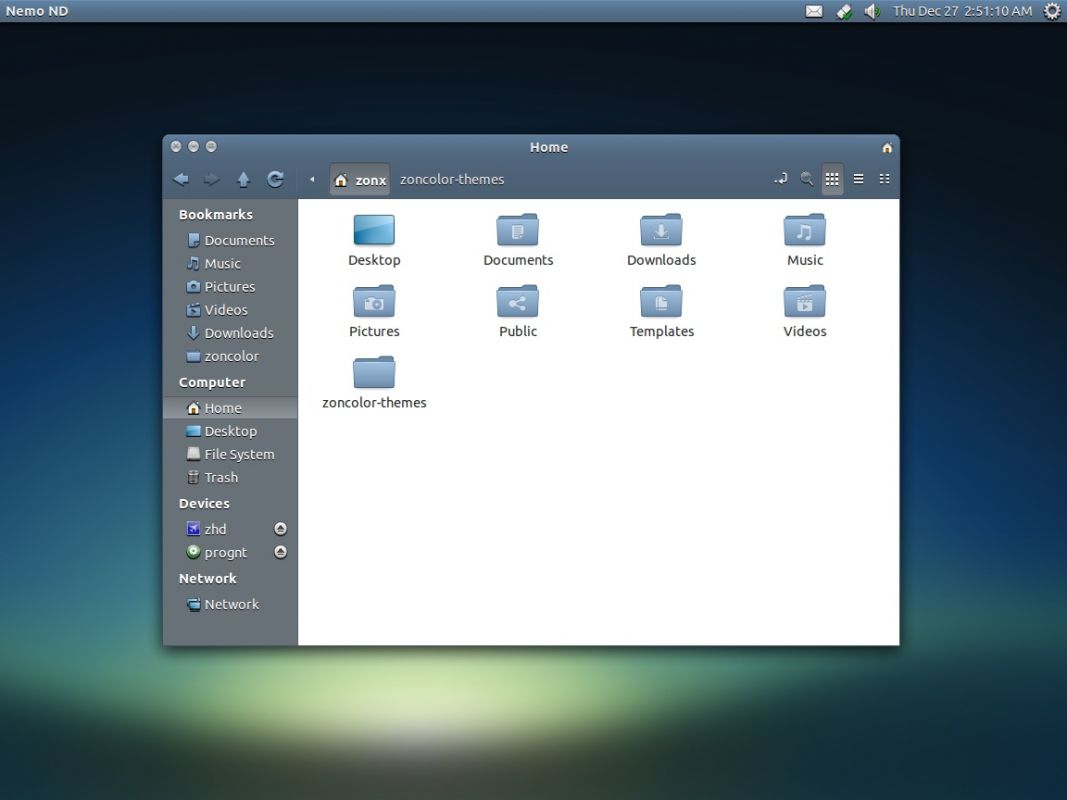
Nemo is a file manager application developed by Linux Mint team. It is a fork of Nautilus, the GNOME’s file manager. In the beginning, Nemo was just Nautilus 3.4 (Nautilus version which is forked to become Nemo) with different name.
With rapid development and improvement, Nemo now become a full-featured file manager with lots of features, more customizable, and looks beter (in my opinion) than its original (Nautilus).
Nemo is the default file manager in Linux Mint, to handle folder and also handle the desktop. You can also easily install Nemo in Ubuntu if you want which is just apt-get away using a PPA (read more: How to install Nemo in Ubuntu),
When you install Nemo in Ubuntu, it doesn’t set itself as the default file manager, Nautilus remains as the default one. If you want to integrate Nemo into Ubuntu system (as the default folder handler), you have to do it manually.
Here I want to share simple command to set Nemo as the default file manager in Ubuntu.
We will invoke the xdg-mime command from freedesktop.org, which is standard command and installed by default in most Linux distribution including Ubuntu. It can be use to set an application (*.desktop file) as the default file opening a certain file type(s) (mime-type). You can also use it to find out what application on your system to handle type(s) of file. Lire la suite…
Put this in a script and run it:
#!/bin/bash
gconftool-2 -s -t bool /apps/metacity/general/resize_with_right_button true
gsettings set org.gnome.desktop.wm.preferences resize-with-right-button true
The gconftool-2 line is for GConf based systems, and gsettings is its newer replacement.
# allows php on html
 AddType application/x-httpd-php .html
# Using this code, instead of having to type in http://mysite.com/contact.php, you only need to enter http://mysite.com/contact to access that page.
# And the best part is, you can still access the page with .php on the end of it, so no old incoming links or bookmarks become orphaned as a result of this, and everyone is happy.
 RewriteCond %{REQUEST_FILENAME} !-d
 RewriteCond %{REQUEST_FILENAME}\.htm -f
 RewriteRule ^(.*)$ $1.htm
# gzip compression.
# html, txt, css, js, json, xml, htc:
 AddOutputFilterByType DEFLATE text/html text/plain text/css application/json
 AddOutputFilterByType DEFLATE text/javascript application/javascript application/x-javascript
 AddOutputFilterByType DEFLATE text/xml application/xml text/x-component
# ------------------------
# CACHING to speed up site
# MONTH
 <FilesMatch "\.(flv|gif|jpg|jpeg|png|ico|swf)$">
 Header set Cache-Control "max-age=2592000"
# WEEK
 <FilesMatch "\.(js|css|pdf|txt)$">
 Header set Cache-Control "max-age=604800"
# DAY
 <FilesMatch "\.(html|htm)$">
 Header set Cache-Control "max-age=43200"
# webfonts and svg:
 <FilesMatch "\.(ttf|otf|eot|svg)$" >
 SetOutputFilter DEFLATE
# use utf-8 encoding for anything served text/plain or text/html
 AddDefaultCharset utf-8
# force utf-8 for a number of file formats
 AddCharset utf-8 .html .css .js .xml .json .rss
# Custom 400 errors
 ErrorDocument 400 /error.php
# Custom 401 errors
 ErrorDocument 401 /error.php
# Custom 403 errors
 ErrorDocument 403 /error.php
# Custom 404 errors
 ErrorDocument 404 /error.php
# Custom 500 errors
 ErrorDocument 500 /error.php
# Changes http://example.com to http://www.example.com
 RewriteEngine on
 RewriteCond %{HTTP_HOST} !^www.your-domain.com$
 RewriteRule ^(.*)$ http://www.your-domain.com/$1 [R=301]
# Specifies what file will be the directory index
 DirectoryIndex index.php index.html index.htm
# Unhide the code below to turn on a Site Down Page
 # RewriteEngine On
 # RewriteBase /
 # RewriteCond %{REQUEST_URI} !^/your-domain\.php$
 # RewriteRule ^(.*)$ http://your-domain.com/site-down.php [R=307,L]
# redirect any variations of a specific character string to a specific address
 # RewriteEngine On
 # RewriteRule ^appsupport http://www.your-domain.com/ [R]
# ---- # The following will redirect to the new page permanently ----#
# Redirect 301 /index.php http://www.your-domain.com/site-down.php.htaccess files can be a powerful tool for a developer, that is, as long as they are set up properly. What follows is a pretty simple .htaccess template that I use on the majority of my projects.
Secure .htaccess File
<Files .htaccess>
 order allow,deny
 deny from all
</Files>
This first set of lines essentially prevents others from viewing your htaccess file (and learning all about your crazy redirects).
Lire la suite…