Linux comes with a host based firewall called Netfilter. According to the official project site:
netfilter is a set of hooks inside the Linux kernel that allows kernel modules to register callback functions with the network stack. A registered callback function is then called back for every packet that traverses the respective hook within the network stack.
This Linux based firewall is controlled by the program called iptables to handles filtering for IPv4, and ip6tables handles filtering for IPv6. I strongly recommend that you first read our quick tutorial that explains how to configure a host-based firewall called Netfilter (iptables) under CentOS / RHEL / Fedora / Redhat Enterprise Linux. This post list most common iptables solutions required by a new Linux user to secure his or her Linux operating system from intruders.
Linux
IPTABLES Rules Example
Most of the actions listed in this post are written with the assumption that they will be executed by the root user running the bash or any other modern shell. Do not type commands on remote system as it will disconnect your access.
For demonstration purpose I’ve used RHEL 6.x, but the following command should work with any modern Linux distro.
This is NOT a tutorial on how to set iptables. See tutorial here. It is a quick cheat sheet to common iptables commands.
How can I mount remote directory with ssh on a Linux bases system? How do I use SSHFS to mount remote file systems over SSH on a Ubuntu or Debian/RHEL/CentOS/Arch Linux system?
SSH is a secure protocol and you can use it to mount a directory on a remote server or local laptop with the help of the SSHF service. With SSHFS you can mount remote server file system to your local
More on SSHFS
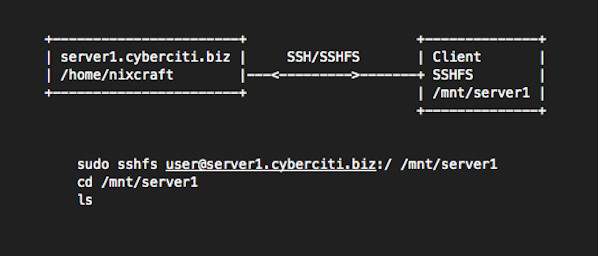
sshfs is a filesystem based on the SSH file transfer protocol. It is used on a client system i.e. you need to install sshfs package on your local computer/laptop powered by CentOS/RHEL/Ubuntu/Debian/Arch Linux. No need to install anything on server (server1.cyberciti.biz). You only need an openssh server installed on server side. Our sample setup:
Both Debian and Ubuntu Linux provides a number of package management tools. This article summaries package management command along with it usage and examples for you.
apt-get : APT is acronym for Advanced Package Tool. It supports installing packages over internet using ftp or http protocols. You can also upgrade all packages in a single operations, which makes it even more attractive.
dpkg : Debian packaging tool which can be use to install, query, uninstall packages.
Gui tools: You can also try GUI based or high level interface to the Debian GNU/Linux package system. Following list summaries them:
aptitude: It is a text-based interface to the Debian GNU/Linux package system.
Red hat Linux package names generally end in .rpm, similarly Debian package names end in .deb, for example:
apache_1.3.31-6_i386.deb
Where,
apache : Package name
1.3.31-6 : Version number
i386 : Hardware Platform on which this package will run (i386 == intel x86 based system)
.deb : Extension that suggest it is a Debian package
Remember, whenever I refer .deb file it signifies complete file name, and whenever I refer package name it must be first part of .deb file. For example, when I refer to a package sudo it means sudo only and not the .deb file i.e. sudo_1.6.7p5-2_i386.deb. You can find out debian package name with the following command:
Finally, most of the actions listed in this post are written with the assumption that they will be executed by the root user running the bash or any other modern shell. Lire la suite…
I setup a web-server. I need to grant a user ssh access but I do not trust users. How can I limit user session to a specific directory such as /home/httpd/$USERNAME? How do I set up a ssh chroort jail on a Linux operating systems?
You can interactive shell with special root directory on a Linux or Unix-like systems. You can set the pathname (such as /home/httpd/foo) of a directory to chroot to after authentication. All components of the pathname must be root owned directories that are not writable by any other user or group. After the chroot, sshd changes the working directory to the user’s home directory.
Say hello to ChrootDirectory directive
From the sshd_config man page:
The ChrootDirectory must contain the necessary files and directo ries to support the user’s session. For an interactive session this requires at least a shell, typically sh(1), and basic /dev nodes such as null(4), zero(4), stdin(4), stdout(4), stderr(4), arandom(4) and tty(4) devices. For file transfer sessions using « sftp », no additional configuration of the environment is necessary if the in-process sftp server is used, though sessions which use logging do require /dev/log inside the chroot directory.