Linux Iptables Block Outgoing Access To Selected or Specific IP Address / Port

17/04/2024 Categories: Réseau, Sécurité Tags: , Comments off

You would like to block outgoing access to particular remote host/ip or port for all or selected service/port. In this quick tutorial I will explain how to use iptables to block outgoing access.

Block Access To Outgoing IP Address

The following rule will block ip address 202.54.1.22 from making any outgoing connection:

iptables -A OUTPUT -d 202.54.1.22 -j DROP

The above will block chat server ip address or site having dangerous contains such as viruses or malware.

Block Access To Outgoing IP TCP / UDP Port Number

To block specific port number such tcp port # 5050, enter:
iptables -A OUTPUT -p tcp --dport 5050 -j DROP

To block tcp port # 5050 for an IP address 192.168.1.2 only, enter:
iptables -A OUTPUT -p tcp -d 192.168.1.2 --dport 5050 -j DROP

Finally, you need to save your firewall rules. Under CentOS / RHEL / Fedora Linux, enter:
# /sbin/service iptables save
OR
# /etc/init.d/iptables save
Categories: Réseau, Sécurité Tags: ,

Postrouting and IP Masquerading in Linux

16/04/2024 Categories: Réseau, Sécurité Tags: , , Comments off

postrouting masqueradingIPTables is responsible to handle packet filtering in Linux system. IPTables contains several predefined and/or user-defined tables. Each table contains chains and chain contain packet rules. IPTables uses NAT table to forward packets to another node.

What is POSTROUTING?

A Postrouting chain in NAT table means altering the IP packet after the routing is completed. Logically, a postrouting can be used to change the Source Address. As the routing is completed and destination has his own address, the only unknown address that can be masked is the Source. This is why postrouting is used for SNAT.

What is IP MASQUERADING?

Now, when a packet leaves the local network and tries to travel the public network, it will fail to traverse if it keeps using the local details. This is where IP Masquerading plays the role. IP Masquerading is masking the packet with identity of the external interface.

How POSTROUTING and MASQUERADING relates?

When a packet arrives to the local gateway that has external interface, masks the packet with IP Masquerading and send it through the public interface. That says, packet has to be routed first before mangling it for Masquerading. That is why, you need to apply the Masquerading target on the Postrouting chain of the NAT table.

How to setup Masquerading in Linux Firewall?

The following command will enable IP Masquerading in Linux Firewall:

$ iptables -t nat -A POSTROUTING -o eth0 -j MASQUERADE

The above rule will use NAT table (-t nat) on built-in Postrouting Chain (-A POSTROUTING) on interface eth0 (-o eth0).

The target Masquerade (-j MASQUERADE) advises to mask the above matched IP packets from the related table to external interface of the system.

Thus the above, would allow the local networks to gain access to external network through IP Masquerading.


Source: Mellowhost

compgen: An Awesome Command To List All Linux Commands

16/04/2024 Categories: Système Tags: , Comments off

Source: nixCraft

Ever want to list all the Linux commands (including bash shell aliases and functions) you could run on the server / workstation? Look now further. Try compgen command.

compgen is bash built-in command and it will show all available commands, aliases, and functions for you. The syntax is:

compgen option

compgen command examples

To list all the commands available to you, enter:

 
compgen -c

Sample outputs:

ls
if
then
else
elif
fi
....
mahjongg
sol
gtali
sl-h
gnobots2
gnotravex
iagno
fortune
gnect
gnome-sudoku
LS
glchess
gnuchess
gnuchessx

You can search or count the commands:

compgen -c | grep find
compgen -c | wc -l
echo "$USER user can run $(compgen -c | wc -l) commands on $HOSTNAME."

Lire la suite…

Categories: Système Tags: ,

Simple failover cluster using UCARP on Ubuntu

15/04/2024 Categories: Système Tags: , , , Comments off

In this tutorial, I’ll show you the steps to create a simple failover cluster on Ubuntu using CARP. To make the things meaningful,we’ll create the cluster for Apache service but you can use it for any other service, which relay on IP.

Scenario:

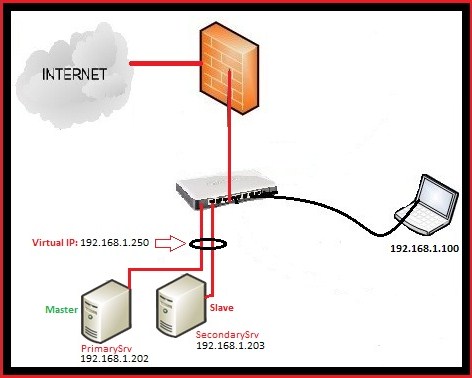
Here is my Setup:

PrimarySrv: This is the main server, where I configured the apache and which act as Master (IP: 192.168.1.202)
SecondarySrv: 2nd Apache Server where I configured the apache exactly like on PrimarySrv (IP : 192.168.1.203)
192.168.1.250 : Virtual IP address,created using Ucarp.

Ucarp is really simple, it works like this,when the PrimarySrv is up,it will assign the virtual IP 192.168.1.250 to it, in case that PrimarySrv is down then it will assign virtual IP to the SeconadrySrv and when the PrimarySrv will come online, it will assign the virtual IP once again to it.

Lire la suite…

Convert HTML Page To a PDF Using Open Source Tool

15/04/2024 Categories: Logiciel Tags: Comments off

Source: nixCraft

Do you need a simple open source cross-platform command line tool that converts web pages and HTML to a PDF file? Look no further, try wkhtmltopdf.

From the project home page:

Simple shell utility to convert html to pdf using the webkit rendering engine, and qt. Searching the web, I have found several command line tools that allow you to convert a HTML-document to a PDF-document, however they all seem to use their own, and rather incomplete rendering engine, resulting in poor quality. Recently QT 4.4 was released with a WebKit widget (WebKit is the engine of Apples Safari, which is a fork of the KDE KHtml), and making a good tool became very easy.

Software features

  1. Cross platform.
  2. Open source.
  3. Convert any web pages into PDF documents using webkit.
  4. You can add headers and footers.
  5. TOC generation.
  6. Batch mode conversions.
  7. Can run on Linux server with an XServer (the X11 client libs must be installed).
  8. Can be directly used by PHP or Python via bindings to libwkhtmltox.

A note about Debian / Ubuntu Linux user

You can install wkhtmltopdf using apt-get command:
$ sudo apt-get install wkhtmltopdf
$ sudo ln -s /usr/bin/wkhtmltopdf /usr/local/bin/html2pdf

Sample outputs:

[sudo] password for vivek:
Reading package lists... Done
Building dependency tree
Reading state information... Done
The following NEW packages will be installed:
  wkhtmltopdf
0 upgraded, 1 newly installed, 0 to remove and 10 not upgraded.
Need to get 116 kB of archives.
After this operation, 303 kB of additional disk space will be used.
Get:1 http://debian.osuosl.org/debian/ squeeze/main wkhtmltopdf amd64 0.9.9-1 [116 kB]
Fetched 116 kB in 2s (49.4 kB/s)
Selecting previously deselected package wkhtmltopdf.
(Reading database ... 274164 files and directories currently installed.)
Unpacking wkhtmltopdf (from .../wkhtmltopdf_0.9.9-1_amd64.deb) ...
Processing triggers for man-db ...
Setting up wkhtmltopdf (0.9.9-1) ...

Lire la suite…

Categories: Logiciel Tags: