Un site web sur plusieurs serveurs avec load balancing
En 2014 petit budget ne signifie pas nécessairement configuration bas de gamme et il est assez facile de faire tourner de grosses applications ou un grand nombr
e de sites internet pour quelques centaines, voire dizaines d’euros. En conséquence directe de la deuxième loi de Moore (qui annonce que la puissance des ordinateurs double tous les 2 ans) et de la guerre que se livrent les société d’hébergement, il est assez facile de se procurer 2 serveurs assez puissants pour bien moins cher qu’un seul serveur de la même puissance il y a 2 ans.
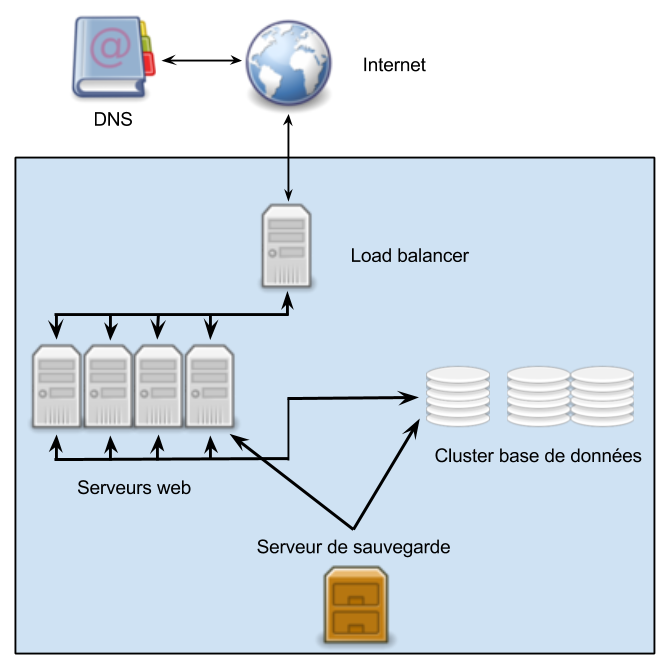
Cela explique que de plus en plus de société se tournent vers des configurations comportant plusieurs serveurs, avec une seule adresse présentée aux internautes. Ces configurations peuvent être plus ou moins complexes et dépendent à la fois des besoins et des ressources à allouer mais globalement ça ressemble à ça :
De quoi se compose notre système ?
Je pense qu’il est nécessaire de détailler les éléments ci-dessus afin de comprendre leur rôle et la façon dont ils interagissent.
- Internet : il s’agit du client, l’internaute qui accède au site internet ou à l’application;
- DNS : lorsque le client veut accéder à une ressource sur internet, il fait appel à un serveur DNS pour faire la traduction entre le nom de domaine et l’adresse IP du serveur qui fournit la ressource. Ici le serveur DNS semble un peu hors sujet mais j’ai préféré l’inclure parce qu’il va jouer un rôle dans la mise en oeuvre que je vous proposerai par la suite;
- Load balancer : bien souvent il s’agit d’un serveur reverse proxy qui se charge de répartir les requêtes entre les différents serveurs de la grappe, parfois il s’agit d’une configuration plus complexe. Pour les montages simples, le load balancing est attribué au serveur DNS, nous y reviendrons par la suite. Ce que vous pouvez constater ici c’est que notre load balancer est le seul serveur visible depuis le monde extérieur.
- Serveurs web : nous avons ici une grappe de n serveurs (en fonction de la puissance demandée) dont le rôle est de traiter les requêtes et de renvoyer les ressources demandées. Les fichiers disponibles sur toutes ces machines sont strictement identiques. Bien souvent il s’agit même d’un cluster dans lequel tous les nœuds agissent comme une seule et même entité, parfois il s’agit de machines indépendantes qui ont un système de fichiers distribué tel que Glusterfs;
- Cluster base de données : les principaux systèmes de gestion de base de données sont capables de fonctionner en cluster, même sur des environnements hétérogènes. Pour cette raison, quelque soit le nombre de serveurs sur lesquels les bases de données sont réparties, j’ai choisi de les faire apparaître comme un cluster et non comme des serveurs distincts;
- Serveur de sauvegarde : il n’est peut-être pas nécessaire de s’étendre. Quel que soit le dispositif, il dispose d’une grande capacité de stockage et d’un accès à sens unique à l’un des serveurs applicatifs (s’ils ont tous les mêmes fichiers, inutile d’ouvrir une porte sur tous) et au cluster de base de données.