Source: nixCraft
Two factor authentication is increasingly becoming a strongly recommended way of protecting user accounts in web applications from attackers by requiring a second method of authentication in addition to the standard username and password pair.
Although two factor authentication can encompass a wide range of techniques like biometrics or smart cards, the most commonly deployed technique in web applications is the one time password. If you have used applications like Gmail, you are probably familiar with the one time password generated by the Google Authenticator app that’s available on iOS or Android devices.
The algorithm used for the one time password in the Google Authenticator app is known as the Time-based One-Time Password (TOTP) algorithm. The TOTP algorithm is a standard algorithm approved by the IETF in (RFC 6238) totp-rfc.
Lire la suite…
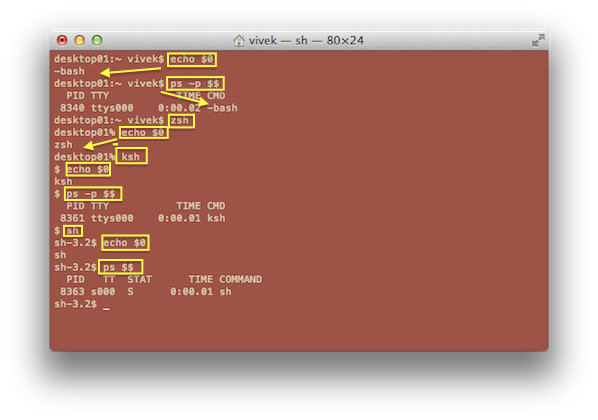
On a Linux or Unix-like systems each user and process runs in a specific environment. An environment includes variables, settings, aliases, functions and more. Following is a very brief introduction to some useful shell environment commands, including examples of how to use each command and setup your own environment to increase productivity in the command prompt.
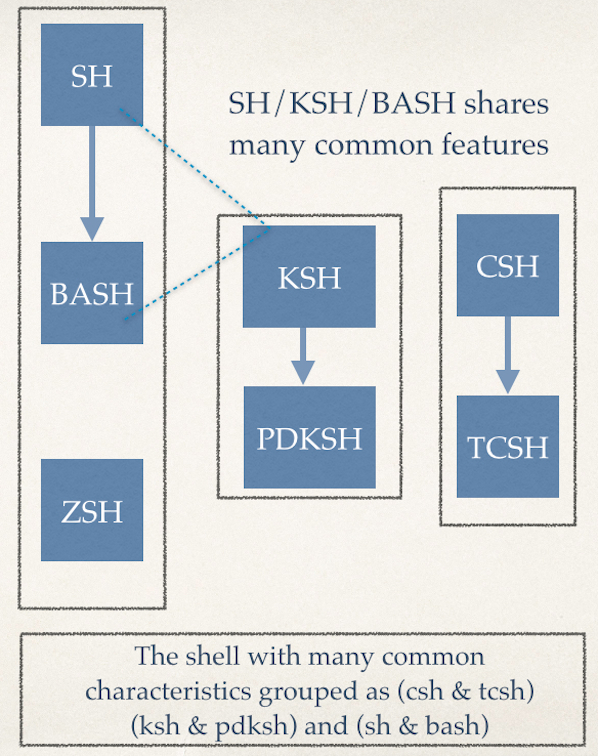
Finding out your current shell
Type any one of the following command at the Terminal app:
ps $$
ps -p $$
OR
echo "$0"
Sample outputs:
Bash (Bourne-Again SHell) is a Linux and Unix-like system shell or command language interpreter. It is a default shell on many operating systems including Linux and Apple OS X. Today, we’ll see how to quickly learn scripting.
If you have always used a graphic user interface like KDE or Gnome or MS-Windows or Apple OS X, you are likely to find bash shell confusing. If you spend some time with the bash shell prompt and it will be difficult for you to go back.
Here are a list of tutorials and helpful resources to help you learn bash scripting and bash shell itself.
Lire la suite…
Source: nixCraft
For new computer or Laptop or server, I need to collect the information about its hardware. This is also useful when you need to replace a disk or memory with a vendor. In order to replace hardware you need all information in advance. In this post, I’m going to list commands that you can use to collect the hardware information.
All of the following commands are tested on Ubuntu Linux LTS 14.04, but should work with any modern distro too such as Debian or Fedora Linux.
Lire la suite…
Source: denisrosenkranz.com
Nous avons vu précédement comment mettre un place un Cluster Apache actif/passif avec DRBD et HeartBeat. Dans ce tutoriel nous allons voir comment faire la même chose mais avec MySQL.
La configuration de DRBD et de Heartbeat est la même que pour le tutoriel précédent.
Voilà ce que nous allons mettre en place
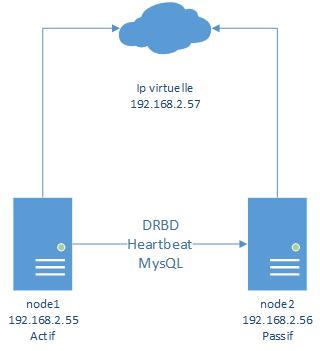
Donc pour faire ce tutoriel suivez le tutoriel suivant jusqu’a « Installation d’apache« :
Un cluster DRBD/Apache avec Heartbeat sur Debian 7
Lire la suite…