Using iptables to list filtering rules is OK. Running this command in a shell loop can help but it needs that you write a shell script.
Another convenient way is to use the watch command:
watch --interval 0 'iptables -nvL'
or
sudo watch --interval 0 'iptables -nvL'
depending on whether you’re logged as super-user or not.
This will show a permanent iptables -L with a refresh interval that can be specified:
watch --interval 0 'iptables -nvL'
will refresh every second.
Typical output will be:
Every 10,0s: iptables -nvL                                                                                         Tue Nov  3 16:35:19 2015

Chain INPUT (policy DROP 44001 packets, 2444K bytes)
 pkts bytes target     prot opt in     out     source               destination
    3   160 fail2ban-ssh  tcp  --  *      *       0.0.0.0/0            0.0.0.0/0            multiport dports 22
  11M 1770M ACCEPT     all  --  *      *       0.0.0.0/0            0.0.0.0/0            state RELATED,ESTABLISHED
 107K 6878K ACCEPT     tcp  --  *      *       78.193.xx.xx         0.0.0.0/0
    0     0 ACCEPT     tcp  --  *      *       195.154.xx.xx        0.0.0.0/0
 231K   14M ACCEPT     tcp  --  *      *       213.36.xx.xx         0.0.0.0/0
    0     0 ACCEPT     tcp  --  *      *       195.154.xx.xx        0.0.0.0/0
    2    92 ACCEPT     tcp  --  *      *       0.0.0.0/0            0.0.0.0/0            tcp dpt:548
    0     0 ACCEPT     icmp --  *      *       0.0.0.0/0            0.0.0.0/0            icmptype 0
 1475  139K ACCEPT     icmp --  *      *       0.0.0.0/0            0.0.0.0/0            icmptype 8
  134  9600 ACCEPT     tcp  --  *      *       0.0.0.0/0            0.0.0.0/0            tcp spt:80
  110  6563 ACCEPT     tcp  --  *      *       0.0.0.0/0            0.0.0.0/0            tcp spt:443
    0     0 ACCEPT     tcp  --  *      *       0.0.0.0/0            0.0.0.0/0            tcp spt:943
 136K 9529K ACCEPT     udp  --  *      *       0.0.0.0/0            0.0.0.0/0            udp dpt:1194
 1423 85360 ACCEPT     tcp  --  *      *       0.0.0.0/0            0.0.0.0/0            tcp dpt:4949
    3   120 ACCEPT     tcp  --  eth0   *       0.0.0.0/0            0.0.0.0/0            tcp dpt:873 state NEW,ESTABLISHED
   24  1910 ACCEPT     udp  --  *      *       0.0.0.0/0            0.0.0.0/0            udp dpt:161
    0     0 ACCEPT     udp  --  *      *       0.0.0.0/0            0.0.0.0/0            udp dpt:162
    0     0 ACCEPT     udp  --  *      *       0.0.0.0/0            0.0.0.0/0            udp dpt:119
    2    92 ACCEPT     tcp  --  *      *       0.0.0.0/0            0.0.0.0/0            tcp dpt:3000
  156  7584 ACCEPT     tcp  --  *      *       0.0.0.0/0            0.0.0.0/0            tcp dpt:8080
 2952  177K ACCEPT     all  --  lo     *       0.0.0.0/0            0.0.0.0/0
    0     0 ACCEPT     tcp  --  *      *       172.27.xx.xx/24      0.0.0.0/0
    0     0 ACCEPT     tcp  --  as0t0  *       0.0.0.0/0            0.0.0.0/0
    3   192 ACCEPT     tcp  --  as0t1  *       0.0.0.0/0            0.0.0.0/0
Homemade DDoS Protection Using IPTables SYNPROXY
 First off, if you want the real deal and get your service DDoS protected from even the most complex types of DDoS attacks by security specialists today, don’t bother reading about SYNPROXY and instead check out our Anti DDoS Hosting and Remote DDoS Protection. If you feel confident that you can use SYNPROXY as an addition to your current DDoS mitigation strategy and are an experienced system or network admin, continue reading.
It’s nothing new that DDoS attacks are increasing constantly in size and quantity over the years, making them more likely to affect you personally every month passing by. Apart of DNS Amplifictation Attacks, SYN Floods are one of the most common DDoS attack types today. Until recently Linux systems were very bad at handling SYN Floods properly compared to *BSD, which has a SYN Proxy feature built into its default firewall « PF » for quite a while now, which is a good approach for SYN Flood DDoS mitigation. The Linux default firewall « IPTables » hasn’t had a similar feature for a long time and the only approach to mitigate SYN Floods was the Kernel’s « syncookie » feature, which isn’t by far as performant as one would wish when under SYN Flood.
Finally, after years of lacking appropiate SYN Flood mitigation options under Linux, the new « SYNPROXY » target was introduced with the 3.12 kernel and IPTables version 1.4.21 trying to fill that gap quite successfully. Although it’s not a cure for every SYN Flood, because most ISPs are likely to nullroute your IP before the attack clogs your TCP/IP stack and probably your NIC will cause interrupts before your kernel, but tests have shown that there is a major increase of performance when under SYN Flood, SYN-ACK Flood or ACK Flood.
While a Linux kernel with default settings usually starts to cause software interrupts and starts dropping packets at as little as 200.000 packets per second (PPS), it can handle multiple millions of packets per second with the strategy explained in this tutorial. The number of SYN packets it can handle per second increases by a factor of 10 and the number of ACK packets it can handle per second even increases by a factor of 20, which can be a major advantage when you have to handle large amounts of packets (read: you’re under SYN or ACK Flood).
IPTables « SYNPROXY » on Debian Wheezy
In this example we’ll use a Debian Wheezy system for our setup. I can imagine this being used on Vyatta boxes in the future to effectively protect whole network segments with very cheap hardware. The first things we’ll have to do is to upgrade our kernel and iptables version.
Lire la suite…
Source: Digital Point
After a few days of being attacked by a 25,000 zombie botnet, believe me i have tried almost everything possible to make it stop. The best thing that helped was this script, thought it could help here when it’s your turn getting those script-kiddies attackers visiting your servers.
#!/bin/sh
#------------------------------------------------------------------------------
#
# File: SIG-antiDDoS.sh
#
# Compiler: Ruslan Abuzant <[email protected]>
#           PS> Collected From Lots Of Sources
#           PS> Credits: Real Authors (no idea)
#
# URL: http://www.liteforex.org/
#
# License: GNU GPL (version 2, or any later version).
#
# Configuration.
#------------------------------------------------------------------------------

# For debugging use iptables -v.
IPTABLES="/sbin/iptables"
IP6TABLES="/sbin/ip6tables"
MODPROBE="/sbin/modprobe"
RMMOD="/sbin/rmmod"
ARP="/usr/sbin/arp"


# Logging options.
#------------------------------------------------------------------------------
LOG="LOG --log-level debug --log-tcp-sequence --log-tcp-options"
LOG="$LOG --log-ip-options"


# Defaults for rate limiting
#------------------------------------------------------------------------------
RLIMIT="-m limit --limit 3/s --limit-burst 8"
Lire la suite…
 Nodaways seems that every script kid is able to produce a soft DDOS attack, happily they are small and limited so they cant saturate your DNS unless they really know what they are doing.
This is a more or less step by step guide intended for begginers to help stabilize the linux server and prevent further attacks.
There are some basic settings you should have already implemented in your linux server as part of security 101 but this is not always the case and also it is not enough.
Questions and Answers:
- Limiting the ammount of concurrent connections from the same IP address to your Server.
- Identifying the offending IP.
- And kill the Ongoing TCP Connections with TCPKILL.
- Or use Cutter to kill the connections on any port/Network interface.
- Drop it With Iptables.
- Make the DROP Persistant after a reboot. (iptables save and restore)
- Basic Iptables-save trouble shoot.
- Stop Start Iptables
This article assumes you have root access to your linux BOX / Server, the IP addresses shown in this guide are randomly generated and in no case are offending connections.
Lire la suite…
About Fragmented IP packet forwarding.
I couldn’t really find a suitable topic for this post actually but I will try to find answers for the following questions:
- How can we fragment an IP packet manually in scapy
- How does a fragmented packet look like and how the transport layer (TCP/UDP) header is located
- How do we forward fragmented packets, do we reassemle them?
- If we don’t reassemble, can we force reassembly?
First of all a bit of a theory: if an incoming IP packet is to be forwarded to another next hop and the MTU of this new path is smaller than the packet to be transmitted, we must find a way to forward the packet. If the packet has DF (Don’t Fragment) bit on i.e we are instructed not to fragment the packet most probably by the source, then normally we are expected to send an ICMP packet with type “Fragmentation needed” and pray that on the way back to the source no devices block all ICMP type of traffic. Second scenario is that what if the source lets us fragment the packet. Then we need to fragment it and story from now on is about this part of the scenario and the topology we will use is something like below.
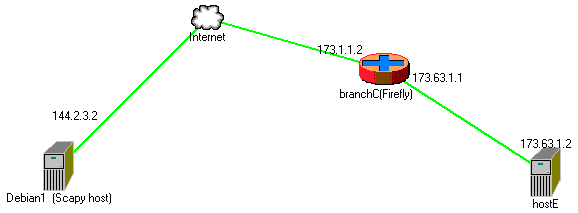
Scapy is a fantastic tool to generate your own packets. It is exremely flexible and in our example, we will perform the fragmentation of a packet via our script.
Lire la suite…