Archive

Archives pour la catégorie ‘Réseau’

Iptables Limits Connections Per IP

30/05/2024 Comments off

How do I restrict the number of connections used by a single IP address to my server for port 80 and 25 using iptables?

You need to use the connlimit modules which allows you to restrict the number of parallel TCP connections to a server per client IP address (or address block).

This is useful to protect your server or vps box against flooding, spamming or content scraping.

Syntax

The syntax is as follows:

/sbin/iptables -A INPUT -p tcp --syn --dport $port -m connlimit --connlimit-above N -j REJECT --reject-with tcp-reset
# save the changes see iptables-save man page, the following is redhat and friends specific command
service iptables save

Example: Limit SSH Connections Per IP / Host

Only allow 3 ssg connections per client host:

/sbin/iptables  -A INPUT -p tcp --syn --dport 22 -m connlimit --connlimit-above 3 -j REJECT
# save the changes see iptables-save man page, the following is redhat and friends specific command
service iptables save

Example: Limit HTTP Connections Per IP / Host

Only allow 20 http connections per IP (MaxClients is set to 60 in httpd.conf):

warning-40pxWARNING! Please note that large proxy servers may legitimately create a large number of connections to your server. You can skip those ips using ! syntax
/sbin/iptables -A INPUT -p tcp --syn --dport 80 -m connlimit --connlimit-above 20 -j REJECT --reject-with tcp-reset
# save the changes see iptables-save man page, the following is redhat and friends specific command
service iptables save

Skip proxy server IP 1.2.3.4 from this kind of limitations:

/sbin/iptables -A INPUT -p tcp --syn --dport 80 -d ! 1.2.3.4 -m connlimit --connlimit-above 20 -j REJECT --reject-with tcp-reset

Example: Class C Limitations

In this example, limit the parallel http requests to 20 per class C sized network (24 bit netmask)

/sbin/iptables  -A INPUT -p tcp --syn --dport 80 -m connlimit --connlimit-above 20 --connlimit-mask 24 -j REJECT --reject-with tcp-reset
# save the changes see iptables-save man page
service iptables save

Lire la suite…

Categories: Réseau, Sécurité Tags: ,

How to protect server from simple DoS attack

30/05/2024 2 commentaires

You can use a firewall to limit the number of concurrent connections and the rate of new connections coming from a network (e.g. a /32 for IPv4 and a /64 for IPv6). Example of what it may look like using iptables:

# Limit number of concurrent connections
-A INPUT -i eth0 -p tcp --syn -m connlimit --connlimit-above 50 -j DROP
# Limit rate of new connections
-A INPUT -i eth0 -p tcp --syn -m hashlimit --hashlimit-name tcp --hashlimit-mode srcip --hashlimit-above 3/sec --hashlimit-burst 7 --hashlimit-srcmask 32 -j DROP

(Same thing for ip6tables except adding --connlimit-mask 64 to the first and changing --hashlimit-srcmask to 64 in the second.)

You can also limit the rate of HTTP requests, for example with the limit_req module of nginx.

Source: serverfault.com

Categories: Réseau, Sécurité Tags: , ,

Monitor TCP Traffic on specific port

29/05/2024 un commentaire

Source: superuser.com

I’ve searched quite extensively for this, but cannot seem to come up with a working example.

My objective is to monitor TCP traffic on a specific port to see incoming connections and write them to a text file. The catch is I also need a timestamp on each row to show exactly when the client connected down to the second.

I’ve already exhausted netstat, nmap, and tcptrack, but none support timestamp.

I was thinking a linux shell script might work if I monitored a specific local port and wrote text to a file when a connection is made then just concatenate the date on each line.

I was playing with this:

netstat -ano|grep 443|grep ESTABLISHED

as well as this:

tcptrack -i eth0 port 443

but neither suit my needs as I need the time the connection comes in at.

Categories: Réseau Tags:

Communication Networks/IP Tables

28/05/2024 Comments off

Operational summary

The netfilter framework, of which iptables is a part of, allows the system administrator to define rules for how to deal with network packets. Rules are grouped into chains—each chain is an ordered list of rules. Chains are grouped into tables—each table is associated with a different kind of packet processing.

Each rule contains a specification of which packets match it and a target that specifies what to do with the packet if it is matched by that rule. Every network packet arriving at or leaving from the computer traverses at least one chain, and each rule on that chain attempts to match the packet. If the rule matches the packet, the traversal stops, and the rule’s target dictates what to do with the packet. If a packet reaches the end of a predefined chain without being matched by any rule on the chain, the chain’s policy target dictates what to do with the packet. If a packet reaches the end of a user-defined chain without being matched by any rule on the chain or the user-defined chain is empty, traversal continues on the calling chain (implicit target RETURN). Only predefined chains have policies.

Rules in iptables are grouped into chains. A chain is a set of rules for IP packets, determining what to do with them. Each rule can possibly dump the packet out of the chain (short-circuit), and further chains are not considered. A chain may contain a link to another chain – if either the packet passes through that entire chain or matches a RETURN target rule it will continue in the first chain. There is no limit to how many nested chains there can be. There are three basic chains (INPUT, OUTPUT, and FORWARD), and the user can create as many as desired. A rule can merely be a pointer to a chain.

Tables

There are three built-in tables, each of which contains some predefined chains. It is possible for extension modules to create new tables. The administrator can create and delete user-defined chains within any table. Initially, all chains are empty and have a policy target that allows all packets to pass without being blocked or altered in any fashion.

  • filter table — This table is responsible for filtering (blocking or permitting a packet to proceed). Every packet passes through the filter table. It contains the following predefined chains, and any packet will pass through one of them:
    • INPUT chain — All packets destined for this system go through this chain (hence sometimes referred to as LOCAL_INPUT)
    • OUTPUT chain — All packets created by this system go through this chain (aka. LOCAL_OUTPUT)
    • FORWARD chain — All packets merely passing through the system (being routed) go through this chain.
  • nat table — This table is responsible for setting up the rules for rewriting packet addresses or ports. The first packet in any connection passes through this table: any verdicts here determine how all packets in that connection will be rewritten. It contains the following predefined chains:
    • PREROUTING chain — Incoming packets pass through this chain before the local routing table is consulted, primarily for DNAT (destination-NAT).
    • POSTROUTING chain — Outgoing packets pass through this chain after the routing decision has been made, primarily for SNAT (source-NAT).
    • OUTPUT chain — Allows limited DNAT on locally-generated packets
  • mangle table — This table is responsible for adjusting packet options, such as quality of service. All packets pass through this table. Because it is designed for advanced effects, it contains all the possible predefined chains:
    • PREROUTING chain — All packets entering the system in any way, before routing decides whether the packet is to be forwarded (FORWARD chain) or is destined locally (INPUT chain).
    • INPUT chain — All packets destined for this system go through this chain
    • FORWARD chain — All packets merely passing through the system go through this chain.
    • OUTPUT chain — All packets created by this system go through this chain
    • POSTROUTING chain — All packets leaving the system go through this chain.

In addition to the built-in chains, the user can create any number of user-defined chains within each table, which allows them to group rules logically.

Each chain contains a list of rules. When a packet is sent to a chain, it is compared against each rule in the chain in order. The rule specifies what properties the packet must have for the rule to match, such as the port number or IP address. If the rule does not match then processing continues with the next rule. If, however, the rule does match the packet, then the rule’s target instructions are followed (and further processing of the chain is usually aborted). Some packet properties can only be examined in certain chains (for example, the outgoing network interface is not valid in the INPUT chain). Some targets can only be used in certain chains, and/or certain tables (for example, the SNAT target can only be used in the POSTROUTING chain of the nat table).

Lire la suite…

SynFlood

28/05/2024 Comments off

1 – Le concept

L’attaque SynFlood est basée sur l’envoi massif de demande d’ouverture de session TCP. Les buts recherchés peuvent être :

  • Le Buffer Overflow du process écoutant le port TCP de destination.
  • La saturation du nombre d’ouverture de session TCP en cours.

2 – Le fonctionnement

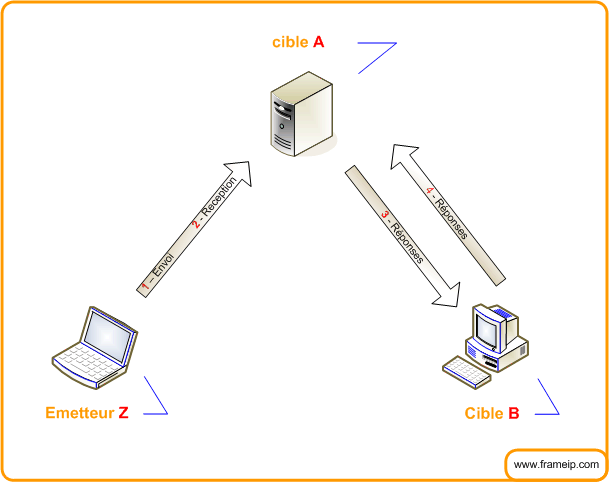
2.1 – Schéma

2.2 – Envoi du SYN

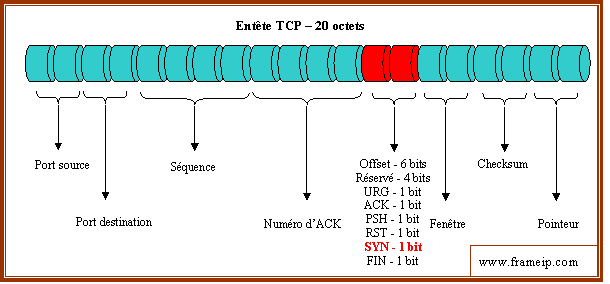
Le fonctionnement est de générer une trame TCP de demande de synchronisation à destination de la cible. Cette demande de synchronisation SYN est la première étape d’une ouverture de session TCP. Voici le schéma de l’entête TCP avec ce fameux flag SYN basé sur 1 bit :


Les 5 autres flags doivent être positionnés à 0.

2.3 – Réception par la cible A

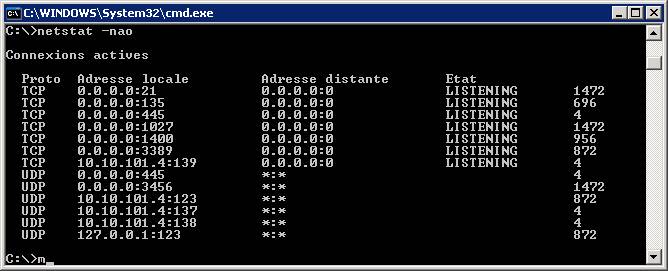
La cible recevant la synchronisation TCP mémorise cette demande nécessitant donc de la mémoire et du processeur. Voici l’état des connexions d’un Windows XP avant la réception d’un Synflood :


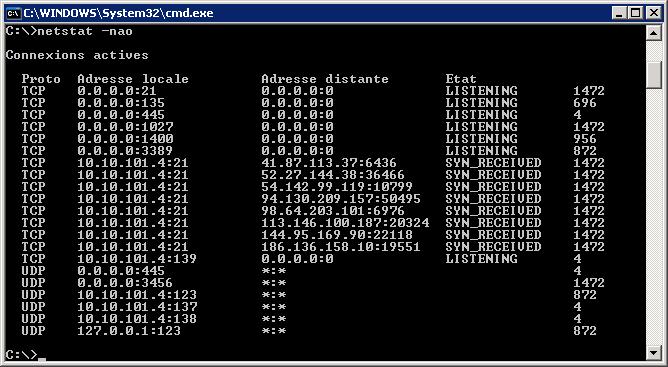
Et voici après la réception des demandes de SYN :


La cible passe les requêtes reçues en SYN_RECEIVED. Cet état est temporaire, le temps de durée de vie est variable en fonction de la pile IP.

Dans mon exemple, la cible tourne sur une station XP limitée en nombre de sessions simultanée. Ceci ayant pour conséquence l’indisponibilité temporaire du port ciblé.

* testé depuis la machine ayant effectuée le Synflood

Lire la suite…

Categories: Réseau, Sécurité Tags: , , ,