Archive

Archives pour la catégorie ‘Logiciel’

Tutoriel pour débuter avec le Raspberry Pi

28/01/2014 Comments off

Source: benji1000.net

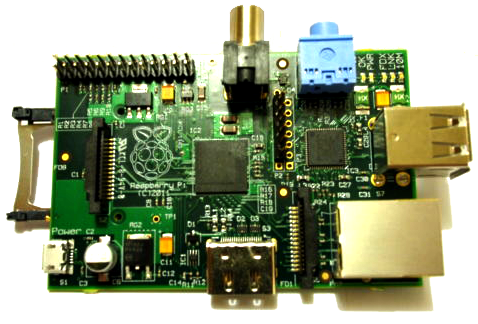
Raspberry PiJ’ai reçu cette semaine mon Raspberry Pi, et j’ai décidé de faire un petit guide pour ceux qui, comme moi, débutent avec cet engin ! J’espère qu’il sera assez clair, n’hésitez pas si vous avez des questions. Voilà tout d’abord un lien pour commander un Raspberry Pi.


Lire la suite…

Que faire, si la mise à jour de Mac Ports échoue?

28/01/2014 Comments off

Source: korben.info

Si vous êtes sous Mac et que vous tentez de faire un

sudo port selfupdate

pour mettre à jour MacPorts, il est possible que vous obteniez le message suivant :

Error: /opt/local/bin/port: port selfupdate failed: Error installing new MacPorts base: command execution failed

Pas de panique !

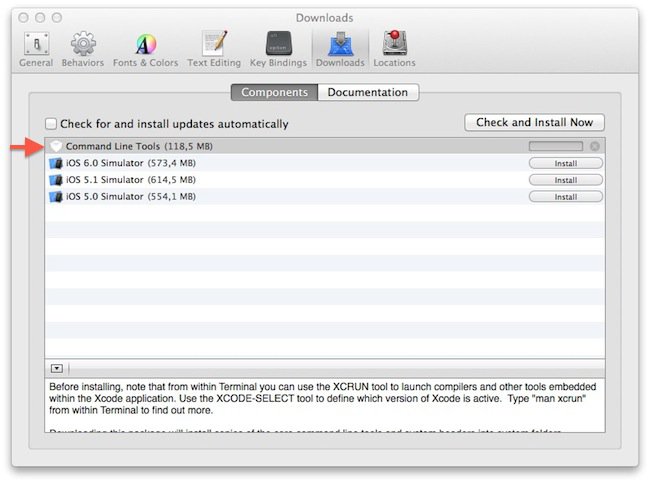
Pour arranger le souci, il suffit que vous installiez Xcode et les Command Line Tools. Pour cela, rendez-vous dans l’App Store. Installez Xcode, puis lancez-le.

Ensuite, allez dans le menu XCode -> Preferences et dans l’onglet « Downloads », installez les « Command Line Tools ».

xcodeRelancez ensuite la commande

sudo port selfupdate

Et cette fois, Mac Ports devrait se mettre à jour correctement. Ensuite, pour mettre à jour les paquets dont la date limite de fraicheur a expiré, tapez la commande :

sudo port upgrade outdated

How to set up iCloud services in Snow Leopard

28/01/2014 Comments off

Source: cnet.com by Topher Kessler

While Apple’s iCloud services are officially supported only in OS X 10.7 Lion or later, you can get some working in Snow Leopard.

iCloud is the latest iteration of Apple’s cloud-based services, and while it can be accessed from any Web browser, it requires at least OS X 10.7 to integrate into the Mac OS. Unfortunately this means that if you are on an older Mac system running Snow Leopard that you either don’t want to or can’t upgrade, then Apple no longer supports accessing its iCloud services.

Recently MacFixIt reader Brandon wrote in wondering about the options for people with these setups:

I just purchased an iPhone and am trying to sync my Mac devices, but have run into a problem. I currently have an iMac 4,1 version 10.6.8 with a 2 GHz Intel Core Duo processor. In order to sync my devices with iCloud, I was told (by Apple) that I need to upgrade to Lion, at least.

[How can I get iCloud on my computer?] My ultimate goal is to have my work computer synced with my iPhone synced with my MacBook at home. Can I purchase and install the Intel Core 2 Duo processor I apparently need [to run Lion]? Are there any ways around this issue? Perhaps there is a cheaper component I could buy?

Upgrading the iMac‘s hardware would theoretically be possible, except that Apple’s iMac systems are soldered together, making it impossible to perform tasks like upgrading the CPU. They also do not have any standardized expansion slots, so upgrading components like video cards is also impossible. Even if you were able to upgrade the hardware and get Lion or Mountain Lion running, the system would not have been tested and could have stability problems.

The only components that can be upgraded on systems like the iMac are the removable RAM modules, the hard drive, and the optical drive. As a result, in most cases a Mac system that does not meet the minimum CPU and graphics requirements will not be able to run Lion or Mountain Lion, regardless of what you do.

Therefore, the only supported method for accessing iCloud services on older systems that can only run Snow Leopard is to use Apple’s iCloud Web interface; however, there are ways you can set up programs like Safari, Address Book, and iCal in unsupported ways to access iCloud services and make use of them.

Do keep in mind that these setups may not be the most reliable, but you can use the following steps to get the services to work in Snow Leopard and test them out with your phone.

Lire la suite…
Categories: Constructeur, Logiciel Tags: , ,

Mac OS X: Synchronisation AddressBook/iCal/iCloud/Google. L’impasse ?

28/01/2014 Comments off

Pour ceux qui ont eu la mauvaise idée de posséder un iMac, un iPhone *ET* un smartphone Android, se pose le problème de synchronisation des informations. J’en fais partie…

Est-ce que j’utilise iCloud avec mon iMac et mon iPhone et je reste planté avec mon Android chez Google Contacts?

Est-ce que j’utilise Google Contacts avec Android et j’utilise « Synchro avec Google » dans AddressBook et créer un compte GMail sur le iPhone?

Dans le premier cas, comment être certain que les contacts iCloud sont bien les mêmes que sur Google Contacts? Et réciproquement.

J’ai essayé le deuxième scénario: synchro stable la plupart du temps mais si on a le malheur de modifier ou effacer une fiche sur Mac OS X, la reprise d ela synchro crée un doublon, voire un triplon et pas forcément sur toutes les fiches, et pas forcément doublon plutôt que triplon, des fois plutôt sur les fiches « société » (sans nom/prénom) mais pas obligatoirement…

Comme vous le voyez, c’est pénible et ça enlève toute confiance dans une source (Google) ou l’autre (Mac OS X).

Une solution: SmoothSync for Cloud.

SmoothSync for Cloud Calendar syncs your iCloud calendars
https://play.google.com/store/apps/details?id=org.dmfs.caldav.icloud&feature=search_r esult#?t=W251bGwsMSwxLDEsIm9yZy5kbWZzLmNhbGRhdi5pY 2xvdWQiXQ..

SmoothSync for Cloud Contacts syncs your iCloud contacts
https://play.google.com/store/apps/details?id=org.dmfs.carddav.icloud&feature=search_ result#?t=W251bGwsMSwxLDEsIm9yZy5kbWZzLmNhcmRkYXYu aWNsb3VkIl0.

Setting up Wireless motion-detect cam

28/01/2014 Comments off

This project is based on a post by dozencrows here which explored the use of a Raspberry Pi camera board as a motion detecting video cam. It is based on the motion package in Debian. He has recompiled this with a slightly different configuration, making it convenient to work with the Raspberry Pi cam board. I take no credit for the code, but hope that details of how I have se it up on my system, and how I have connected it to a Synology NAS with built in Surveillance Station will be of interest to others. The original thread has multiple posts on it, and it can be confusing to get to grips with the code as a result.

Lire la suite…