Archive

Archives pour la catégorie ‘Logiciel’

Port Knocking : sécuriser l’accès à un port

07/04/2021 Comments off

source: http://doc.ubuntu-fr.org/port-knocking

Le port-knocking est une méthode permettant de modifier le comportement d’un firewall en temps réel pour provoquer l’ouverture d’un port suite au lancement préalable d’une suite de connexions sur des ports distincts dans le bon ordre, à l’instar d’un code frappé à une porte.

Cette technique est notamment utilisée pour protéger l’accès au port 22 dédié au Secure shell (SSH) ; elle ne nécessite pas beaucoup de ressources et reste facile à mettre en œuvre.

En résumé, le port knocking est donc une méthode simple pour autoriser un accès distant sur un port non constamment ouvert. Cela permet d’éviter les scans de ports et certaines attaques.

La méthode de port-knocking est considérée comme sécurisée étant donné qu’elle est située à un niveau bas des couches TCP/IP et qu’elle ne requière pas de port ouvert (le service knockd est lui aussi invisible). C’est donc une méthode, mais pas infaillible, permettant de masquer la présence d’un serveur derrière un port.

Lire la suite…

Supervision de postfix via mailgraph avec le plugin check_mailstat.pl via Nagios/Centreon

28/03/2021 Comments off

Source:  l’admin sous GNU/Linux – blog libreCentreon_graph_mailstat_home
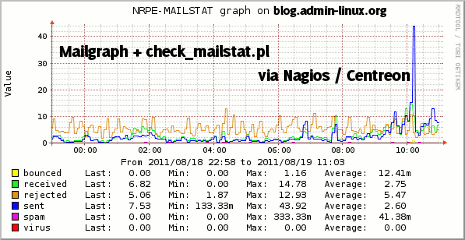
 

Voici une procédure permettant de contrôler l’activité d’un serveur de messagerie postfix via Nagios / Centreon.

Pour cela nous allons utiliser le plugins check_mailstat.pl avec une petite adaptation du script afin de le rendre compatible avec la génération de graphe sous Centreon.

Le plugin check_mailstat.pl va récupérer depuis des données depuis mailgraph qui permet de générer des graphes via RRDTool

Tout d’abord, il faut installer Mailgraph sur l’hôte à superviser, ici une Debian.

Installation de Mailgraph

aptitude install mailgraph

Si l’installation ne vous a pas poser les questions propres au paramétrage, lancer :

dpkg-reconfigure mailgraph

Voici les questions et réponse à fournir :

Mailgraph doit-il être lancé au démarrage ? OUI

Fichier de journalisation à utiliser par mailgraph : /var/log/mail.log (à adapter)

Faut-il compter les courriels entrants comme des courriels sortants ? NON (J’utilise Amavis, donc j’ai choisi cette option, encore une fois à adapter.

Lire la suite…
Howto: Performance Benchmarks a Webserver

27/03/2021 Comments off

source: nixCraft

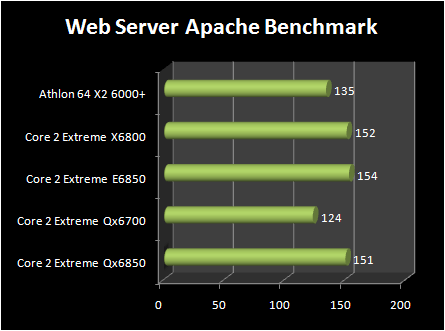
You can benchmark Apache, IIS and other web server with apache benchmarking tool called ab. Recently I was asked to performance benchmarks for different web servers.

Apache benchmark

Apache benchmark

It is true that benchmarking a web server is not an easy task. From how to benchmark a web server:

First, benchmarking a web server is not an easy thing. To benchmark a web server the time it will take to give a page is not important: you don’t care if a user can have his page in 0.1 ms or in 0.05 ms as nobody can have such delays on the Internet.

What is important is the average time it will take when you have a maximum number of users on your site simultaneously. Another important thing is how much more time it will take when there are 2 times more users: a server that take 2 times more for 2 times more users is better than another that take 4 times more for the same amount of users. »

Here are few tips to carry out procedure along with an example:

Apache Benchmark Procedures

  • You need to use same hardware configuration and kernel (OS) for all tests
  • You need to use same network configuration. For example, use 100Mbps port for all tests
  • First record server load using top or uptime command
  • Take at least 3-5 readings and use the best result
  • After each test reboot the server and carry out test on next configuration (web server)
  • Again record server load using top or uptime command
  • Carry on test using static html/php files and dynamic pages
  • It also important to carry out test using the Non-KeepAlive and KeepAlive (the Keep-Alive extension to provide long-lived HTTP sessions, which allow multiple requests to be sent over the same TCP connection) features
  • Also don’t forget to carry out test using fast-cgi and/or perl tests

Lire la suite…

Howto: Geolocation for Fail2ban

14/03/2021 Comments off

source: fail2ban.org


Using geolocation to locate your attackers.

I use fail2ban on my servers to protect them from would-be attackers, if you don’t your either insanely nieve to the fact that somebody wants in your system, or your just wanting to see if you can get hacked. Most of the attackers I would assume are just after another « bot » in their « net », or maybe a place to host files.

Durzo hosts a script that allows you to log the attacks on you into a mysql database with geocoding, I thought this would be cool to use as I could see from where I was being attacked. I then got this working and another script to display the table in a web page so I could view the data easily.

I then found some scripts from Google to pull data from MySQL in a geolocation table and generate an XML file used to import into Google Maps. With some tweaking and customizing, I now have a map with the geolocation data as markers on the map. Not all the markers are right on a building, but they are close enough for me to see the areas from which attacks are coming.

Now on to the good stuff… Lire la suite…

Apache Web Server Hardening & Security Guide

02/01/2021 Comments off

apache security best practicesSecure Apache Web Server – Practical Guide

1       Introduction

The Web Server is a crucial part of web-based applications. Apache Web Server is often placed at the edge of the network hence it becomes one of the most vulnerable services to attack. Having default configuration supply many sensitive information which may help hacker to prepare for an attack the web server.

The majority of web application attacks are through XSS, Info Leakage, Session Management and PHP Injection attacks which is due to weak programming code and failure to sanitize web application infrastructure. According to the security vendor Cenzic, 96% of tested applications have vulnerabilities. Below chart from Cenzic shows the vulnerability trend report of 2013.

This practical guide provides you the necessary skill set to secure Apache Web Server.  In this course, we will talk about how to Harden & Secure Apache Web Server on Unix platform. Following are tested on Apache 2.4.x and I don’t see any reason it won’t work with Apache 2.2.x.

  1. This assumes you have installed Apache on UNIX platform. If not, you can go through Installation guide. You can also refer very free video about how to Install Apache, MySQL & PHP.
  2. We will call Apache installation directory /opt/apache as $Web_Server throughout this course.
  3. You are advised to take a backup of existing configuration file before any modification.

1.1  Audience

This is designed for Middleware Administrator, Application Support, System Analyst, or anyone working or eager to learn Hardening & Security guidelines. Fair knowledge of Apache Web Server & UNIX command is mandatory. This is seven page guide, click on Next to proceed. You may navigate through table of contents at right hand side.


BONUS (Download in PDF Format): Apache HTTP Security & Hardening Guide

Lire la suite…