Force iptables to log messages to a different log file
Source: nixCraft
According to man page:
Iptables is used to set up, maintain, and inspect the tables of IP packet filter rules in the Linux kernel. Several different tables may be defined. Each table contains a number of built-in chains and may also contain user defined chains.
Iptables default log file
For example, if you type the following command, it will display current iptables log from /var/log/messages file:
# tail -f /var/log/messages
Output:
Oct  4 00:44:28 debian gconfd (vivek-4435): Resolved address "xml:readonly:/etc/gconf/gconf.xml.defaults" to a read-only configuration source at position 2
Oct  4 01:14:19 debian kernel: IN=ra0 OUT= MAC=00:17:9a:0a:f6:44:00:08:5c:00:00:01:08:00 SRC=200.142.84.36 DST=192.168.1.2 LEN=60 TOS=0x00 PREC=0x00 TTL=51 ID=18374 DF PROTO=TCP SPT=46040 DPT=22 WINDOW=5840 RES=0x00 SYN URGP=0
Oct  4 00:13:55 debian kernel: IN=ra0 OUT= MAC=ff:ff:ff:ff:ff:ff:00:18:de:55:0a:56:08:00 SRC=192.168.1.30 DST=192.168.1.255LEN=78 TOS=0x00 PREC=0x00 TTL=128 ID=13461 PROTO=UDP SPT=137 DPT=137 LEN=58
Procedure to log the iptables messages to a different log file
Open your /etc/syslog.conf file:
# vi /etc/syslog.conf
Append following line
kern.warning /var/log/iptables.log
Save and close the file.
Restart the syslogd (Debian / Ubuntu Linux):
# /etc/init.d/sysklogd restart
On the other hand, use following command to restart syslogd under Red Hat/Cent OS/Fedora Core Linux:
# /etc/init.d/syslog restart
Now make sure you pass the log-level 4 option with log-prefix to iptables. For example:
# DROP everything and Log it
iptables -A INPUT -j LOG --log-level 4
iptables -A INPUT -j DROP
For example, drop and log all connections from IP address 64.55.11.2 to your /var/log/iptables.log file:
iptables -A INPUT -s 64.55.11.2 -m limit --limit 5/m --limit-burst 7 -j LOG --log-prefix '** HACKERS **'--log-level 4
iptables -A INPUT -s 64.55.11.2 -j DROP
Where,
- –log-level 4: Level of logging. The level # 4 is for warning.
- –log-prefix ‘*** TEXT ***’: Prefix log messages with the specified prefix (TEXT); up to 29 letters long, and useful for distinguishing messages in the logs.
You can now see all iptables message logged to /var/log/iptables.log file:
# tail -f /var/log/iptables.log
 icmp check: 2 packets per 10 seconds – rcheck
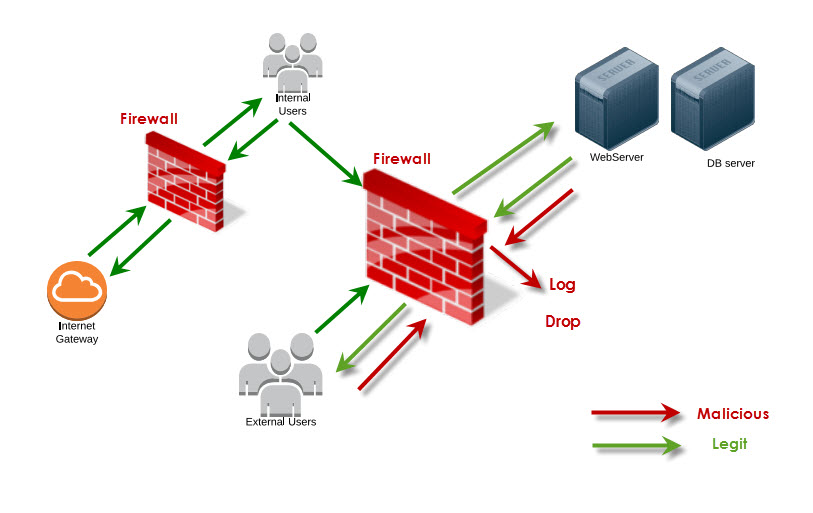
 Since computers are connected to each other, services are growing fast. Email, Social Media, Online Shop, Chat until Web Conferencing are services that used by user. But on the other side this connectivity just likes a double-side knife. It’s also possible to send bad messages to those computers like Virus, malware, trojan-apps are one of them.