Archive

Archives pour 04/2024

Unexpected DDOS: Blocking China with ipset and iptables

18/04/2024 Comments off

When the Great Firewall of China starts hosing your server with unexpected and unrelated traffic, how do you deal with it?

Discovering a problem
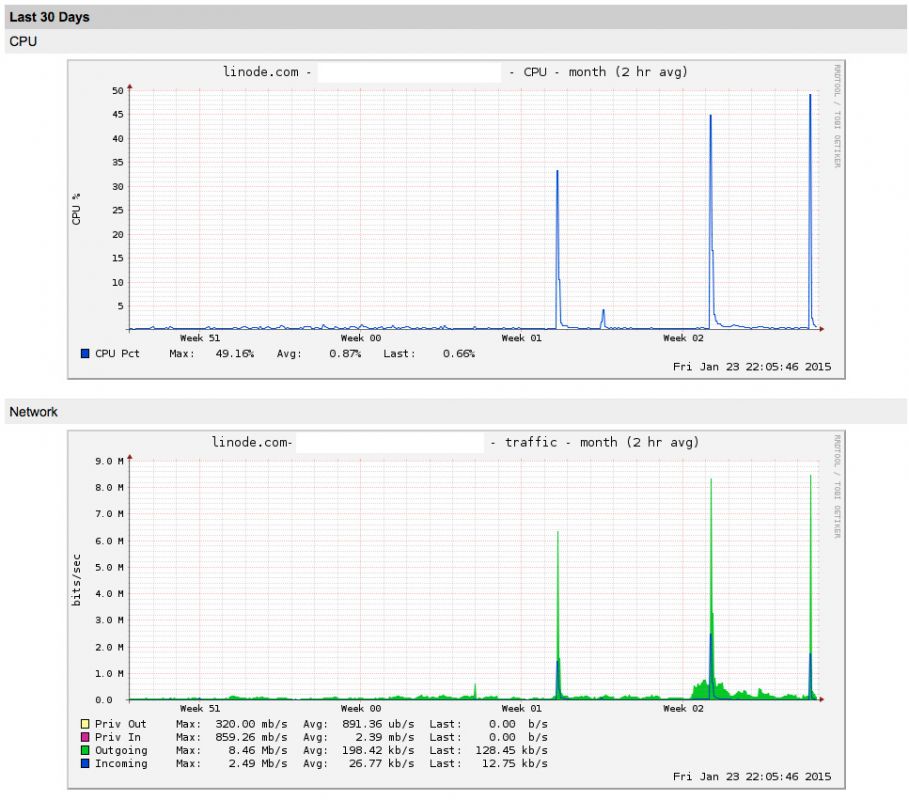
Three times in the last week I’ve had email reports from my Linode’s automatic warning system, informing me that the server had exceeded an average 8Mb/s output for a two hour period. Each time I logged on the traffic had gone right back down, and my website analytics never showed unusual traffic. By the third occurrence I wanted to get to the bottom of it, and I already had suspicions.

Those spikes are not normal.

Earlier in the day I’d stumbled across Craig Hockenberry’s post Fear China, where he was seeing a similar (but larger) problem over a longer period than I was. I looked into my access logs… and discovered I did indeed have the same problem, though it looks like I caught it earlier., or it was less severe.

Being DDOS’d via the Great Firewall of China

Distributed Denial of Service attacks flood a server with pointless requests from many computers all at once.

My logs showed requests for services and URLs that had nothing to do with my server, including an awful lot of BitTorrent URLs. Checking the geolocation of the requesting IPs showed they were all inside China. As Craig’s post covered – it looks a lot like there’s a mis-configuration with China’s state controlled firewall, and people’s normal traffic is sometimes being sent to entirely the wrong servers.

I wondered how bad my server was getting hit, as it didn’t seem to be in the same league as Craig’s:
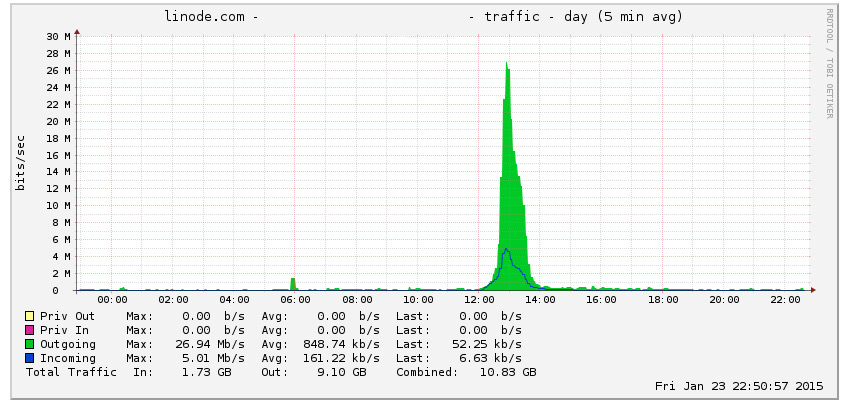


Almost 27Mb/s out is roughly 95 times greater than normal for that server – close to two orders of magnitude increase, and I didn’t like that – I could imagine this getting worse rapidly.


Blocking China

As Craig discusses, there’s really no option but to block everyone from China. Unfortunately for me, I wasn’t using ipfw as a firewall so I couldn’t follow his advice. Having finally figured out how to do this I thought I’d write a step-by-step guide assuming you’ve not got a firewall already set up.

Block WordPress xmlprc.php DDOS attacks using Fail2Ban

17/04/2024 Comments off

Few days ago, my friend’s WordPress website went down. After investigation, I have figured out that it was receiving massive amount of posts requests to the xmlrpc.php file, which brings the apache and mysql to eat up all the system resources and the website crashed. Fortunately, I have figured out the way to mitigate this attack using Fail2Ban, which I’ll share in this post.

Install the Fail2Ban package using the following command:

apt-get install fail2ban iptables

1Make a local copy of jail.conf file for configuration change:

cp /etc/fail2ban/jail.conf /etc/fail2ban/jail.local

2

Lire la suite…

Linux Iptables Block Outgoing Access To Selected or Specific IP Address / Port

17/04/2024 Comments off

You would like to block outgoing access to particular remote host/ip or port for all or selected service/port. In this quick tutorial I will explain how to use iptables to block outgoing access.

Block Access To Outgoing IP Address

The following rule will block ip address 202.54.1.22 from making any outgoing connection:

iptables -A OUTPUT -d 202.54.1.22 -j DROP

The above will block chat server ip address or site having dangerous contains such as viruses or malware.

Block Access To Outgoing IP TCP / UDP Port Number

To block specific port number such tcp port # 5050, enter:
iptables -A OUTPUT -p tcp --dport 5050 -j DROP

To block tcp port # 5050 for an IP address 192.168.1.2 only, enter:
iptables -A OUTPUT -p tcp -d 192.168.1.2 --dport 5050 -j DROP

Finally, you need to save your firewall rules. Under CentOS / RHEL / Fedora Linux, enter:
# /sbin/service iptables save
OR
# /etc/init.d/iptables save

Categories: Réseau, Sécurité Tags: ,

Postrouting and IP Masquerading in Linux

16/04/2024 Comments off

postrouting masqueradingIPTables is responsible to handle packet filtering in Linux system. IPTables contains several predefined and/or user-defined tables. Each table contains chains and chain contain packet rules. IPTables uses NAT table to forward packets to another node.

What is POSTROUTING?

A Postrouting chain in NAT table means altering the IP packet after the routing is completed. Logically, a postrouting can be used to change the Source Address. As the routing is completed and destination has his own address, the only unknown address that can be masked is the Source. This is why postrouting is used for SNAT.

What is IP MASQUERADING?

Now, when a packet leaves the local network and tries to travel the public network, it will fail to traverse if it keeps using the local details. This is where IP Masquerading plays the role. IP Masquerading is masking the packet with identity of the external interface.

How POSTROUTING and MASQUERADING relates?

When a packet arrives to the local gateway that has external interface, masks the packet with IP Masquerading and send it through the public interface. That says, packet has to be routed first before mangling it for Masquerading. That is why, you need to apply the Masquerading target on the Postrouting chain of the NAT table.

How to setup Masquerading in Linux Firewall?

The following command will enable IP Masquerading in Linux Firewall:

$ iptables -t nat -A POSTROUTING -o eth0 -j MASQUERADE

The above rule will use NAT table (-t nat) on built-in Postrouting Chain (-A POSTROUTING) on interface eth0 (-o eth0).

The target Masquerade (-j MASQUERADE) advises to mask the above matched IP packets from the related table to external interface of the system.

Thus the above, would allow the local networks to gain access to external network through IP Masquerading.


Source: Mellowhost

compgen: An Awesome Command To List All Linux Commands

16/04/2024 Comments off

Source: nixCraft

Ever want to list all the Linux commands (including bash shell aliases and functions) you could run on the server / workstation? Look now further. Try compgen command.

compgen is bash built-in command and it will show all available commands, aliases, and functions for you. The syntax is:

compgen option

compgen command examples

To list all the commands available to you, enter:

 
compgen -c

Sample outputs:

ls
if
then
else
elif
fi
....
mahjongg
sol
gtali
sl-h
gnobots2
gnotravex
iagno
fortune
gnect
gnome-sudoku
LS
glchess
gnuchess
gnuchessx

You can search or count the commands:

compgen -c | grep find
compgen -c | wc -l
echo "$USER user can run $(compgen -c | wc -l) commands on $HOSTNAME."

Lire la suite…

Categories: Système Tags: ,