Detect Webcam & Microphone Activity on Mac with Oversight
Source: osxdaily.com
Though Mac users don’t usually have to worry excessively about “camfecting” malware and spyware, some security conscious users may find it nice to know if a process or application is attempting to access their computers web camera or microphone.
With the help of a free third party security utility called Oversight, you can have your Mac alert you anytime an application or process tries to activate either recording device on the computer.
The developer of Oversight explains why a tool like Oversight could be valuable to some users:
“One of the most insidious actions of malware, is abusing the audio and video capabilities of an infected host to record an unknowing user. Macs, of course, are not immune; malware such as OSX/Eleanor, OSX/Crisis, OSX/Mokes, and others, all attempt to spy on OS X users. OverSight constantly monitors a system, alerting a user whenever the internal microphone is activated, or the built-in webcam is accessed. And yes, while the webcam’s LED will turn on whenever a session is initially started, new research has shown that malware can surreptitious piggyback into such existing sessions (FaceTime, Sykpe, Google Hangouts, etc.) and record both audio and video – without fear of detection.”
Sound good? If so, it’s a free download that is easy to install on a Mac with either macOS or Mac OS X:
If you’re interested in this app, simply download Oversight and run the installer (it can be just as easily uninstalled later if you decide you do not need it).
Once installed, Oversight is small and lightweight running quietly in the background, and it will alert you anytime the Mac microphone or webcam FaceTime camera are attempting to be activated. You can then directly intervene and either allow the webcam or microphone access (for legitimate use), or deny it (for theoretical illegitimate use).
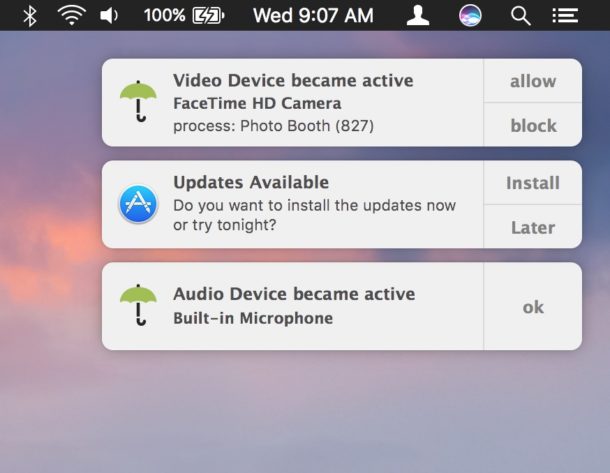
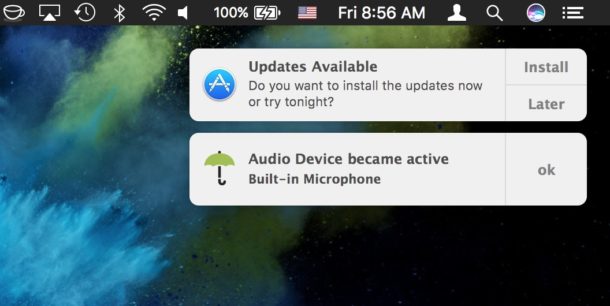
Keep in mind that Oversight does not differentiate between legitimate and illegitimate use of the webcam and microphone on your Mac, that is up to you. For example, you will get a notification alert that the microphone and FaceTime camera are trying to be accessed when you open an app like Skype, Photo Booth, FaceTime, or are recording a video on your Mac with the webcam, but since those applications legitimately use the computers microphone and camera they are probably nothing to be concerned about (assuming you have launched them yourself anyway). On the other hand, if out of the blue and with no provocation if you see a process has attempted to access your microphone, that could potentially be an unauthorized attempt to use the microphone and you could choose to reject it and block the device access with Oversight. Whenever possible, Oversight will attempt to notify you of the process name and PID, but sometimes you will see blank notifications of access anyway – again just think about what apps you are using and if they have any reason to use your camera or microphone, similar to how you can control this type of access in iOS for Photos, camera, and microphone.
This is a software solution which is quite a bit more fancy than the low-tech solution of putting tape on your web camera like the FBI Director does and many security professionals do. You could always use Oversight along with some tape too if you’re extra concerned about your Mac webcam or microphone access and want to be sure nothing fishy is going on from camfecting or otherwise.
While apps like Oversight could be considered overboard and unnecessary for many Mac users, others who are privacy conscious or in fields where higher security matters may find them to be helpful. I’ve personally noticed a particular web browser will occasionally attempt to access the microphone on my Mac from time to time without an obvious reason which I find to be… curious… and Oversight notified me each time. It’s not for everyone, but if you want to be notified when something is trying to use your Mac camera or microphone, check out the app yourself.