A Deep Dive into Iptables and Netfilter Architecture
Introduction
Firewalls are an important tool that can be configured to protect your servers and infrastructure. In the Linux ecosystem, iptables is a widely used firewall tool that interfaces with the kernel’s netfilter packet filtering framework. For users and administrators who don’t understand the architecture of these systems, creating reliable firewall policies can be daunting, not only due to challenging syntax, but also because of number of interrelated parts present in the framework.
In this guide, we will dive into the iptables architecture with the aim of making it more comprehensible for users who need to build their own firewall policies. We will discuss how iptables interacts with netfilter and how the various components fit together to provide a comprehensive filtering and mangling system.
What Are IPTables and Netfilter?
The basic firewall software most commonly used in Linux is called iptables. The iptables firewall works by interacting with the packet filtering hooks in the Linux kernel’s networking stack. These kernel hooks are known as the netfilter framework.
Every packet that enters networking system (incoming or outgoing) will trigger these hooks as it progresses through the stack, allowing programs that register with these hooks to interact with the traffic at key points. The kernel modules associated with iptables register at these hooks in order to ensure that the traffic conforms to the conditions laid out by the firewall rules.
Netfilter Hooks
There are five netfilter hooks that programs can register with. As packets progress through the stack, they will trigger the kernel modules that have registered with these hooks. The hooks that a packet will trigger depends on whether the packet is incoming or outgoing, the packet’s destination, and whether the packet was dropped or rejected at a previous point.
The following hooks represent various well-defined points in the networking stack:
NF_IP_PRE_ROUTING: This hook will be triggered by any incoming traffic very soon after entering the network stack. This hook is processed before any routing decisions have been made regarding where to send the packet.NF_IP_LOCAL_IN: This hook is triggered after an incoming packet has been routed if the packet is destined for the local system.NF_IP_FORWARD: This hook is triggered after an incoming packet has been routed if the packet is to be forwarded to another host.NF_IP_LOCAL_OUT: This hook is triggered by any locally created outbound traffic as soon it hits the network stack.NF_IP_POST_ROUTING: This hook is triggered by any outgoing or forwarded traffic after routing has taken place and just before being put out on the wire.
Kernel modules that wish to register at these hooks must provide a priority number to help determine the order in which they will be called when the hook is triggered. This provides the means for multiple modules (or multiple instances of the same module) to be connected to each of the hooks with deterministic ordering. Each module will be called in turn and will return a decision to the netfilter framework after processing that indicates what should be done with the packet.
IPTables Tables and Chains
The iptables firewall uses tables to organize its rules. These tables classify rules according to the type of decisions they are used to make. For instance, if a rule deals with network address translation, it will be put into the nat table. If the rule is used to decide whether to allow the packet to continue to its destination, it would probably be added to the filter table.
Within each iptables table, rules are further organized within separate « chains ». While tables are defined by the general aim of the rules they hold, the built-in chains represent the netfilter hooks which trigger them. Chains basically determine when rules will be evaluated.
As you can see, the names of the built-in chains mirror the names of the netfilter hooks they are associated with:
PREROUTING: Triggered by theNF_IP_PRE_ROUTINGhook.INPUT: Triggered by theNF_IP_LOCAL_INhook.FORWARD: Triggered by theNF_IP_FORWARDhook.OUTPUT: Triggered by theNF_IP_LOCAL_OUThook.POSTROUTING: Triggered by theNF_IP_POST_ROUTINGhook.
Chains allow the administrator to control where in a packet’s delivery path a rule will be evaluated. Since each table has multiple chains, a table’s influence can be exerted at multiple points in processing. Because certain types of decisions only make sense at certain points in the network stack, every table will not have a chain registered with each kernel hook.
There are only five netfilter kernel hooks, so chains from multiple tables are registered at each of the hooks. For instance, three tables have PREROUTING chains. When these chains register at the associated NF_IP_PRE_ROUTING hook, they specify a priority that dictates what order each table’s PREROUTING chain is called. Each of the rules inside the highest priority PREROUTING chain is evaluated sequentially before moving onto the next PREROUTING chain. We will take a look at the specific order of each chain in a moment.
Lire la suite…
.png?1452541820 "nginx lets encrypt ubuntu") Let’s Encrypt is a new Certificate Authority (CA) that provides an easy way to obtain and install free TLS/SSL certificates, thereby enabling encrypted HTTPS on web servers. It simplifies the process by providing a software client,
Let’s Encrypt is a new Certificate Authority (CA) that provides an easy way to obtain and install free TLS/SSL certificates, thereby enabling encrypted HTTPS on web servers. It simplifies the process by providing a software client, 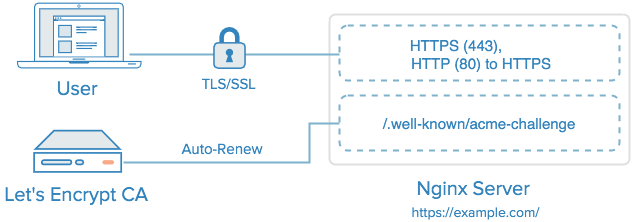
 The
The 
