Archive

Articles taggués ‘securite’

How to Restrict IP Addresses from Accessing your Web Server using .htaccess

30/09/2026 Comments off

If you are running the Apache Web Server or your web hosting provider running Apache based web server, you can use .htaccess configuration file to restrict access to your website. This could be a very important issue from security stand point of view especially if your server is being attacked or hacked from any specific or range of IP addresses.

Now, restricting access method works in two ways. First, you can restrict access to certain IP addresses and allow others. Second, you can restrict access to everyone but few IP addresses only. On this post, I will focus on both method and will try to explain as much as I can.

Restrict Certain IP Addresses

If you want to restrict specific IP addresses from accessing your site, you can use the following lines on your .htaccess file.

order deny,allow
deny from 123.4.5.6
deny from 654.3.2.1
allow from all

These lines above will block “123.4.5.6” and “654.3.2.1” IP addresses from accessing your site. You can add as many IP addresses as you want on this “deny from” list. One interesting fact is, Apache web server gives you lot more flexibility in terms of blocking IP addresses. Take a look at the following lines.

order deny,allow
deny from 123.4.5.
allow from all

If you observe it carefully, you will see that the fourth set of digit is missing on this IP address. It means, if any IP address that matches the first three set of digits will be blocked. So basically anyone with IP address like “123.4.5.1” or “123.4.5.244” won’t be able to access your site as in both IP address matches with the first three (123.4.5.) sets of digits blocked by the Apache web server.

Allow Specific IP Addresses

Think of about a site that you built for a very specific purpose and for very few people, where you do not want everyone to show up. Apache allows you to do that as well.

For an example, lets assume that you built a site that you want one of your friend to be able to access and his IP address is “123.4.5.12”. Simply write the following line on your .htaccess file and you are good to go.

order allow,deny
allow from 123.4.5.12
deny from all

In this case Apache will block all IP addresses except your friends IP address. This is as simple as it can get and I hope you got the basic idea.

Note: On all of my example I used either “allow from all” or “deny from all” at the bottom, this is very important. You must declare either one of these line based on your requirement or things might get little more complicated.

Also remember that all blocked IP addresses would be forwarded or shown an “403 Forbidden” error message. You can definitely customize this message as well but that’s something I will talk about in another post.

Source: iftekhar.net
Categories: Logiciel Tags: , , ,

A Tutorial for Controlling Network Traffic with iptables

28/09/2026 Comments off

Source: Akamai

iptables is an application that allows users to configure specific rules that will be enforced by the kernel’s netfilter framework. It acts as a packet filter and firewall that examines and directs traffic based on port, protocol and other criteria. This guide will focus on the configuration and application of iptables rulesets and will provide examples of ways they are commonly used.

By default, the iptables tool is included with your Linode-supplied distribution. In order to use iptables, you will need root (sudo) privileges.

Use Linux iptables to Manage IPv4 Traffic

The iptables Command

Many options can be used with the iptables command. As stated above, iptables sets the rules that control network traffic. You can define different tables to handle these rules through chains, lists of rules that match a subset of packets. The table contains a variety of built-in chains, but you can add your own.

Basic iptables Parameters and Syntax

Before we begin creating rules, let’s review the syntax of an iptables rule.

For example, the following command adds a rule to the beginning of the chain that will drop all packets from the address 198.51.100.0:

iptables -I INPUT -s 198.51.100.0 -j DROP

The sample command above:

  1. Calls the iptables program
  2. Uses the -I option for insertion. Using a rule with the insertion option will add it to the beginning of a chain and will be applied first. To indicate a specific placement in the chain, you may also use a number with the -I option.
  3. The -s parameter, along with the IP address (198.51.100.0), indicates the source.
  4. Finally, the -j parameter stands for jump. It specifies the target of the rule and what action will be performed if the packet is a match.
Parameter Description
-p, --protocol The protocol, such as TCP, UDP, etc.
-s, --source Can be an address, network name, hostname, etc.
-d, --destination An address, hostname, network name, etc.
-j, --jump Specifies the target of the rule; i.e. what to do if the packet matches.
-g, --goto chain Specifies that the processing will continue in a user-specified chain.
-i, --in-interface Names the interface from where packets are received.
-o, --out-interface Name of the interface by which a packet is being sent.
-f, --fragment The rule will only be applied to the second and subsequent fragments of fragmented packets.
-c, --set-counters Enables the admin to initialize the packet and byte counters of a rule.

Lire la suite…

How to secure SSH login with one-time passwords on Linux

26/09/2026 Comments off

As someone says, security is a not a product, but a process. While SSH protocol itself is cryptographically secure by design, someone can wreak havoc on your SSH service if it is not administered properly, be it weak passwords, compromised keys or outdated SSH client.

As far as SSH authentication is concerned, public key authentication is in general considered more secure than password authentication. However, key authentication is actually not desirable or even less secure if you are logging in from a public or shared computer, where things like stealth keylogger or memory scraper can always a possibility. If you cannot trust the local computer, it is better to use something else. This is when « one-time passwords » come in handy. As the name implies, each one-time password is for single-use only. Such disposable passwords can be safely used in untrusted environments as they cannot be re-used even when they are stolen.

One way to generate disposable passwords is via Google Authenticator. In this tutorial, I am going to demonstrate another way to create one-time passwords for SSH login: OTPW, a one-time password login package. Unlike Google Authenticator, you do not rely on any third party for one-time password generation and verification.

What is OTPW?

OTPW consists of one-time password generator and PAM-integrated verification routines. In OTPW, one-time passwords are generated apriori with the generator, and carried by a user securely (e.g., printed in a paper sheet). Cryptographic hash of the generated passwords are then stored in the SSH server host. When a user logs in with a one-time password, OTPW’s PAM module verifies the password, and invalidates it to prevent re-use.

Step One: Install and Configure OTPW on Linux

Debian, Ubuntu or Linux Mint:

Install OTPW packages with apt–get.

$ sudo apt-get install libpam-otpw otpw-bin

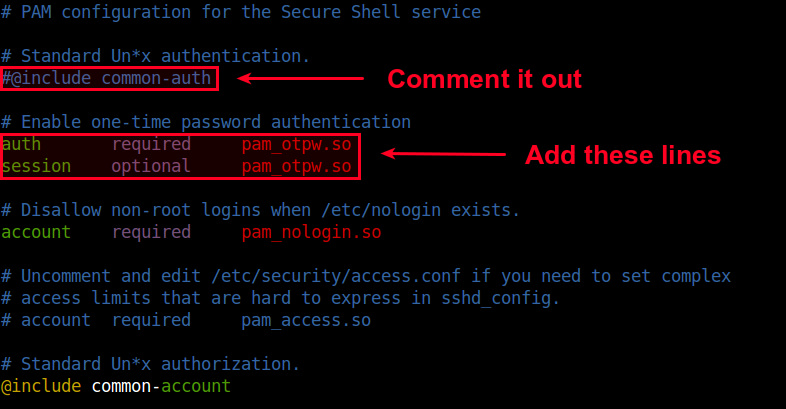
Open a PAM configuration file for SSH (/etc/pam.d/sshd) with a text editor, and comment out the following line (to disable password authentication).

#@include common-auth

and add the following two lines (to enable one-time password authentication):

auth       required     pam_otpw.so
session    optional     pam_otpw.so

16775121360_d1f93feefa_b

Fedora or CentOS/RHEL:

OTPW is not available as a prebuilt package on Red Hat based systems. So let’s install OTPW by building it from the source.

First, install prerequites:

$ sudo yum git gcc pam-devel
$ git clone https://www.cl.cam.ac.uk/~mgk25/git/otpw
$ cd otpw

Open Makefile with a text editor, and edit a line that starts with « PAMLIB= » as follows.

On 64-bit system:

PAMLIB=/usr/lib64/security

On 32-bit system:

PAMLIB=/usr/lib/security

Compile and install it. Note that installation will automatically restart an SSH server. So be ready to be disconnected if you are on an SSH connection.

$ make
$ sudo make install

Now you need to update SELinux policy since /usr/sbin/sshd tries to write to user’s home directory, which is not allowed by default SELinux policy. The following commands will do. If you are not using SELinux, skip this step.

$ sudo grep sshd /var/log/audit/audit.log | audit2allow -M mypol
$ sudo semodule -i mypol.pp

Next, open a PAM configuration file for SSH (/etc/pam.d/sshd) with a text editor, and comment out the following line (to disable password authentication).

#auth       substack     password-auth

and add the following two lines (to enable one-time password authentication):

auth       required     pam_otpw.so
session    optional     pam_otpw.so

Lire la suite…

Comment configurer IPTables sur un serveur Linux

25/09/2026 Comments off

Source: youstable

Pour configurer IPTables sur un serveur Linux, définissez des politiques par défaut, autorisez le trafic essentiel (SSHAutorisez les connexions HTTP/HTTPS, puis bloquez toutes les autres. Enregistrez et conservez ces règles avec iptables-save ou iptables-persistent (Debian/Ubuntu) ou iptables-services (RHEL/Alma/Rocky). Testez depuis une seconde session pour éviter les blocages et consultez les journaux d’erreurs pour faciliter le dépannage.

Configurer IPTables sur un serveur Linux est une compétence essentielle pour un hébergement sécurisé en 2026. Ce guide vous accompagne pas à pas : fonctionnement d’IPTables, configuration sécurisée, règles courantes, NAT/redirection de ports, persistance des paramètres après redémarrage et dépannage. Que vous utilisiez un VPS, un serveur dédié ou une instance cloud, vous découvrirez une méthode de configuration de pare-feu adaptée à la production.

Qu’est-ce qu’IPTables et comment ça fonctionne ?

IPTables est le pare-feu espace utilisateur Linux qui interagit avec Netfilter au niveau du noyau. Il analyse les paquets à l’aide de tables (filtrage, NAT, masquage) et de chaînes (entrée, sortie, transfert, préroutage, postroutage) en appliquant des règles qui correspondent à des critères et déterminent les actions à entreprendre (accepter, bloquer, rejeter). En 2026, de nombreuses distributions Linux utilisaient nftables en interne, mais la compatibilité avec iptables-nft restait largement disponible.

Aperçu rapide : Flux de règles de bonnes pratiques

  • Définir les politiques par défaut sur DROP.
  • Autoriser le trafic de bouclage et le trafic établi/connexe.
  • Autoriser SSH (avec des limites de débit) et les ports de service requis (par exemple, 80/443).
  • Autoriser éventuellement le protocole ICMP (ping) avec des limites.
  • Augmentez la fréquence des chutes de journalisation à un rythme raisonnable pour une meilleure visibilité.
  • Respectez les règles et testez-les minutieusement.

Prérequis et liste de vérification de sécurité

  • Accès root ou sudo sur votre serveur Linux.
  • Deux sessions sont ouvertes (par exemple, SSH + console) pour éviter le verrouillage.
  • IP de votre managemachine à ment (à mettre sur liste blanche si nécessaire).
  • Disponibilité des forfaits :
    • Debian/Ubuntu : iptables, iptables-persistent ou netfilter-persistent
    • RHEL/Alma/Rocky : iptables, iptables-services (optionnel), firewalld (si vous préférez un outil de plus haut niveau)
  • Sachez si vous utilisez iptables-legacy ou iptables-nft :
    • Debian/Ubuntu : update-alternatives –config iptables
    • RHEL 8/9 : iptables est par défaut une surcouche de nftables ; les commandes fonctionnent toujours sauf si vous supprimez la compatibilité.

Lire la suite…

Categories: Réseau, Sécurité Tags: , ,

iptables Tutorial: A Beginner’s Guide to the Linux Firewall

25/09/2026 Comments off

Source: phoenixnap

All modern operating systems include a firewall, an application that regulates network traffic to and from a computer. Firewalls use rules to control incoming and outgoing traffic, creating a network security layer.

iptables is the primary firewall utility program developed for Linux systems. The program enables system administrators to define rules and policies for filtering network traffic.

In this tutorial, learn how to install, configure, and use iptables in Linux.

Introduction to a guide on how to secure your Linux system with iptables.

Prerequisites

  • A Linux system.
  • A user account with sudo privileges.
  • Access to a terminal window/command line.

What Is iptables?

iptables is a command-line utility for configuring the built-in Linux kernel firewall. It enables administrators to define chained rules that control incoming and outgoing network traffic.

The rules provide a robust security mechanism that defines which network packets can pass through and which should be blocked. iptables protects Linux systems from data breaches, unauthorized access, and other network security threats.

Administrators use iptables to enforce network security policies and protect a Linux system from various network-based attacks. Lire la suite…