Fragmented IP packet forwarding

05/05/2024 Categories: Réseau, Sécurité Tags: , , , Comments off

About Fragmented IP packet forwarding.

I couldn’t really find a suitable topic for this post actually but I will try to find answers for the following questions:

  • How can we fragment an IP packet manually in scapy
  • How does a fragmented packet look like and how the transport layer (TCP/UDP) header is located
  • How do we forward fragmented packets, do we reassemle them?
  • If we don’t reassemble, can we force reassembly?

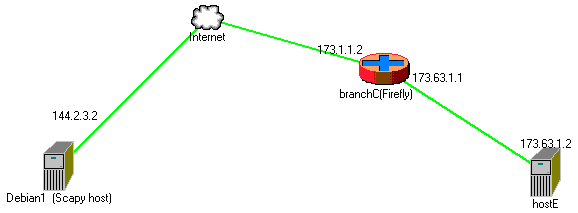
First of all a bit of a theory: if an incoming IP packet is to be forwarded to another next hop and the MTU of this new path is smaller than the packet to be transmitted, we must find a way to forward the packet. If the packet has DF (Don’t Fragment) bit on i.e we are instructed not to fragment the packet most probably by the source, then normally we are expected to send an ICMP packet with type “Fragmentation needed” and pray that on the way back to the source no devices block all ICMP type of traffic. Second scenario is that what if the source lets us fragment the packet. Then we need to fragment it and story from now on is about this part of the scenario and the topology we will use is something like below.

fragmented_packets


Scapy is a fantastic tool to generate your own packets. It is exremely flexible and in our example, we will perform the fragmentation of a packet via our script.

Lire la suite…

Categories: Réseau, Sécurité Tags: , , ,

IP Fragmentation Attack

05/05/2024 Categories: Réseau, Sécurité Tags: , , , , , Comments off

ip fragmentation attackIP fragmentation attacks are a common form of denial of service attack, in which the perpetrator overbears a network by exploiting datagram fragmentation mechanisms.

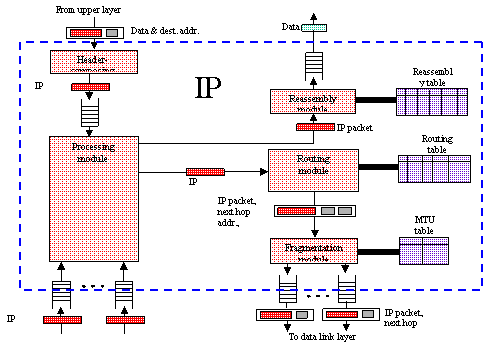
Understanding the attack starts with understanding the process of IP fragmentation, a communication procedure in which IP datagrams are broken down into small packets, transmitted across a network and then reassembled back into the original datagram.

Fragmentation is necessary for data transmission, as every network has a unique limit for the size of datagrams that it can process. This limit is known as the maximum transmission unit (MTU). If a datagram is being sent that is larger than the receiving server’s MTU, it has to be fragmented in order to be transmitted completely

ip-fragmentation
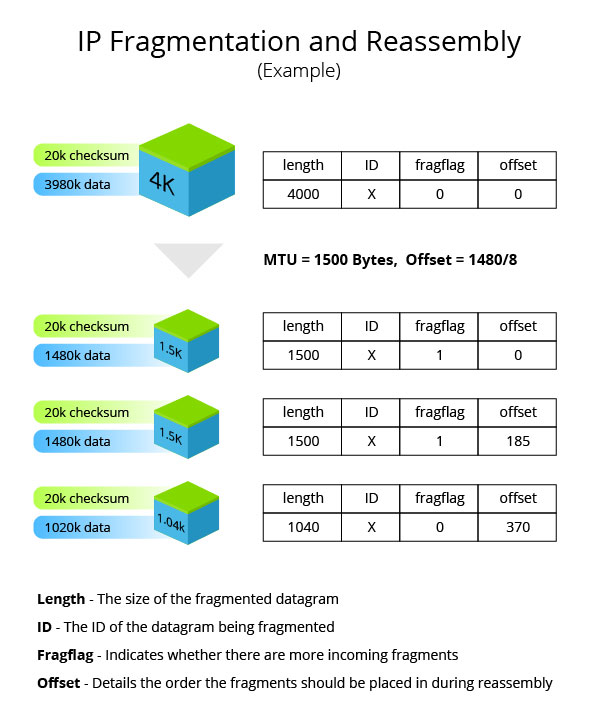
Example of how an IP datagram is fragmented and reassembled

The IP header in every datagram contains flags detailing whether fragmentation is allowed to take place. In cases where a « don’t fragment » flag is attached to the IP header, the packet is dropped and the server sends out a message saying that the ICMP datagram is too big to transmit. The offset explains to the recipient device the exact order the fragments should be placed in for reassembly.

Attack Types

IP fragmentation attacks can take several forms. While they all exploit the breakdown of datagrams in order to overbear the target networks, there are some notable differences in how different attack vectors are executed.

  • UDP and ICMP fragmentation attacks – These attacks involve the transmission of fraudulent UDP or ICMP packets that are larger than the network’s MTU, (usually ~1500 bytes). As these packets are fake, and are unable to be reassembled, the target server’s resources are quickly consumed, resulting in server unavailability.
  • TCP fragmentation attacks (a.k.a. Teardrop) – Also known as Teardrop attacks, these assaults target TCP/IP reassembly mechanisms, preventing them from putting together fragmented data packets. As a result, the data packets overlap and quickly overwhelm the victim’s servers, causing them to fail.Teardrop attacks are a result of an OS vulnerability common in older versions of Windows, including 3.1, 95 and NT. While patches were thought to have put a stop to these attacks, a vulnerability resurfaced in Windows 7 and Windows Vista, making Teardrop attacks once again a viable attack vector.The vulnerability was re-patched in the latest version of Windows, but operators should keep an eye out to ensure that it stays patched in all future versions.

Methods of Mitigation

IP fragmentation attacks are mitigated in several different ways, depending on the type and severity of the attack. Most mitigation methods ensure that malicious data packets never reach their target destinations. The most common one involves inspecting incoming packets for violations of fragmentation rules (e.g., using a router or a secured proxy).

At Incapsula, these inspections are augmented by dedicated DDoS protection hardware. On top of leveraging our on-edge position to observe fragmentation rules, Incapsula also employs blacklisting/whitelisting mechanisms that filter traffic based on factors such as IP reputation and rate patterns. Using these methods, our platform provides complete immunity from all types of IP fragmentation attacks.

Source: incapsula

Ubuntu Linux /etc/network/interfaces networking example

04/05/2024 Categories: Réseau, Système Tags: , Comments off

Source: nixCraft

Q. Can you explain how to setup network parameters such as IP address, subnet, dhcp etc using /etc/network/interfaces file?

A. /etc/network/interfaces file contains network interface configuration information for the both Ubuntu and Debian Linux. This is where you configure how your system is connected to the network.

Defining physical interfaces such as eth0

Lines beginning with the word « auto » are used to identify the physical interfaces to be brought up when ifup is run with the -a option. (This option is used by the system boot scripts.) Physical interface names should follow the word « auto » on the same line. There can be multiple « auto » stanzas. ifup brings the named inter faces up in the order listed. For example following example setup eth0 (first network interface card) with 192.168.1.5 IP address and gateway (router) to 192.168.1.254:

iface eth0 inet static
address 192.168.1.5
netmask 255.255.255.0
gateway 192.168.1.254

Setup interface to dhcp

To setup eth0 to dhcp, enter:
auto eth0
iface eth0 inet dhcp

Lire la suite…

Categories: Réseau, Système Tags: ,

How Do I Save Iptables Rules or Settings

04/05/2024 Categories: Réseau, Sécurité Tags: , Comments off

save iptables rulesI am using GUI tool to setup firewall rules for my home computer connected to ADSL (DSL/Cable) network. However, after reboot my rules are not saved. Is there any way I can save and load all firewall rules again?

You need to use the iptables-save command, which is used to dump the contents of an IP Table in easily parseable format to screen. Using I/O-redirection provided by your shell you can save iptables firewall rules to a file.

To restore iptables rules use the iptables-restore command. It is used to restore an IP Tables from data specified from file. Use I/O redirection provided by your shell to read from a file.

Examples: Saving and Restoring Iptables Rules

In this example, save current iptables firewall rules to a file called /root/dsl.fw, enter:
# iptables-save > /root/dsl.fw

To restore iptables rules, enter:
# iptables-restore < /root/dsl.fw

To restore rules automatically upon Linux system reboot add following command to your /etc/rc.local file, enter:
# vi /etc/rc.local

Append the line:
/sbin/iptables-restore < /root/dsl.fw

Save and close the file. Please note that under Red Hat enterprise Linux (RHEL) / CentOS / Fedora Linux you can use following commands to save and restore firewall rules. To Save the rules to /etc/sysconfig/iptables file:
# /etc/init.d/iptables save

To restore the rules from /etc/sysconfig/iptables file:
# /etc/init.d/iptables start

If you are using Debian / Ubuntu Linux open /etc/network/interfaces:
# vi /etc/network/interfaces

Append the line to eth0 section:
post-up iptables-restore
Close and save the file. Reboot the system.

Source: nixCraft

Categories: Réseau, Sécurité Tags: ,

How to Protect Yourself from NSA Attacks on 1024-bit DH

03/05/2024 Categories: Logiciel, Réseau Tags: , , , , , , , , , Comments off

nsa attacksWhen NSA gets you worrying

In a post on Wednesday, researchers Alex Halderman and Nadia Heninger presented compelling research suggesting that the NSA has developed the capability to decrypt a large number of HTTPS, SSH, and VPN connections using an attack on common implementations of the Diffie-Hellman key exchange algorithm with 1024-bit primes. Earlier in the year, they were part of a research group that published a study of the Logjam attack, which leveraged overlooked and outdated code to enforce « export-grade » (downgraded, 512-bit) parameters for Diffie-Hellman. By performing a cost analysis of the algorithm with stronger 1024-bit parameters and comparing that with what we know of the NSA « black budget » (and reading between the lines of several leaked documents about NSA interception capabilities) they concluded that it’s likely NSA has been breaking 1024-bit Diffie-Hellman for some time now.

The good news is, in the time since this research was originally published, the major browser vendors (IE, Chrome, and Firefox) have removed support for 512-bit Diffie-Hellman, addressing the biggest vulnerability. However, 1024-bit Diffie-Hellman remains supported for the forseeable future despite its vulnerability to NSA surveillance. In this post, we present some practical tips to protect yourself from the surveillance machine, whether you’re using a web browser, an SSH client, or VPN software.

Disclaimer: This is not a complete guide, and not all software is covered.

Web Browser

To make sure you’re using the strongest crypto, you have to look at the encryption algorithms (or cipher suites) that your browser supports. There’s an excellent tool, How’s My SSL?, that will test your browser’s cipher suite support. The relevant area of the page is the bottom, Given Cipher Suites. You want to make sure that you don’t see the text « _DHE_ » in the list of ciphersuites – although the Elliptic Curve variant of Diffie-Hellman, represented by suites with « _ECDHE_ » is okay. It is important to note that there is a trade-off here: removing your clients support for « _DHE_ » ciphers will eliminate the risk of this attack, but it may also remove Forward Secrecy support altogether for some sites. Here’s how to remove those « _DHE_ » cipher suites if you still have them:

Firefox

(tested with 40.0.3)

Open a new tab, enter « about:config » into the location bar and hit the « Enter » key. If you get a warning page, click « I’ll be careful, I promise! » This will bring you to the Firefox configuration settings. In the search bar up top, type « .dhe_ » and hit the « Enter » key. This should result in two settings being displayed: « security.ssl3.dhe_rsa_aes_128_sha » and « security.ssl3.dhe_rsa_aes_256_sha ». Double-click both of them to change the value from « true » to « false ».
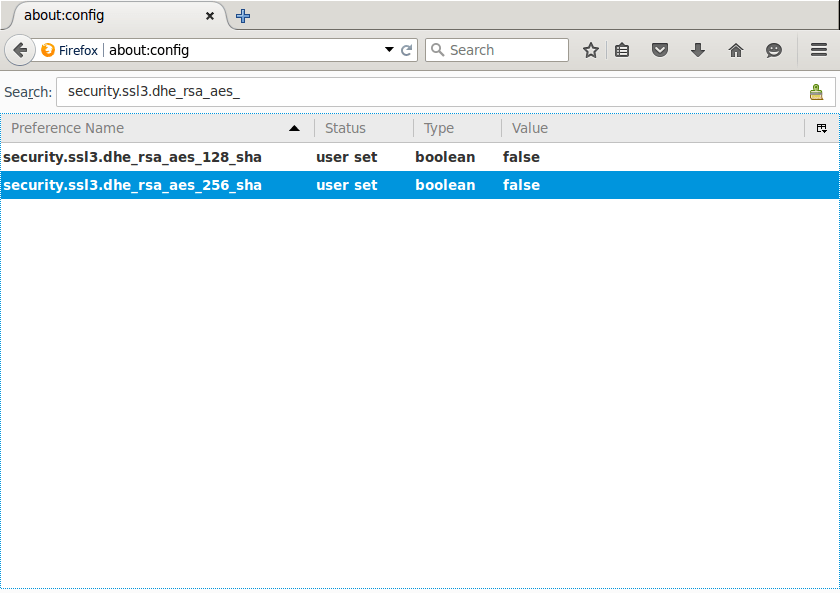
ff

Now, if you refresh the How’s My SSL page, the « _DHE_ » ciphersuites should be gone!

Lire la suite…