Archive

Articles taggués ‘MySQL’

Pure-FTPd et MySQL

30/09/2026 Comments off

Le logiciel pure-ftpd est l’un des serveurs FTP les plus simple à installer et configurer c’est pourquoi si vous cherchez à installer un serveur FTP rapidement sur votre serveur Linux, je ne peux que vous le recommander.
Aujourd’hui, nous allons voir comment utiliser pure-ftpd et MySQL simultanément pour permettre la séparation des tâches avec l’enregistrement des comptes utilisateurs dans la base de données et le reste du fonctionnement gérer par pure-ftpd. Le but du tutoriel n’étant pas de vous apprendre à installer et manipuler MySQL, je pars du principe que ce dernier est installé sur la même machine (ou une machine distante) que votre serveur FTP et que vous avez soit MySQL Workbench sous la main ou le client MySQL en ligne de commande pour la partie traitant des manipulations sur la base de donnée.

Installation du serveur Pure-FTPd-mysql

Pour utiliser MySQL avec votre serveur de FTP, il faut que ce dernier ai été compilé avec la commande “–with-mysql“. Heureusement pour nous, plutôt que de ce compliquer la vie à compiler les sources du serveur, nous allons directement installer le paquet tout prêt à l’usage nommé : pure-ftpd-mysql.
Même si on vous conseil d’installer “pure-ftpd” ou même qu’on vous demande de le désinstaller si vous l’avez déjà installé, dite oui pour continuer l’installation.

sudo apt install pure-ftpd-mysql

Note : Si vous avez votre serveur FTP déjà en cours de production, l’installation de cette version ne perturbera en rien vos utilisateurs et vous pouvez continuer la suite de ce tutoriel puisque le redémarrage ne sera nécessaire qu’à la fin.

Création de la Base de données

A partir de votre interface PHPMyAdmin ou du client MySQL, vous allez créer un utilisateur ainsi qu’une base de données associés à ce compte.

Création d’un compte utilisateur en requête SQL.

CREATE USER 'pureftpd' identified by 'pwdftp';

Création de la base de donnée et une table qui servira à contenir les comptes utilisateurs.

CREATE DATABASE pureftpd;

Association du compte utilisateur “pureftpd” avec la table “users” en lui attribuant les droits de lecture, écriture, mise à jour et suppression.

GRANT SELECT, INSERT, UPDATE, DELETE ON '*.pureftpd' TO 'pureftpd';

Création de la table où les utilisateurs seront enregistrés.

CREATE TABLE users (
Id int(11) NOT NULL auto_increment PRIMARY KEY,
User varchar(32) NOT NULL default '' UNIQUE KEY,
Password varchar(64) NOT NULL default '',
Uid int(3) NOT NULL default 33,
Gid int(3) NOT NULL default 33,
Dir varchar(255) NOT NULL default '',
QuotaSize int(4) NOT NULL default 250,
ULBandwidth int(2) NOT NULL default 10,
DLBandwidth int(2) NOT NULL default 10
);
Lire la suite…

Categories: Bases de données, Réseau, Système Tags: ,

MySQL: Setting Account Resource Limits

27/09/2026 Comments off

mysql account resource limitsOne means of restricting client use of MySQL server resources is to set the global max_user_connections system variable to a nonzero value. This limits the number of simultaneous connections that can be made by any given account, but places no limits on what a client can do once connected. In addition, settingmax_user_connections does not enable management of individual accounts. Both types of control are of interest to MySQL administrators.

To address such concerns, MySQL permits limits for individual accounts on use of these server resources:

  • The number of queries an account can issue per hour
  • The number of updates an account can issue per hour
  • The number of times an account can connect to the server per hour
  • The number of simultaneous connections to the server by an account

Any statement that a client can issue counts against the query limit, unless its results are served from the query cache. Only statements that modify databases or tables count against the update limit.

An “account” in this context corresponds to a row in the mysql.user table. That is, a connection is assessed against the User and Host values in the user table row that applies to the connection. For example, an account 'usera'@'%.example.com' corresponds to a row in the user table that has User and Host values of usera and %.example.com, to permit usera to connect from any host in the example.com domain. In this case, the server applies resource limits in this row collectively to all connections by usera from any host in the example.com domain because all such connections use the same account.

Before MySQL 5.0.3, an “account” was assessed against the actual host from which a user connects. This older method of accounting may be selected by starting the server with the --old-style-user-limits option. In this case, if usera connects simultaneously from host1.example.com andhost2.example.com, the server applies the account resource limits separately to each connection. If usera connects again from host1.example.com, the server applies the limits for that connection together with the existing connection from that host.

To establish resource limits for an account at account-creation time, use the CREATE USER statement. To modify the limits for an existing account, use ALTER USER. (Before MySQL 5.7.6, use GRANT, for new or existing accounts.) Provide a WITH clause that names each resource to be limited. The default value for each limit is zero (no limit). For example, to create a new account that can access the customer database, but only in a limited fashion, issue these statements:

mysql> CREATE USER 'francis'@'localhost' IDENTIFIED BY 'frank'
    ->     WITH MAX_QUERIES_PER_HOUR 20
    ->          MAX_UPDATES_PER_HOUR 10
    ->          MAX_CONNECTIONS_PER_HOUR 5
    ->          MAX_USER_CONNECTIONS 2;

The limit types need not all be named in the WITH clause, but those named can be present in any order. The value for each per-hour limit should be an integer representing a count per hour. For MAX_USER_CONNECTIONS, the limit is an integer representing the maximum number of simultaneous connections by the account. If this limit is set to zero, the global max_user_connections system variable value determines the number of simultaneous connections. Ifmax_user_connections is also zero, there is no limit for the account.

Lire la suite…

MySQL – Migrate Users from Server to Server

13/06/2024 Comments off

mysql migrate usersSometimes we need to migrate our databases to a new MySQL server.  It is easy to move the databases, but without the users and their permissions, our new databases would be worthless.  Below is a step-by-step on migrating MySQL users to a new MySQL server

Step 1 – Create a Query List That We Can Use to Get Grants for All Users

I use these options so that I wouldn’t get any formatting characters that I would have to manually delete later.

  • -N skip column names in the output
  • -p password – Asks me to type the password so nobody can get it from the command line history
  • -s  silent mode – less formatting output that we don’t want like “|” and “-“

So, let’s get a list of the users in a query that we can use to get the grants.  Our query will be output into the “myfile” file

$ mysql -uroot -N -p -s > myfile
Enter password:
select Distinct CONCAT(‘show grants for `’, user, ‘`@`’, host, ‘`;’) as query from mysql.user;
quit

If we want to see what our query file look like, we can take a quick peek:

[root@classes-dev-mysql ~]# cat myfile
show grants for `user1`@`%`;
show grants for `user2`@`%`;
show grants for `user3`@`10.%`;
show grants for `user4`@`10.%`;
show grants for `jeff`@`10.%`;

Step 2 – Create the MySQL Grant File

We don’t have quite what we want and need yet.  We are looking for a query that will create all of our users on the new MySQL server.  We need to run the query that we just created and it will give us the query that we will use later to create the users.  It will create our grant permission statements in a file named “grantfile”

[root@classes-dev-mysql ~]# mysql -uroot -N -p -s -r < myfile > grantfile
Enter password:

We can take a peek at what our grantfile contains:

$ cat grantfile
GRANT USAGE ON *.* TO ‘user1’@’%’ IDENTIFIED BY PASSWORD ‘5ea9af6g6t27032f’
GRANT ALL PRIVILEGES ON `database1`.* TO ‘user1’@’%’
GRANT USAGE ON *.* TO ‘user2’@’10.%’ IDENTIFIED BY PASSWORD ‘2a123b405cbfe27d’
GRANT SELECT ON `database1`.`table1` TO ‘user2’@’10.%’GRANT ALL PRIVILEGES ON *.* TO ‘user3’@’10.%’ IDENTIFIED BY PASSWORD ‘753af2za1be637ea’
GRANT SELECT, INSERT, UPDATE, DELETE ON *.* TO ‘user3’@’10.%’ IDENTIFIED BY PASSWORD ’08ad9be605rfgcb’…

Step 3 – Create Users and Grant MySQL Permissions on the New MySQL Machine

Now we are done working on the source machine.  We need to copy our file named “grantfile” over to the new machine.

$ scp grantfile [email protected]:/home/myuser

Next, we login to the destination or the new MySQL machine that we are building and run the “grantfile” in MySQL to create our users on the new MySQL machine.

$ mysql -uroot -p < ./grantfile

That’s it.  As long as our databases are named the same in the new MySQL, our users should be ready to use the copy of the databases in the new MySQL machine.

Source: Uptime Made Easy

Des requêtes SQL pour vous sauver la vie avec WordPress

09/06/2024 Comments off

sql wordpressVous avez changé votre blog WordPress de serveur et de domaine et là plus rien ne marche?

Vous voulez faire le ménage dans votre base de données ?

Et bien voici quelques exemples de requêtes SQL qui vous aiderons à faire tout ça rapidement et sans prise de tête.

Sauvegarde:

Avant de commencer la chose la plus importante à faire c’est de sauvegarder votre base de donnée.

Pour cela, plusieurs solutions s’offre à vous.

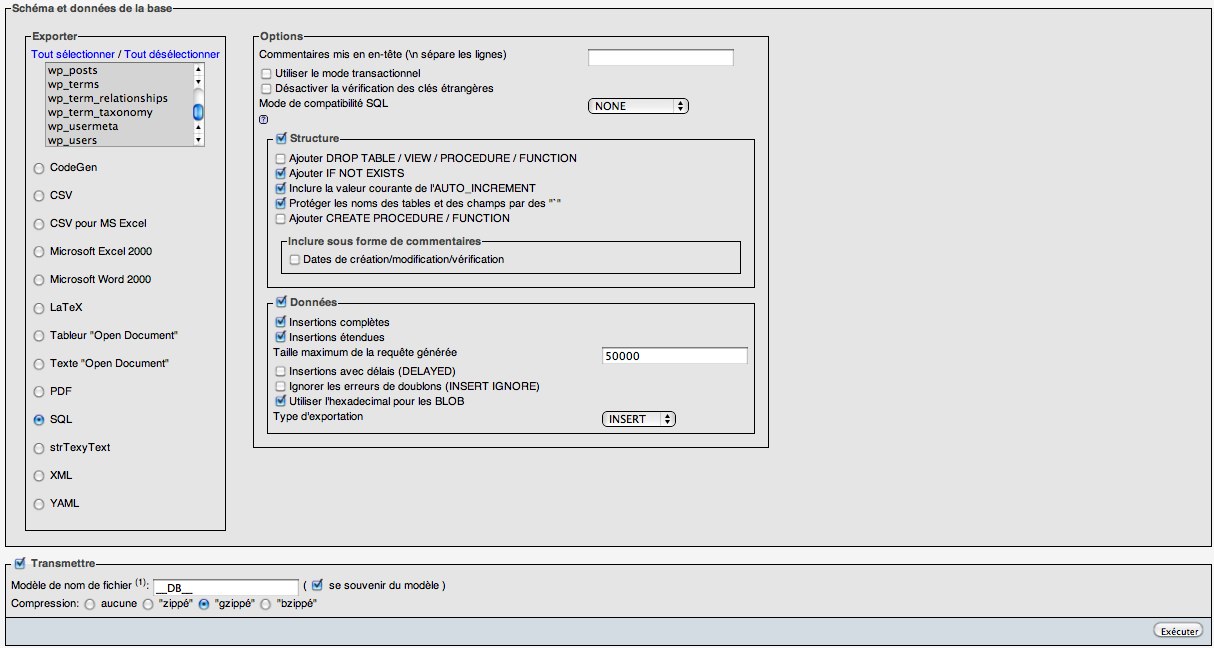
Soit vous utilisez directement une extensions WordPress tel que WP-DB-Backup ou WP-DBManager, ou alors vous pouvez le faire manuellement depuis l’interface de phpMyAdmin en suivant la procédure suivante:

  1. Connectez vous sur phpMyAdmin.
  2. Sélectionnez votre base WordPress.
  3. Cliquez sur « exporter » dans le menu en haut de la page.
  4. Sélectionnez les tables à sauvegarder.
  5. Sélectionnez SQL pour avoir un fichier de sortie en .sql.
  6. Cochez la case « Transmettre«
  7. Vous pouvez choisir un type de compression afin de réduire la taille de votre fichier.
  8. Cliquez sur « Exécuter » et le fichier devrait se télécharger.

phpmyadmin-export

Lire la suite…

MySQL Query Profiling

24/05/2024 Comments off

You can profile a query by doing following:

mysql> SET SESSION profiling = 1;
mysql> USE database_name;
mysql> SELECT * FROM table WHERE column = 'value';
mysql> SHOW PROFILES;

First line enables profiling for current mysql interactive session only. Global profiling is not recommended.

Second line selects database on which we need to fire query.

Third line is actual query. (do not use EXPLAIN here).

Fourth line shows list of recorded profiles. It’s output looks like:


mysql> SHOW PROFILES;
+----------+------------+-----------------------------------------------------------------------------------------------------------------------------------+
| Query_ID | Duration   | Query                                                                                                                             |
+----------+------------+-----------------------------------------------------------------------------------------------------------------------------------+
|        1 | 0.00008050 | SELECT DATABASE()                                                                                                                 |
|        2 | 0.00034975 | show databases                                                                                                                    |
|        3 | 0.00073850 | show tables                                                                                                                       |
|        4 | 0.00040525 | SELECT * From wp_terms wt INNER JOIN wp_term_taxonomy wtt ON wt.term_id=wtt.term_id WHERE wtt.taxonomy='post_tag' AND wtt.count=0 |
+----------+------------+-----------------------------------------------------------------------------------------------------------------------------------+
4 rows in set (0.00 sec)

Above is list of queries profiled in current session.

You can get execution time breakdown by running another mysql query:

SELECT * FROM INFORMATION_SCHEMA.PROFILING WHERE QUERY_ID=4;

It will print data like:


mysql> SELECT * FROM INFORMATION_SCHEMA.PROFILING WHERE QUERY_ID=4;
+----------+-----+--------------------------------+----------+----------+------------+-------------------+---------------------+--------------+---------------+---------------+-------------------+-------------------+-------------------+-------+-----------------------+---------------+-------------+
| QUERY_ID | SEQ | STATE                          | DURATION | CPU_USER | CPU_SYSTEM | CONTEXT_VOLUNTARY | CONTEXT_INVOLUNTARY | BLOCK_OPS_IN | BLOCK_OPS_OUT | MESSAGES_SENT | MESSAGES_RECEIVED | PAGE_FAULTS_MAJOR | PAGE_FAULTS_MINOR | SWAPS | SOURCE_FUNCTION       | SOURCE_FILE   | SOURCE_LINE |
+----------+-----+--------------------------------+----------+----------+------------+-------------------+---------------------+--------------+---------------+---------------+-------------------+-------------------+-------------------+-------+-----------------------+---------------+-------------+
|        4 |   2 | starting                       | 0.000014 |     NULL |       NULL |              NULL |                NULL |         NULL |          NULL |          NULL |              NULL |              NULL |              NULL |  NULL | NULL                  | NULL          |        NULL |
|        4 |   3 | Waiting for query cache lock   | 0.000002 |     NULL |       NULL |              NULL |                NULL |         NULL |          NULL |          NULL |              NULL |              NULL |              NULL |  NULL | try_lock              | sql_cache.cc  |         646 |
|        4 |   4 | Waiting on query cache mutex   | 0.000001 |     NULL |       NULL |              NULL |                NULL |         NULL |          NULL |          NULL |              NULL |              NULL |              NULL |  NULL | try_lock              | sql_cache.cc  |         650 |
|        4 |   5 | checking query cache for query | 0.000057 |     NULL |       NULL |              NULL |                NULL |         NULL |          NULL |          NULL |              NULL |              NULL |              NULL |  NULL | send_result_to_client | sql_cache.cc  |        1853 |
|        4 |   6 | checking permissions           | 0.000003 |     NULL |       NULL |              NULL |                NULL |         NULL |          NULL |          NULL |              NULL |              NULL |              NULL |  NULL | check_access          | sql_parse.cc  |        5007 |
|        4 |   7 | checking permissions           | 0.000004 |     NULL |       NULL |              NULL |                NULL |         NULL |          NULL |          NULL |              NULL |              NULL |              NULL |  NULL | check_access          | sql_parse.cc  |        5007 |
|        4 |   8 | Opening tables                 | 0.000046 |     NULL |       NULL |              NULL |                NULL |         NULL |          NULL |          NULL |              NULL |              NULL |              NULL |  NULL | open_tables           | sql_base.cc   |        4944 |
|        4 |   9 | System lock                    | 0.000009 |     NULL |       NULL |              NULL |                NULL |         NULL |          NULL |          NULL |              NULL |              NULL |              NULL |  NULL | mysql_lock_tables     | lock.cc       |         299 |
|        4 |  10 | Waiting for query cache lock   | 0.000001 |     NULL |       NULL |              NULL |                NULL |         NULL |          NULL |          NULL |              NULL |              NULL |              NULL |  NULL | try_lock              | sql_cache.cc  |         646 |
|        4 |  11 | Waiting on query cache mutex   | 0.000021 |     NULL |       NULL |              NULL |                NULL |         NULL |          NULL |          NULL |              NULL |              NULL |              NULL |  NULL | try_lock              | sql_cache.cc  |         650 |
|        4 |  12 | init                           | 0.000032 |     NULL |       NULL |              NULL |                NULL |         NULL |          NULL |          NULL |              NULL |              NULL |              NULL |  NULL | mysql_select          | sql_select.cc |        2622 |
|        4 |  13 | optimizing                     | 0.000015 |     NULL |       NULL |              NULL |                NULL |         NULL |          NULL |          NULL |              NULL |              NULL |              NULL |  NULL | optimize              | sql_select.cc |         889 |
|        4 |  14 | statistics                     | 0.000057 |     NULL |       NULL |              NULL |                NULL |         NULL |          NULL |          NULL |              NULL |              NULL |              NULL |  NULL | optimize              | sql_select.cc |        1099 |
|        4 |  15 | preparing                      | 0.000017 |     NULL |       NULL |              NULL |                NULL |         NULL |          NULL |          NULL |              NULL |              NULL |              NULL |  NULL | optimize              | sql_select.cc |        1121 |
|        4 |  16 | executing                      | 0.000002 |     NULL |       NULL |              NULL |                NULL |         NULL |          NULL |          NULL |              NULL |              NULL |              NULL |  NULL | exec                  | sql_select.cc |        1879 |
|        4 |  17 | Sending data                   | 0.000099 |     NULL |       NULL |              NULL |                NULL |         NULL |          NULL |          NULL |              NULL |              NULL |              NULL |  NULL | exec                  | sql_select.cc |        2423 |
|        4 |  18 | end                            | 0.000003 |     NULL |       NULL |              NULL |                NULL |         NULL |          NULL |          NULL |              NULL |              NULL |              NULL |  NULL | mysql_select          | sql_select.cc |        2658 |
|        4 |  19 | query end                      | 0.000003 |     NULL |       NULL |              NULL |                NULL |         NULL |          NULL |          NULL |              NULL |              NULL |              NULL |  NULL | mysql_execute_command | sql_parse.cc  |        4686 |
|        4 |  20 | closing tables                 | 0.000007 |     NULL |       NULL |              NULL |                NULL |         NULL |          NULL |          NULL |              NULL |              NULL |              NULL |  NULL | mysql_execute_command | sql_parse.cc  |        4738 |
|        4 |  21 | freeing items                  | 0.000011 |     NULL |       NULL |              NULL |                NULL |         NULL |          NULL |          NULL |              NULL |              NULL |              NULL |  NULL | mysql_parse           | sql_parse.cc  |        5931 |
|        4 |  22 | logging slow query             | 0.000001 |     NULL |       NULL |              NULL |                NULL |         NULL |          NULL |          NULL |              NULL |              NULL |              NULL |  NULL | log_slow_statement    | sql_parse.cc  |        1625 |
|        4 |  23 | cleaning up                    | 0.000002 |     NULL |       NULL |              NULL |                NULL |         NULL |          NULL |          NULL |              NULL |              NULL |              NULL |  NULL | dispatch_command      | sql_parse.cc  |        1475 |
+----------+-----+--------------------------------+----------+----------+------------+-------------------+---------------------+--------------+---------------+---------------+-------------------+-------------------+-------------------+-------+-----------------------+---------------+-------------+
22 rows in set (0.00 sec)

Source: rtcamp.com